AI Construction Employee Architecture • Procore & Autodesk Build Certified • Zero Per-Seat Fees

Hire a Ready-Made AI Construction Employee — or build a custom one in minutes

Stop losing project profit margins to delayed RFI responses, missing subcontractor lien waivers, and change order disputes. Deploy an autonomous AI Construction Project Lead that oversees 8 specialized sub-agents to process submittals, track jobsite daily logs, manage safety compliance, and sync Procore/Autodesk 24/7.

No credit card required Live within 15 minutes SOC 2 & GDPR compliant Native CRM & App integrations Zero per-seat user tax
8 Sub-Agents
Jobsite operations squad
<2 Mins
RFI extraction & engineer routing
100%
Lien waiver compliance before payout
Credit-Based
1,000 free credits • Plans from $20/mo
Live Interactive Console & Architecture

Primary AI Employee: Construction Project Director & Operations Lead

Experience how an autonomous primary AI Employee orchestrates 8 specialized sub-agents to vet data, enforce business rules, and trigger human approval gates in real time.

Live Orchestration Console

Active Construction Project Desk • Commercial Jobsite Operations

Active Pipeline Mode Enterprise Stack Synced
CP
Commercial Build Project #CB-4412 • 8-Story Office Tower • Subcontractor: Apex Mechanical • Item: HVAC Duct RFI #RFI-088
Conflict: Structural I-Beam Clashes with 24" Duct on Level 4 • Cost Impact: Pending Review
RFI Readiness: 97%
Plan Inspector:
Located BIM clash on Drawing Sheet M-402
RFI Drafter:
Prepared structured RFI with 2 proposed reroute options
Procore Sync:
Logged RFI in Procore & notified Structural Engineer
Project Cost Gate: Change orders > $10,000 prompt Project Executive 1-click Slack authorization.
Primary AI Employee: Construction Project Director & Operations Lead

Autonomous Jobsite Orchestrator & Subcontractor Controller

Coordinates 8 construction operations sub-agents across commercial builds, enforces architectural spec adherence, manages RFI and submittal turnarounds, and tracks change orders.

Autonomous Orchestrator Active v2.4
RFI & Specification Parser
Blueprint Callouts
Submittal & Spec Book Matcher
CSI MasterFormat
Subcontractor Lien Waiver Tracker
Lien Waiver Compliance
Daily Jobsite Log & Weather Scribe
Voice-to-Daily-Log
Procore & Autodesk Cloud Two-Way Sync
Procore & Autodesk
Safety & OSHA Compliance Auditor
Toolbox Talks
Change Order & Cost Variance Analyst
PCO Cost Audit
Punch List & Closeout Concierge
Punch List Clearance
Rule Logic Preview Lien waivers required before progress payment release • Daily site logs compiled by 5 PM • Safety incidents alert Safety Officer immediately
Customize Rules
Flexible Deployment Spectrum

Three Ways to Put AI to Work in Your Team

Whether you want an instant out-of-the-box employee, want to adapt existing business rules, or need a fully bespoke custom AI employee, RhinoAgents gives you complete flexibility.

Option 1 • Instant Deployment

Hire a Ready-Made Construction Employee

Deploy an out-of-the-box AI Construction Project Lead equipped with all 8 sub-agents. Connects directly to Procore, Autodesk Construction Cloud, Buildertrend, and PlanGrid in 15 minutes.

  • All 8 specialized construction & jobsite operations sub-agents included
  • Automated RFI, submittal, and lien waiver tracking workflows
  • Native integrations with Procore & Autodesk Construction Cloud
Hire Ready-Made Employee
Most Popular
Option 2 • No-Code Customization

Change Rules & Business Logic

Keep the ready-made employee architecture, but adapt the logic to your exact business operations. Adjust scoring thresholds, set custom knockout questions, alter tone, and define approval triggers.

  • Modify scoring rubrics & operational criteria
  • Set automated knockout filters for zero bad fits
  • Configure Slack human-in-the-loop review gates
Learn How to Edit Rules
Option 3 • Bespoke AI Employee

Create a Custom AI Employee

Build a custom AI construction employee tailored for heavy civil earthwork, industrial energy plants, or residential subdivision development.

  • Custom role identity, persona & voice
  • Select which specialized sub-agents work under it
  • Connect to proprietary databases & webhooks
Build Custom AI Employee
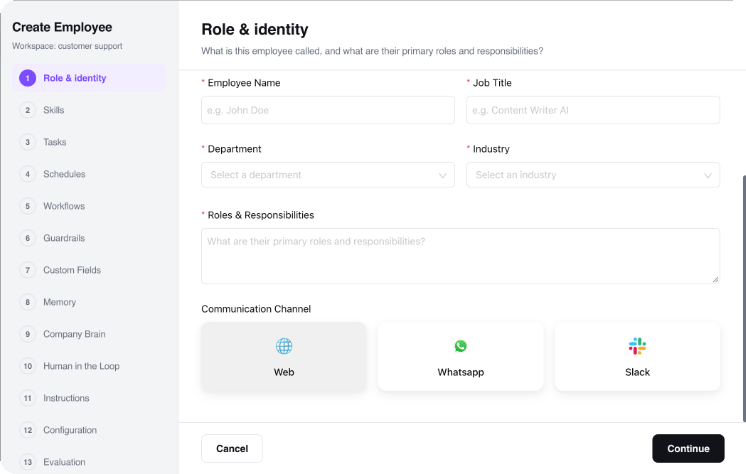
Bespoke Creation Wizard

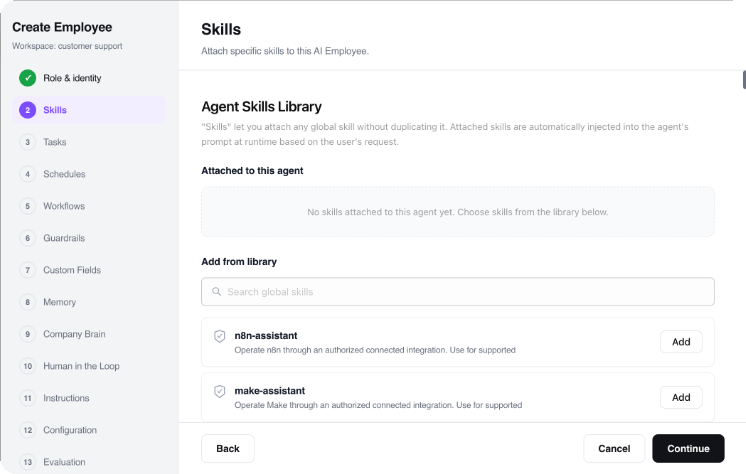
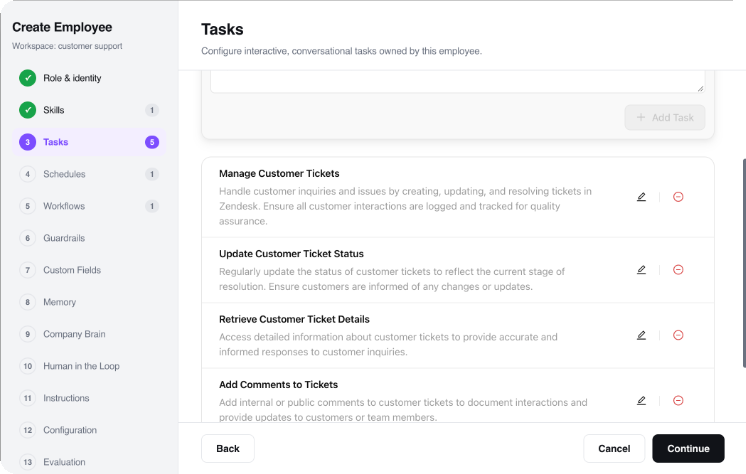
How to Create Your Custom AI Employee in 4 Steps

Need a purpose-built AI employee tailored to your organization? Use our intuitive step-by-step studio to define identity, channels, orchestrated sub-agents, and task execution logic.

Step 1 • Identity Configuration

Define Role Name, Avatar & Persona

Name your AI employee, upload or select a brand avatar, define its job title, and establish its core personality traits. Configure whether it communicates with a consultative corporate tone, an energetic sales cadence, or a friendly customer care voice.

Role Name & Title: e.g., "Civil & Heavy Highway Project Lead"
Persona Definition: Set brand voice guidelines, communication policies, and greeting formats.
Avatar & Bio: Establish internal and customer-facing profile visuals.
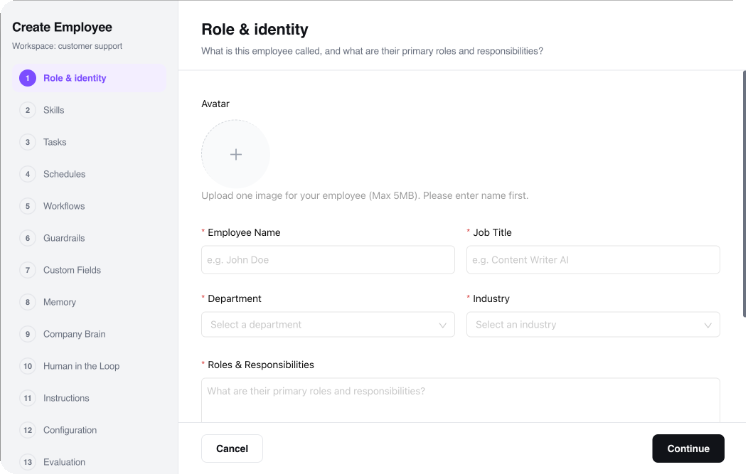
Step 1 Identity Studio
Autonomous Multi-Agent Workflow

How Sub-Agents Collaborate Under the AI Employee

Sub-agents do not operate as disconnected single-purpose bots. They operate as a synchronized squad orchestrated by the primary AI Employee, exchanging context and data in real time.

1

Signal & Intake

Inquiry or record is ingested from web chat, email, form submission, or webhook. Primary AI Employee verifies context and dispatches it to the Intake sub-agent.

Trigger: Signal Received
2

Enrichment & Vetting

Data is parsed against your custom rubrics. Sub-agents verify external databases, enrich missing parameters, and calculate objective qualification scores.

Logic: Custom Rubrics
3

Gate Evaluation

Scores meeting your auto-advance threshold proceed immediately. Borderline cases generate an executive summary card to a designated Slack channel for human 1-click review.

Security: Human-in-the-Loop
4

Action & 360° Sync

Sub-agents book calendar invites, trigger confirmation notifications, and write full audit logs into your CRM, ERP, and database systems automatically.

Output: Closed-Loop Execution
Modular Sub-Agent Squad

8 Ready-Made Sub-Agents at Your Service

Each sub-agent is an autonomous specialist. Use them together under the Primary AI Employee or configure individual rules, knockouts, and triggers for each.

Sub-Agent 01

RFI & Specification Parser

Extracts architectural clashes and specification conflicts from blueprints, drafting formatted RFIs with suggested solutions.

Trigger: Jobsite clash reported
Output: Structured RFI document
Blueprint Callouts RFI Drafting
Sub-Agent 02

Submittal & Spec Book Matcher

Compares manufacturer cut-sheets and submittals against project spec books (CSI MasterFormat), checking code compliance.

Trigger: Submittal package uploaded
Output: Spec compliance review stamp
CSI MasterFormat Submittal Tracking
Sub-Agent 03

Subcontractor Lien Waiver Tracker

Collects conditional and unconditional progress lien waivers before releasing subcontractor payments, eliminating double liability.

Trigger: Pay application submitted
Output: Verified lien waiver packet
Lien Waiver Compliance Pay App Validation
Sub-Agent 04

Daily Jobsite Log & Weather Scribe

Transcribes superintendent voice notes into structured daily site logs, documenting manpower counts, equipment hours, and weather delays.

Trigger: Daily 4 PM superintendent log
Output: Formatted Daily Construction Report
Voice-to-Daily-Log Weather Delay Proof
Sub-Agent 05

Procore & Autodesk Cloud Two-Way Sync

Syncs drawing revisions, punch list items, RFIs, and meeting minutes directly into Procore or Autodesk Construction Cloud.

Trigger: Document revision event
Output: Synchronized construction record
Procore & Autodesk Zero Double-Entry
Sub-Agent 06

Safety & OSHA Compliance Auditor

Tracks toolbox talk sign-off sheets, site safety inspections, and OSHA 300 incident logs, alerting safety directors to hazards.

Trigger: Safety audit checklist
Output: OSHA safety compliance log
Toolbox Talks OSHA 300 Logs
Sub-Agent 07

Change Order & Cost Variance Analyst

Reviews subcontractor potential change orders (PCO), verifying unit labor rates and material markup limits against master contracts.

Trigger: PCO submitted by sub
Output: Change order cost analysis
PCO Cost Audit Margin Protection
Sub-Agent 08

Punch List & Closeout Concierge

Organizes punch list photo tickets by trade, coordinates subcontractor walkthroughs, and compiles O&M warranty closeout binders.

Trigger: Substantial completion milestone
Output: Closeout O&M manual bundle
Punch List Clearance Warranty Binders
No-Code Rule Customization

How to Change Rules & Customize Logic

You never have to accept a rigid black-box AI. Every scoring weight, knockout condition, tone guideline, and approval gate can be altered in seconds using visual toggles or natural language.

1. Adjust Scoring Weights

Use visual percentage sliders to weight qualification rubrics (e.g. 40% Fit Criteria, 30% Budget/Timeline, 20% Tech Stack, 10% Profile Quality).

Core Fit:40%
Authority / Budget:30%

2. Set Mandatory Knockout Criteria

Add non-negotiable prerequisite rules. If an inquiry fails any knockout criteria, it is politely handled with an automated response without wasting your team's time.

Minimum budget threshold met
Corporate business email domain
Operating in serviceable geographic territory

3. Set Human Approval Thresholds

Define exact score brackets that trigger instant execution versus those requiring human team sign-off via Slack or email.

• Score ≥ 85: Auto-execute
• Score 70-84: Slack Team 1-Click Gate
• Score < 70: Polite automated routing
Natural Language Rule Modification

Or Simply Edit Rules in Plain English

Zero Code Required
// Type plain English prompt to change rules:
"Lien waivers required before progress payment release • Daily site logs compiled by 5 PM • Safety incidents alert Safety Officer immediately"
RhinoAgents Logic Engine Compiles:
  • • Evaluates criteria ≥ 200 units → Rule Tag: TIER_1_VIP
  • • Trigger action → CALENDAR_SYNC_SENIOR_PANEL
  • • Webhook → SLACK_DISPATCH(#sales-leads)
Applied instantly across all 8 sub-agents Live Status: Active
Ideal Fit

Built for Modern Teams Across Every Scale

From agile high-velocity startups to established enterprise organizations, deploy an autonomous AI Construction Employee tailored to your operational velocity.

Freight Brokerages

3PL & Freight Brokers

Automate carrier verification, rate negotiations, tracking check-calls, and exception dispatching.

Sub-Minute Carrier Vetting
Manufacturers

Industrial & Manufacturing Plants

Monitor inventory stockouts, track component supplier lead times, and automate purchase order flows.

Zero Supply Stoppage
Contractors

General Contractors & Builders

Track sub-contractor bids, RFI distribution, and building material shipping confirmations on schedule.

RFI Acceleration
Distribution Hubs

Wholesale & Warehousing Networks

Balance multi-facility inventory levels, predict replenishment dates, and prevent costly detention fees.

Detention Prevention
Proven Operational ROI

Measurable Advantages for Modern Organizations

Replacing administrative manual labor with an autonomous AI Construction Employee delivers direct returns on execution speed, operational accuracy, and staffing overhead.

80% Less Dispatch Call Time

Automated carrier check-ins, load tracking, and digital exception notifications replace phone tag.

Sub-Minute Rate Quote Matching

Compare freight and procurement bids against historical lanes and market benchmarks instantly.

Zero Critical Stockouts

Predictive reorder thresholds trigger supplier replenishment orders before warehouse stock runs dry.

Millions Saved in Detention Fees

Proactive delivery exception alerts allow dispatchers to resolve delays before demurrage starts.

Synchronized Supply Squad

8 sub-agents coordinate sourcing, carrier vetting, shipment tracking, PO reconciliation, and dispatch.

Enterprise ERP & Telematics Sync

Native bidirectional connectivity with SAP S/4HANA, NetSuite, Samsara, Project44, and FourKites.

Ecosystem Connectors

Native Integrations with Your Existing Stack

Connect your CRM, messaging channels, databases, and enterprise tools in seconds. The AI employee synchronizes updates automatically without changing your team's workflow.

SAP S/4HANA Oracle NetSuite Project44 FourKites Samsara DAT Freight & Analytics Shopify QuickBooks Twilio SMS Google Maps API Slack 400+ More Integrations →
Frequently Asked Questions

Got Questions? We Have Answers.

Everything you need to know about hiring, customizing, and scaling autonomous AI employees.

It cross-references blueprint sheets and architectural specification books, identifying the exact page conflict and drafting a complete RFI with proposed solutions in under 2 minutes.

We provide native two-way sync with Procore, Autodesk Construction Cloud (BIM 360 / Build), PlanGrid, Buildertrend, and Fieldwire.

Superintendents can dictate daily site logs via WhatsApp voice notes or SMS. The agent parses manpower counts, trade work, and weather conditions into Procore automatically.

Yes. Every potential change order is audited against contract markup caps and routed for 1-click human sign-off in Slack or dashboard.

RhinoAgents operates on a transparent credit-based model with zero per-seat human fees. You start with 1,000 free execution credits on our Free Trial ($0). Monthly plans start at $20/month (Starter: 10,000 credits/mo), $49/month (Pro: 50,000 credits/mo), and $99/month (Business: 150,000 credits/mo). Credits are consumed based on task complexity (such as research, data processing, workflow orchestration, communication, or CRM/ERP syncing). Unlimited human team members can access and collaborate with the AI employee without paying user seat penalties.

RhinoAgents pays for 100% of the underlying AI model costs (LLM tokens for GPT-4o, Claude 3.5 Sonnet, Gemini, etc.) and cloud computing infrastructure—all covered directly by your monthly credit allotment. You never need to supply your own OpenAI or Anthropic API keys. The customer is only responsible for their own external third-party software subscriptions and tool accounts (such as your existing CRM, ATS, Twilio, WhatsApp Business API, ERP, or cloud accounts). RhinoAgents connects seamlessly via 1-click native integrations with zero markup.

Get Started in Minutes

Put Your Autonomous AI Construction Employee to Work Today

Deploy in 15 minutes. Connect your CRM, email, and tools with 1-click connectors. Experience the power of an orchestrated AI team without adding headcount.

No credit card required 15-Minute Quick Setup SOC 2 & GDPR Compliant No Per-Seat Human Fees