AI HR Employee Architecture • Rated 4.9/5 by 290+ People Leaders • Zero Per-Seat Fees

Hire a Ready-Made AI HR Employee — or build a custom one in minutes

Stop answering the same 20 PTO and benefits questions every day. Deploy an autonomous AI People Operations Specialist that oversees 8 specialized sub-agents to onboard new hires, resolve employee policy questions, track leave requests, and sync Workday/BambooHR 24/7.

No credit card required Live within 15 minutes SOC 2 & GDPR compliant Native CRM & App integrations Zero per-seat user tax
8 Sub-Agents
People operations squad
<20 Secs
Employee inquiry resolution time
96%
New hire onboarding satisfaction
Credit-Based
1,000 free credits • Plans from $20/mo
Live Interactive Console & Architecture

Primary AI Employee: Head of People & Employee Operations

Experience how an autonomous primary AI Employee orchestrates 8 specialized sub-agents to vet data, enforce business rules, and trigger human approval gates in real time.

Live Orchestration Console

Active People Operations Desk • Employee Help & Lifecycle Hub

Active Pipeline Mode Enterprise Stack Synced
JD
Jordan Davis • Senior Frontend Engineer • Engineering Dept (Day 1 Onboarding)
Task: Equipment Delivery & I-9 Verification • Benefits Enrollment Window: 30 Days
Onboarding Progress: 85%
Onboarding Guide:
Issued Slack, GitHub & Okta credentials
Benefits Advisor:
Walked through 401(k) 4% match & PPO plan
HRIS Sync:
Completed BambooHR employee file
HR Compliance Gate: Policy exceptions or harassment inquiries route to Chief People Officer.
Primary AI Employee: Head of People & Employee Operations

Autonomous Workforce Concierge & Policy Orchestrator

Maintains workplace culture and compliance policies, coordinates 8 HR sub-agents, manages employee lifecycle workflows, and alerts People VPs on sensitive escalations.

Autonomous Orchestrator Active v2.4
New Hire Onboarding Concierge
Day 1 Setup
Employee Handbook & Policy FAQ
Zero Confusion
PTO & Leave Request Manager
Coverage Checks
Benefits & Open Enrollment Advisor
HSA vs PPO
HRIS & Directory Sync
Workday & BambooHR
Performance Review Coordinator
360 Feedback
Pulse Survey & Sentiment Monitor
Burnout Detection
Offboarding & Exit Interviewer
Asset Return
Rule Logic Preview PTO requests <5 days auto-approve • Benefits questions reference 2026 Handbook • Sensitive terms alert Head of People
Customize Rules
Flexible Deployment Spectrum

Three Ways to Put AI to Work in Your Team

Whether you want an instant out-of-the-box employee, want to adapt existing business rules, or need a fully bespoke custom AI employee, RhinoAgents gives you complete flexibility.

Option 1 • Instant Deployment

Hire a Ready-Made HR Employee

Deploy an out-of-the-box AI HR Employee equipped with all 8 sub-agents. Integrates directly with Workday, BambooHR, Rippling, Gusto, and Slack in under 15 minutes.

  • All 8 specialized HR sub-agents working as a unified team
  • 1-click sync with Workday, BambooHR, Rippling & Gusto
  • 24/7 instant answers to policy, benefits & leave questions
Hire Ready-Made Employee
Most Popular
Option 2 • No-Code Customization

Change Rules & Business Logic

Keep the ready-made employee architecture, but adapt the logic to your exact business operations. Adjust scoring thresholds, set custom knockout questions, alter tone, and define approval triggers.

  • Modify scoring rubrics & operational criteria
  • Set automated knockout filters for zero bad fits
  • Configure Slack human-in-the-loop review gates
Learn How to Edit Rules
Option 3 • Bespoke AI Employee

Create a Custom AI Employee

Build a custom AI HR employee tailored to global remote teams, union labor agreements, or healthcare staff credentialing policies.

  • Custom role identity, persona & voice
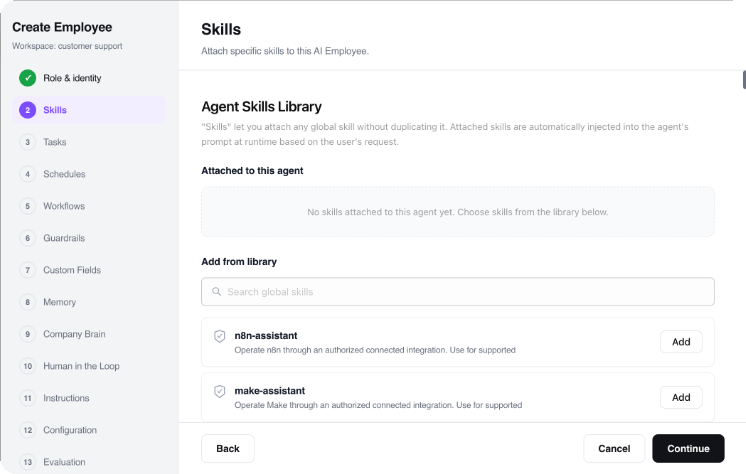
  • Select which specialized sub-agents work under it
  • Connect to proprietary databases & webhooks
Build Custom AI Employee
Bespoke Creation Wizard

How to Create Your Custom AI Employee in 4 Steps

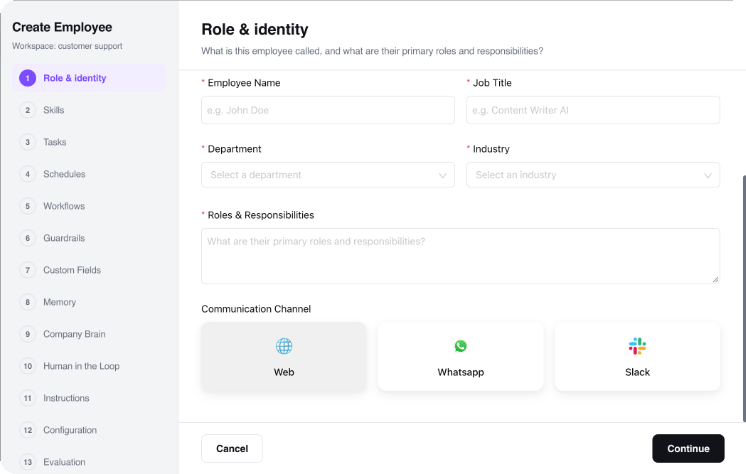
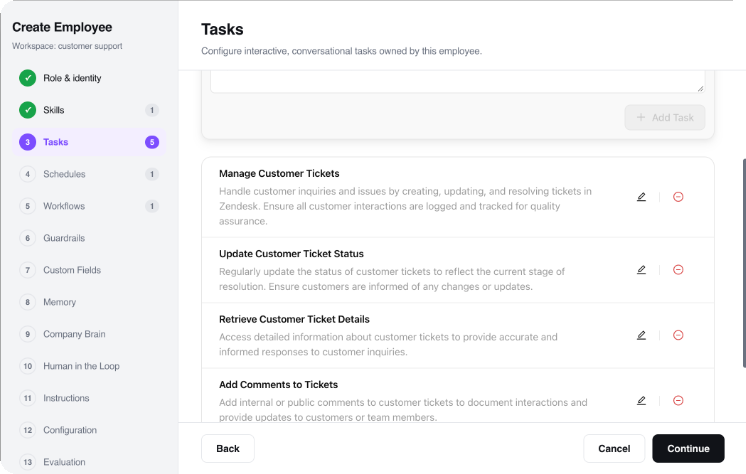
Need a purpose-built AI employee tailored to your organization? Use our intuitive step-by-step studio to define identity, channels, orchestrated sub-agents, and task execution logic.

Step 1 • Identity Configuration

Define Role Name, Avatar & Persona

Name your AI employee, upload or select a brand avatar, define its job title, and establish its core personality traits. Configure whether it communicates with a consultative corporate tone, an energetic sales cadence, or a friendly customer care voice.

Role Name & Title: e.g., "Talent Development & People Ops Lead"
Persona Definition: Set brand voice guidelines, communication policies, and greeting formats.
Avatar & Bio: Establish internal and customer-facing profile visuals.
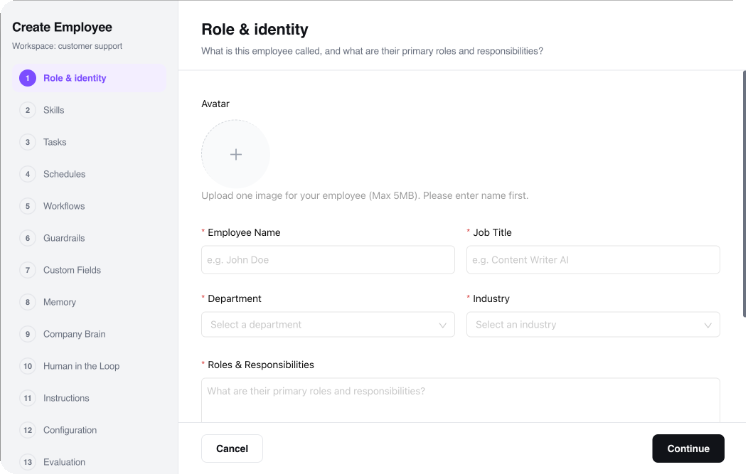
Step 1 Identity Studio
Autonomous Multi-Agent Workflow

How Sub-Agents Collaborate Under the AI Employee

Sub-agents do not operate as disconnected single-purpose bots. They operate as a synchronized squad orchestrated by the primary AI Employee, exchanging context and data in real time.

1

Signal & Intake

Inquiry or record is ingested from web chat, email, form submission, or webhook. Primary AI Employee verifies context and dispatches it to the Intake sub-agent.

Trigger: Signal Received
2

Enrichment & Vetting

Data is parsed against your custom rubrics. Sub-agents verify external databases, enrich missing parameters, and calculate objective qualification scores.

Logic: Custom Rubrics
3

Gate Evaluation

Scores meeting your auto-advance threshold proceed immediately. Borderline cases generate an executive summary card to a designated Slack channel for human 1-click review.

Security: Human-in-the-Loop
4

Action & 360° Sync

Sub-agents book calendar invites, trigger confirmation notifications, and write full audit logs into your CRM, ERP, and database systems automatically.

Output: Closed-Loop Execution
Modular Sub-Agent Squad

8 Ready-Made Sub-Agents at Your Service

Each sub-agent is an autonomous specialist. Use them together under the Primary AI Employee or configure individual rules, knockouts, and triggers for each.

Sub-Agent 01

New Hire Onboarding Concierge

Guides new hires through document collection, company handbook sign-offs, software account setup, and 30-60-90 day goal setting.

Trigger: New hire marked in HRIS
Output: Completed onboarding milestones
Day 1 Setup Interactive Checklists
Sub-Agent 02

Employee Handbook & Policy FAQ

Answers employee questions regarding PTO accrual, parental leave, expense policies, and remote work stipends using verified SOPs.

Trigger: Employee policy question asked
Output: Accurate verified handbook citation
Zero Confusion Instant Slack Answers
Sub-Agent 03

PTO & Leave Request Manager

Checks vacation balances, validates team coverage overlaps, auto-approves compliant requests, and notifies department managers.

Trigger: Leave request submitted
Output: Approved leave & calendar block
Coverage Checks Auto-Approval Logic
Sub-Agent 04

Benefits & Open Enrollment Advisor

Guides team members through health plan comparisons (HSA vs PPO), 401(k) contribution matching, and commuter benefits options.

Trigger: Open enrollment / life event
Output: Personalized benefits plan comparison
HSA vs PPO 401(k) Matching
Sub-Agent 05

HRIS & Directory Sync

Syncs address updates, emergency contacts, compensation adjustments, and department changes directly into Workday or BambooHR.

Trigger: Employee profile update
Output: Updated HRIS record
Workday & BambooHR Zero Data Entry
Sub-Agent 06

Performance Review Coordinator

Coordinates quarterly 360-degree feedback cycles, sends self-evaluation reminders, and compiles peer reviews for managers.

Trigger: Review cycle initiation
Output: Compiled 360-degree review packet
360 Feedback Review Reminders
Sub-Agent 07

Pulse Survey & Sentiment Monitor

Conducts anonymous weekly micro-surveys, analyzes workplace morale trends, and flags team burnout risks for executive leadership.

Trigger: Scheduled weekly pulse
Output: Executive sentiment dashboard
Burnout Detection eNPS Tracking
Sub-Agent 08

Offboarding & Exit Interviewer

Coordinates exit checklists, collects asset return confirmations, deactivates software licenses, and conducts structured exit interviews.

Trigger: Departure date scheduled
Output: Complete offboarding dossier
Asset Return Exit Survey Insights
No-Code Rule Customization

How to Change Rules & Customize Logic

You never have to accept a rigid black-box AI. Every scoring weight, knockout condition, tone guideline, and approval gate can be altered in seconds using visual toggles or natural language.

1. Adjust Scoring Weights

Use visual percentage sliders to weight qualification rubrics (e.g. 40% Fit Criteria, 30% Budget/Timeline, 20% Tech Stack, 10% Profile Quality).

Core Fit:40%
Authority / Budget:30%

2. Set Mandatory Knockout Criteria

Add non-negotiable prerequisite rules. If an inquiry fails any knockout criteria, it is politely handled with an automated response without wasting your team's time.

Minimum budget threshold met
Corporate business email domain
Operating in serviceable geographic territory

3. Set Human Approval Thresholds

Define exact score brackets that trigger instant execution versus those requiring human team sign-off via Slack or email.

• Score ≥ 85: Auto-execute
• Score 70-84: Slack Team 1-Click Gate
• Score < 70: Polite automated routing
Natural Language Rule Modification

Or Simply Edit Rules in Plain English

Zero Code Required
// Type plain English prompt to change rules:
"PTO requests <5 days auto-approve • Benefits questions reference 2026 Handbook • Sensitive terms alert Head of People"
RhinoAgents Logic Engine Compiles:
  • • Evaluates criteria ≥ 200 units → Rule Tag: TIER_1_VIP
  • • Trigger action → CALENDAR_SYNC_SENIOR_PANEL
  • • Webhook → SLACK_DISPATCH(#sales-leads)
Applied instantly across all 8 sub-agents Live Status: Active
Ideal Fit

Built for Modern Teams Across Every Scale

From agile high-velocity startups to established enterprise organizations, deploy an autonomous AI HR Employee tailored to your operational velocity.

Fast-Scaling Scaleups

High-Growth Scaleups

Onboard tens of new hires seamlessly across global timezones without manual HR coordination bottlenecks.

Instant Onboarding
Distributed Teams

Remote-First Companies

Provide 24/7 answers to company policy, health insurance benefits, and time-off rules directly in Slack.

24/7 Global Answers
People Operations

Corporate HR Departments

Automate I-9 verifications, background check tracking, and hardware provisioning workflows.

100% SOP Compliance
High-Turnover Sectors

Retail & Hospitality Operators

Standardize frontline employee training, compliance modules, and digital employee file retention.

Zero Paperwork
Proven Operational ROI

Measurable Advantages for Modern Organizations

Replacing administrative manual labor with an autonomous AI HR Employee delivers direct returns on execution speed, operational accuracy, and staffing overhead.

90% Faster New Hire Ramp

Step-by-step interactive guidance, tool provisioning, and policy FAQs empower employees from Day 1.

Zero Unanswered Policy Queries

24/7 instant answers to health insurance, 401(k), parental leave, and PTO questions in Slack.

100% Onboarding Compliance

Automated tracking of tax forms, NDAs, direct deposit authorizations, and security certifications.

Free People Teams from Admin

Gives HR leaders hours back every week to focus on culture, talent retention, and team leadership.

Coordinated People Ops Squad

8 sub-agents handle document collection, tool provisioning, training assignments, and check-ins.

Native HRIS & Slack Sync

Real-time updates to BambooHR, Workday, Rippling, Gusto, Slack, and Google Workspace.

Ecosystem Connectors

Native Integrations with Your Existing Stack

Connect your CRM, messaging channels, databases, and enterprise tools in seconds. The AI employee synchronizes updates automatically without changing your team's workflow.

BambooHR Workday Rippling Gusto Greenhouse Slack Microsoft Teams Google Workspace Notion Checkr Calendly 400+ More Integrations →
Frequently Asked Questions

Got Questions? We Have Answers.

Everything you need to know about hiring, customizing, and scaling autonomous AI employees.

You upload your employee handbook, benefits summary, and internal SOPs. The agent references these documents with strict retrieval guardrails to provide accurate answers without guessing.

Yes. Employees can send direct messages or mention the agent in dedicated HR channels inside Slack or Microsoft Teams to get instant answers 24/7.

We support native two-way sync with Workday, BambooHR, Rippling, Gusto, UKG, ADP Workforce Now, Deel, and Remote.

Our Sensitive Escalation sub-agent flags sensitive workplace issues immediately and routes the employee to a confidential conversation with the Chief People Officer or designated HR manager.

RhinoAgents operates on a transparent credit-based model with zero per-seat human fees. You start with 1,000 free execution credits on our Free Trial ($0). Monthly plans start at $20/month (Starter: 10,000 credits/mo), $49/month (Pro: 50,000 credits/mo), and $99/month (Business: 150,000 credits/mo). Credits are consumed based on task complexity (such as research, data processing, workflow orchestration, communication, or CRM/ERP syncing). Unlimited human team members can access and collaborate with the AI employee without paying user seat penalties.

RhinoAgents pays for 100% of the underlying AI model costs (LLM tokens for GPT-4o, Claude 3.5 Sonnet, Gemini, etc.) and cloud computing infrastructure—all covered directly by your monthly credit allotment. You never need to supply your own OpenAI or Anthropic API keys. The customer is only responsible for their own external third-party software subscriptions and tool accounts (such as your existing CRM, ATS, Twilio, WhatsApp Business API, ERP, or cloud accounts). RhinoAgents connects seamlessly via 1-click native integrations with zero markup.

Get Started in Minutes

Put Your Autonomous AI HR Employee to Work Today

Deploy in 15 minutes. Connect your CRM, email, and tools with 1-click connectors. Experience the power of an orchestrated AI team without adding headcount.

No credit card required 15-Minute Quick Setup SOC 2 & GDPR Compliant No Per-Seat Human Fees