AI IT Operations Architecture • Enterprise 99.99% Reliability • Zero Per-Seat Fees

Hire a Ready-Made AI IT Operations Employee — or build a custom one in minutes

Stop wasting valuable engineering hours resetting passwords and provisioning accounts. Deploy an autonomous AI IT Systems Lead that oversees 8 specialized sub-agents to resolve 65%+ of internal IT tickets, grant Okta/SaaS permissions, detect outages, and sync Jira/ServiceNow 24/7.

No credit card required Live within 15 minutes SOC 2 & GDPR compliant Native CRM & App integrations Zero per-seat user tax
8 Sub-Agents
Autonomous IT engineering squad
<30 Secs
Password reset & access grant time
68%
First-touch IT ticket deflection
Credit-Based
1,000 free credits • Plans from $20/mo
Live Interactive Console & Architecture

Primary AI Employee: IT Operations Lead & Systems Administrator

Experience how an autonomous primary AI Employee orchestrates 8 specialized sub-agents to vet data, enforce business rules, and trigger human approval gates in real time.

Live Orchestration Console

Active IT Helpdesk & Systems Desk • Enterprise IT Service Management

Active Pipeline Mode Enterprise Stack Synced
AM
Alex Mercer • Data Science Team • Ticket #IT-5521 • Urgent Snowflake Production Access Request
User Role: Senior Data Scientist • Approval: Manager Signed Off in Slack • MFA: Active
Compliance Verification: 100%
Access Validator:
Verified manager approval & MFA
Okta Provisioner:
Added to Snowflake-Read-Prod role
Audit Logger:
Logged access grant in Jira Service Desk
Security Access Gate: Production database administrator privileges require Security Lead sign-off.
Primary AI Employee: IT Operations Lead & Systems Administrator

Autonomous Infrastructure Concierge & Incident Controller

Controls internal IT service management (ITSM), coordinates 8 resolution sub-agents, enforces security access policies, and routes critical infrastructure outages to on-call DevOps.

Autonomous Orchestrator Active v2.4
Password Reset & MFA Resolver
<30s Resolution
SaaS Account Provisioner
Role-Based Access
Hardware & Asset Tracker
Jamf & Intune
IT Service Desk & Jira Sync
Jira & ServiceNow
Network & Cloud Uptime Monitor
Outage Detection
Software Troubleshooting Guide
VPN Diagnostics
Offboarding Deprovisioner
Zero-Day Deprovisioning
Security & Patch Auditor
Vulnerability Patching
Rule Logic Preview Standard SaaS apps auto-provision with manager approval • Outages severity-1 page PagerDuty immediately • SOC 2 logs audited daily
Customize Rules
Flexible Deployment Spectrum

Three Ways to Put AI to Work in Your Team

Whether you want an instant out-of-the-box employee, want to adapt existing business rules, or need a fully bespoke custom AI employee, RhinoAgents gives you complete flexibility.

Option 1 • Instant Deployment

Hire a Ready-Made IT Operations Employee

Deploy an out-of-the-box AI IT Operations Lead equipped with all 8 sub-agents. Connects directly to Okta, Jira Service Management, ServiceNow, Slack, and Google Workspace in 15 minutes.

  • All 8 specialized IT operations sub-agents working together
  • 1-click sync with Okta, Jira Service Management & ServiceNow
  • Instant password resets, access provisioning & software setup
Hire Ready-Made Employee
Most Popular
Option 2 • No-Code Customization

Change Rules & Business Logic

Keep the ready-made employee architecture, but adapt the logic to your exact business operations. Adjust scoring thresholds, set custom knockout questions, alter tone, and define approval triggers.

  • Modify scoring rubrics & operational criteria
  • Set automated knockout filters for zero bad fits
  • Configure Slack human-in-the-loop review gates
Learn How to Edit Rules
Option 3 • Bespoke AI Employee

Create a Custom AI Employee

Build a custom AI IT employee configured for AWS/Kubernetes cloud cost optimization, SOC 2 compliance monitoring, or CI/CD build failure triage.

  • Custom role identity, persona & voice
  • Select which specialized sub-agents work under it
  • Connect to proprietary databases & webhooks
Build Custom AI Employee
Bespoke Creation Wizard

How to Create Your Custom AI Employee in 4 Steps

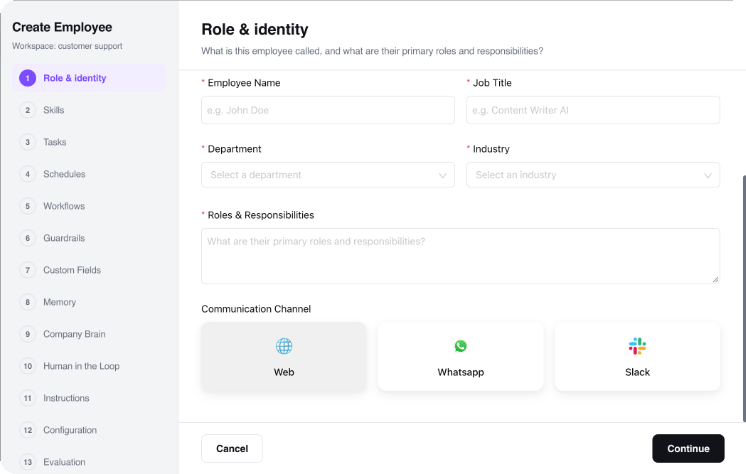
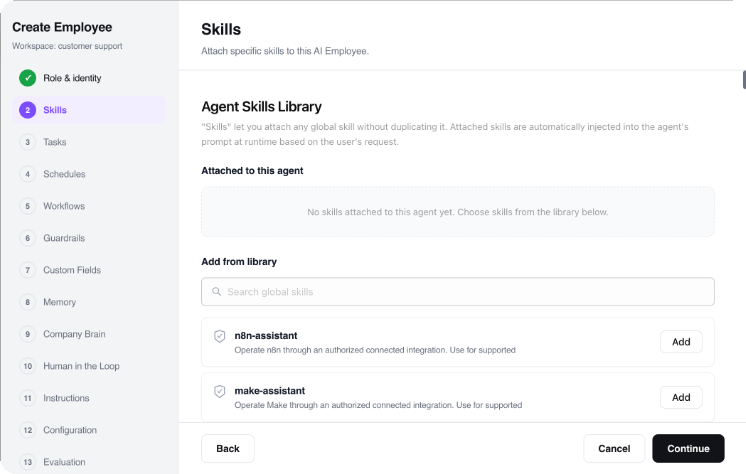
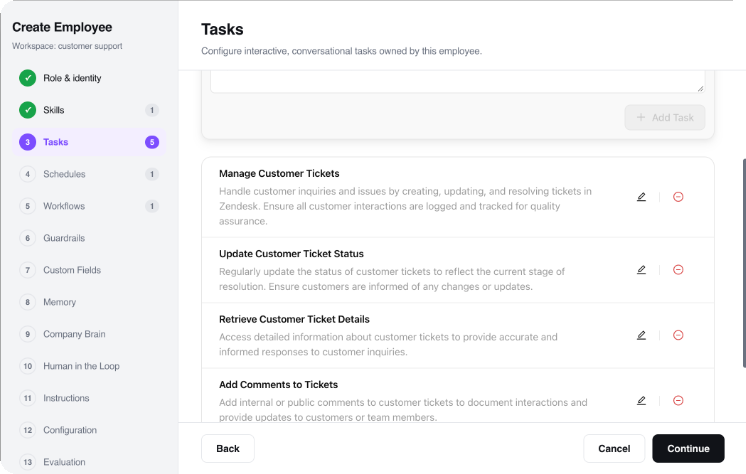
Need a purpose-built AI employee tailored to your organization? Use our intuitive step-by-step studio to define identity, channels, orchestrated sub-agents, and task execution logic.

Step 1 • Identity Configuration

Define Role Name, Avatar & Persona

Name your AI employee, upload or select a brand avatar, define its job title, and establish its core personality traits. Configure whether it communicates with a consultative corporate tone, an energetic sales cadence, or a friendly customer care voice.

Role Name & Title: e.g., "DevOps & Cloud Reliability Lead"
Persona Definition: Set brand voice guidelines, communication policies, and greeting formats.
Avatar & Bio: Establish internal and customer-facing profile visuals.
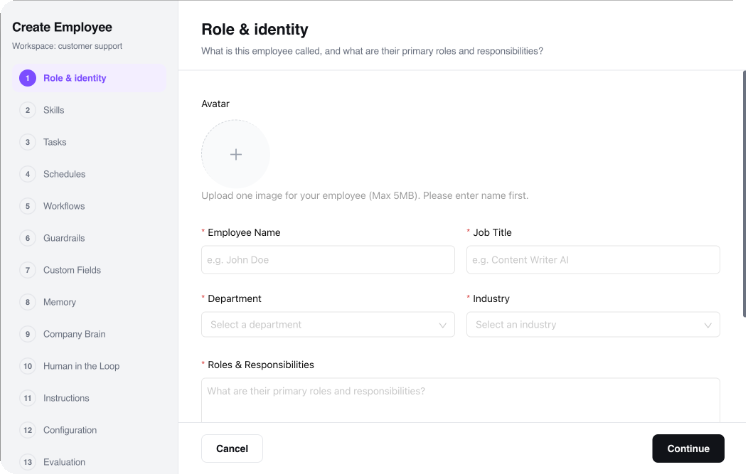
Step 1 Identity Studio
Autonomous Multi-Agent Workflow

How Sub-Agents Collaborate Under the AI Employee

Sub-agents do not operate as disconnected single-purpose bots. They operate as a synchronized squad orchestrated by the primary AI Employee, exchanging context and data in real time.

1

Signal & Intake

Inquiry or record is ingested from web chat, email, form submission, or webhook. Primary AI Employee verifies context and dispatches it to the Intake sub-agent.

Trigger: Signal Received
2

Enrichment & Vetting

Data is parsed against your custom rubrics. Sub-agents verify external databases, enrich missing parameters, and calculate objective qualification scores.

Logic: Custom Rubrics
3

Gate Evaluation

Scores meeting your auto-advance threshold proceed immediately. Borderline cases generate an executive summary card to a designated Slack channel for human 1-click review.

Security: Human-in-the-Loop
4

Action & 360° Sync

Sub-agents book calendar invites, trigger confirmation notifications, and write full audit logs into your CRM, ERP, and database systems automatically.

Output: Closed-Loop Execution
Modular Sub-Agent Squad

8 Ready-Made Sub-Agents at Your Service

Each sub-agent is an autonomous specialist. Use them together under the Primary AI Employee or configure individual rules, knockouts, and triggers for each.

Sub-Agent 01

Password Reset & MFA Resolver

Safely verifies user identity via secondary authentication, resets Okta/Google passwords, and unlocks accounts in under 30 seconds.

Trigger: Account locked / reset request
Output: Secure password reset loop
<30s Resolution Okta & Google Workspace
Sub-Agent 02

SaaS Account Provisioner

Grants and revokes software seats (Slack, Figma, GitHub, Salesforce) following manager approval workflows and role-based access control.

Trigger: Access request submitted
Output: Provisioned user account & licenses
Role-Based Access License Management
Sub-Agent 03

Hardware & Asset Tracker

Tracks laptop serial numbers, MDM enrollment status (Jamf/Intune), warranty expirations, and coordinates hardware refresh cycles.

Trigger: Hardware refresh milestone
Output: Asset inventory update
Jamf & Intune MDM Compliance
Sub-Agent 04

IT Service Desk & Jira Sync

Categorizes incoming tickets, tags priority, updates status, and synchronizes resolution notes directly in Jira Service Management or ServiceNow.

Trigger: New ticket / resolution
Output: Synchronized ITSM record
Jira & ServiceNow Zero Manual Logging
Sub-Agent 05

Network & Cloud Uptime Monitor

Monitors internal APIs, VPN gateways, and cloud servers, identifying latency spikes and posting automated status updates to #it-status.

Trigger: API healthcheck anomaly
Output: Automated incident report & page
Outage Detection StatusPage Sync
Sub-Agent 06

Software Troubleshooting Guide

Guides employees step-by-step through solving common printer errors, VPN connection failures, browser certificate issues, and audio bugs.

Trigger: Technical troubleshooting prompt
Output: Step-by-step verified diagnostic
VPN Diagnostics Self-Serve IT Support
Sub-Agent 07

Offboarding Deprovisioner

Instantly revokes all enterprise app access, invalidates API keys, terminates active sessions, and re-allocates SaaS licenses on employee departure.

Trigger: Employee departure trigger
Output: Complete access revocation audit
Zero-Day Deprovisioning SOC 2 Clean Access
Sub-Agent 08

Security & Patch Auditor

Audits employee laptops for outdated OS versions, disabled firewalls, and missing antivirus software, prompting users to patch vulnerabilities.

Trigger: Weekly fleet scan
Output: Fleet compliance report
Vulnerability Patching OS Fleet Health
No-Code Rule Customization

How to Change Rules & Customize Logic

You never have to accept a rigid black-box AI. Every scoring weight, knockout condition, tone guideline, and approval gate can be altered in seconds using visual toggles or natural language.

1. Adjust Scoring Weights

Use visual percentage sliders to weight qualification rubrics (e.g. 40% Fit Criteria, 30% Budget/Timeline, 20% Tech Stack, 10% Profile Quality).

Core Fit:40%
Authority / Budget:30%

2. Set Mandatory Knockout Criteria

Add non-negotiable prerequisite rules. If an inquiry fails any knockout criteria, it is politely handled with an automated response without wasting your team's time.

Minimum budget threshold met
Corporate business email domain
Operating in serviceable geographic territory

3. Set Human Approval Thresholds

Define exact score brackets that trigger instant execution versus those requiring human team sign-off via Slack or email.

• Score ≥ 85: Auto-execute
• Score 70-84: Slack Team 1-Click Gate
• Score < 70: Polite automated routing
Natural Language Rule Modification

Or Simply Edit Rules in Plain English

Zero Code Required
// Type plain English prompt to change rules:
"Standard SaaS apps auto-provision with manager approval • Outages severity-1 page PagerDuty immediately • SOC 2 logs audited daily"
RhinoAgents Logic Engine Compiles:
  • • Evaluates criteria ≥ 200 units → Rule Tag: TIER_1_VIP
  • • Trigger action → CALENDAR_SYNC_SENIOR_PANEL
  • • Webhook → SLACK_DISPATCH(#sales-leads)
Applied instantly across all 8 sub-agents Live Status: Active
Ideal Fit

Built for Modern Teams Across Every Scale

From agile high-velocity startups to established enterprise organizations, deploy an autonomous AI IT Operations Employee tailored to your operational velocity.

Cloud-Native Teams

Cloud Engineering & DevOps Teams

Autonomous telemetry inspection, root-cause correlation, and auto-remediation runbooks across microservices.

Continuous Telemetry
Enterprise SREs

Site Reliability Organizations

Cut alert noise by 70%, correlate cross-service traces, and trigger instant PagerDuty escalations for genuine P0s.

70% Less Noise
SecOps & InfoSec

Security Operations Centers (SOC)

Block prompt injection attacks, neutralize credential leak attempts, and maintain continuous GDPR logs.

Active Threat Defense
Managed Service Providers

MSPs & IT Infrastructure Hosts

Provide 24/7 autonomous client monitoring, ticket classification, and automated node failovers.

24/7 SLA Guarantee
Proven Operational ROI

Measurable Advantages for Modern Organizations

Replacing administrative manual labor with an autonomous AI IT Operations Employee delivers direct returns on execution speed, operational accuracy, and staffing overhead.

80% Faster Incident MTTD

Detect infrastructure anomalies, latency spikes, and security drifts in seconds across telemetry.

70% Less Alert Fatigue

Intelligent deduplication filters noise and only alerts your on-call engineers for genuine P0/P1s.

Instant Automated Runbooks

Executes pre-approved remediation scripts, spins down degraded nodes, and logs recovery steps.

Zero Prompt Injection Risks

Security sub-agents inspect inputs before LLMs process them, protecting proprietary company data.

8-Specialist SRE Squad

Telemetry monitoring, anomaly detection, root-cause triage, and post-mortem creation working as one.

Native DevOps Stack Sync

Full bidirectional connectivity with Langfuse, Datadog, PagerDuty, Slack, Jira, and GitHub.

Ecosystem Connectors

Native Integrations with Your Existing Stack

Connect your CRM, messaging channels, databases, and enterprise tools in seconds. The AI employee synchronizes updates automatically without changing your team's workflow.

Langfuse Datadog Prometheus Grafana OpenTelemetry AWS CloudWatch PagerDuty Jira Software GitHub Snyk Slack 400+ More Integrations →
Frequently Asked Questions

Got Questions? We Have Answers.

Everything you need to know about hiring, customizing, and scaling autonomous AI employees.

It uses multi-factor out-of-band verification (SMS OTP, push notification to authenticator app, or manager confirmation) to ensure fraudulent password reset requests are blocked.

We provide native integrations with Okta, Microsoft Entra ID (Azure AD), Google Workspace, OneLogin, and Ping Identity.

Yes. Employees can type @it-agent in Slack or Teams to request software access, ask technical questions, or report bugs, receiving immediate resolution.

Yes. Standard SaaS apps can be auto-approved based on manager sign-off, while privileged admin accounts require 1-click authorization from senior IT security.

RhinoAgents operates on a transparent credit-based model with zero per-seat human fees. You start with 1,000 free execution credits on our Free Trial ($0). Monthly plans start at $20/month (Starter: 10,000 credits/mo), $49/month (Pro: 50,000 credits/mo), and $99/month (Business: 150,000 credits/mo). Credits are consumed based on task complexity (such as research, data processing, workflow orchestration, communication, or CRM/ERP syncing). Unlimited human team members can access and collaborate with the AI employee without paying user seat penalties.

RhinoAgents pays for 100% of the underlying AI model costs (LLM tokens for GPT-4o, Claude 3.5 Sonnet, Gemini, etc.) and cloud computing infrastructure—all covered directly by your monthly credit allotment. You never need to supply your own OpenAI or Anthropic API keys. The customer is only responsible for their own external third-party software subscriptions and tool accounts (such as your existing CRM, ATS, Twilio, WhatsApp Business API, ERP, or cloud accounts). RhinoAgents connects seamlessly via 1-click native integrations with zero markup.

Get Started in Minutes

Put Your Autonomous AI IT Operations Employee to Work Today

Deploy in 15 minutes. Connect your CRM, email, and tools with 1-click connectors. Experience the power of an orchestrated AI team without adding headcount.

No credit card required 15-Minute Quick Setup SOC 2 & GDPR Compliant No Per-Seat Human Fees