Autonomous AI Customer Support Chatbots for 24/7 Helpdesks & Technical Troubleshooting
Eliminate ticket backlogs and resolve 78% of customer inquiries in under 1.2 seconds. Deploy an autonomous AI Customer Support Lead that orchestrates 9 specialized sub-agents to guide step-by-step technical diagnostics, process RMA warranty replacements, retrieve billing invoices, enforce VIP SLAs, and sync Zendesk, Freshdesk, Intercom, and Jira Service Management 24/7 with zero per-seat fees.

How to Build & Deploy Your Customer Support & Helpdesks AI Chatbot in 5 Simple Steps
Go from a plain-English prompt to a fully integrated, multi-agent customer support & helpdesks workflow in under 10 minutes—no coding or complex decision trees required.
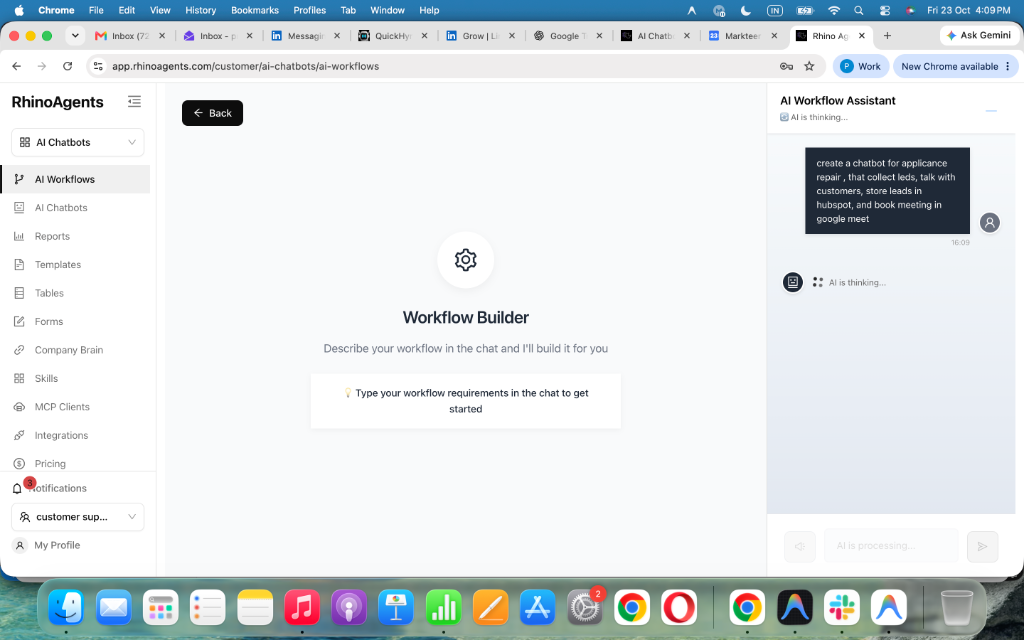
Describe Your Customer Support & Helpdesks Workflow in Plain English
Type a simple natural-language prompt describing how your customer support & helpdesks team operates, what qualification or triage questions to ask, and when to schedule or escalate.
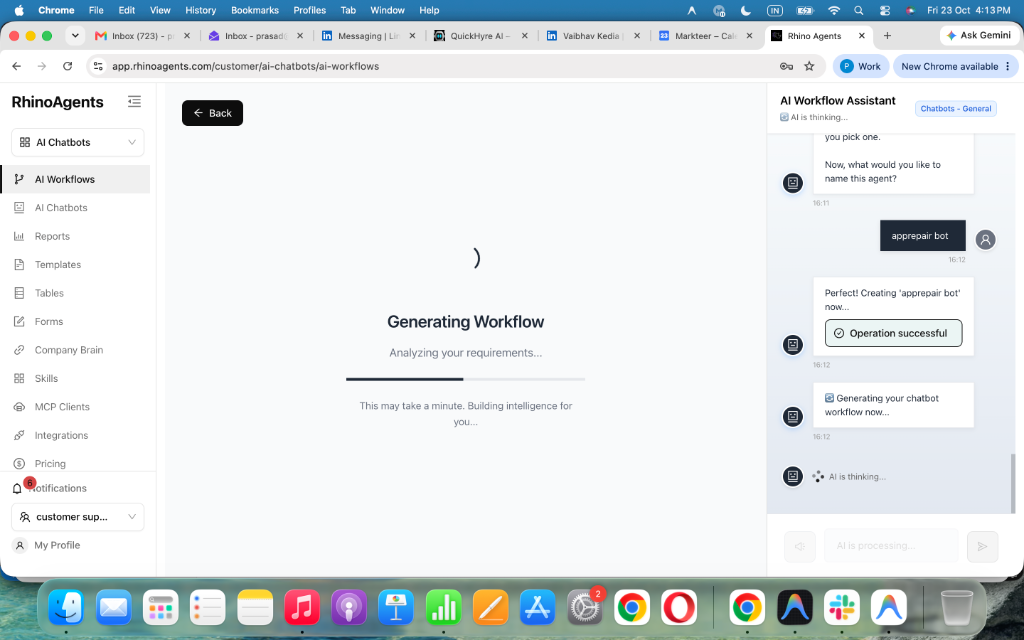
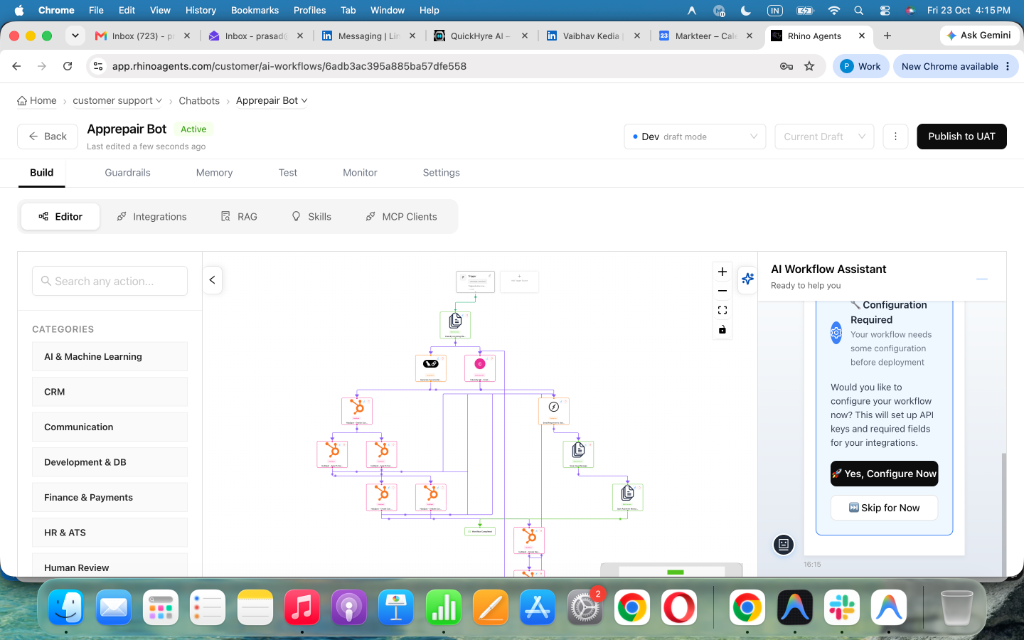
Review Your Auto-Generated Master Agent & 9 Sub-Agents
RhinoAgents automatically compiles a Master Orchestrator and 9 specialized sub-agents tailored to customer support & helpdesks—complete with routing logic and structured data capture.
Connect Zendesk, Freshservice & Your Knowledge Base in 1 Click
Authorize your Jira Service Management, Freshdesk, or Zendesk account with 1-click native integration. Upload your PDFs, policy docs, or website URLs for instant zero-hallucination Vector RAG grounding.
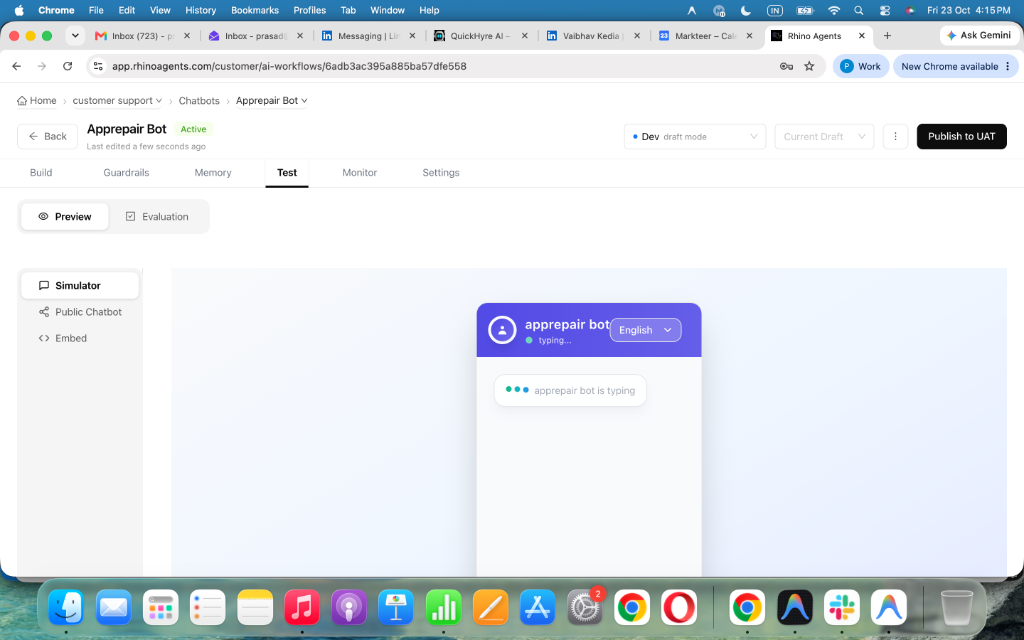
Simulate Real Customer Support & Helpdesks Scenarios & Verify Live Payloads
Run realistic test conversations in the interactive sandbox before going live. Inspect sub-agent handoffs, RAG citations, and JSON writeback payloads to Zendesk.
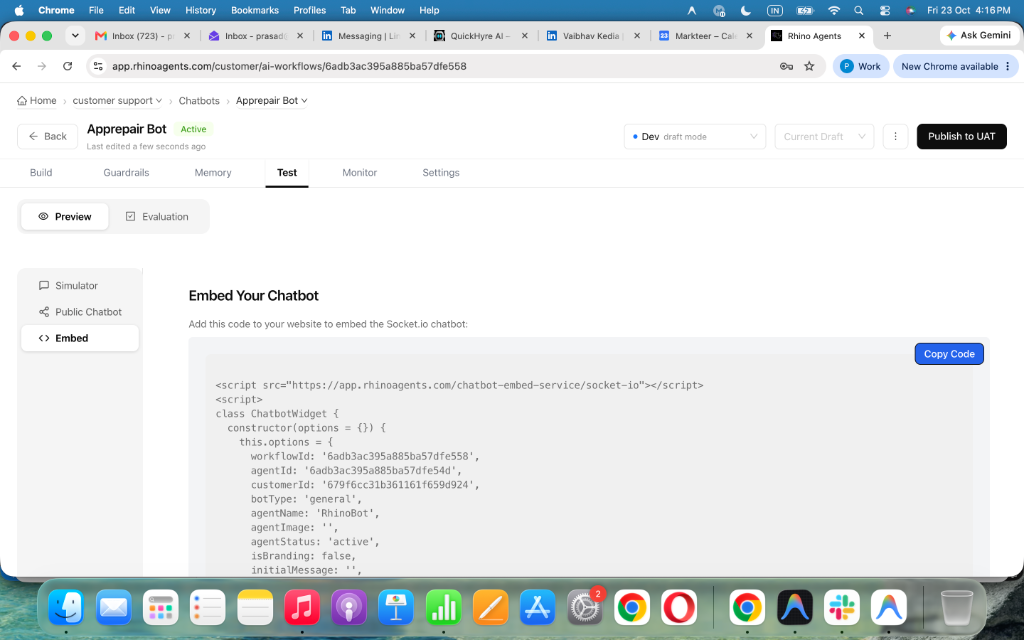
Embed on Your Website & Go Live Across SMS, WhatsApp & Voice
Deploy your AI technical support assistant across your documentation portal, mobile app, and chat widget. Capture and resolve inquiries 24/7 across web chat, SMS, WhatsApp, and Instagram DMs from one unified credit pool.
Prefer Our Engineers to Set Everything Up for You?
Our support solutions engineers can connect your Zendesk / Freshdesk / Jira instance, ingest your help center docs and troubleshooting trees, configure RMA and refund limits, and launch your widget during a complimentary 30-minute onboarding call.
Higher First-Contact Technical Resolution & Support Cost Reduction
Compare long email diagnostic threads and endless back-and-forth troubleshooting against instant step-by-step conversational diagnostics and automated RMA processing.
Engineered Specifically for Hardware Devices, SaaS Platforms & Technical Products
Every advantage solves a complex technical support bottleneck—from error code lookups to serial number warranty validation and RMA replacements.
Interactive Step-by-Step Technical Troubleshooting
Guides customers through diagnostic trees (LED light status, cable resets, firmware updates) in under 1.2 seconds, isolating hardware faults from software glitches.
Serial Number & Warranty Entitlement Lookup
Authenticates product serial numbers against your warranty database, verifying manufacturer warranty status and active service contract coverage instantly.
Zero-Hallucination Error Code & Bug RAG
Translates cryptic technical error codes (e.g. Error 504, LED Red Blink x3, Sensor Fault B2) into clear, actionable customer recovery instructions.
Automated RMA & Hardware Replacement Processing
When hardware diagnostics confirm a failed component under warranty, the AI generates an authorized RMA ticket and dispatches replacement orders in Jira or Shopify.
Automated Diagnostic & Firmware SMS Alerts
Sends automated SMS reminder notifications with direct firmware download links, troubleshooting video guides, and RMA shipping tracking updates.
Tier-2 Engineering Bug Escalation & Jira Sync
When an issue reveals an unreleased software bug or hardware defect, the AI creates detailed bug tickets in Jira with complete environment logs and diagnostic traces.
95+ Native Languages With Technical Accuracy
Handles technical troubleshooting in Spanish, French, Japanese, German, and over 95 languages, auto-detected from incoming text or chat messages.
Zero-Hallucination Schematics & User Guide RAG
Grounded in official user manuals, wiring schematics, and knowledge base articles. Never guesses technical specifications or suggests unsafe electrical procedures.
Enterprise Security & Diagnostic Audit Vault
Bank-grade encryption safeguards device telemetry, customer serial numbers, and diagnostic logs with complete SOC-2 Type II compliance.
Simulate Master Customer Support & Helpdesks AI Agent & Sub-Agents Live
Choose a real-world customer support & helpdesks scenario below to watch how the Master Agent coordinates sub-agents, enforces guardrails, and writes structured records to Zendesk and Freshservice.
Trusted by High-Volume Customer Support & Technical Operations Teams
See how support leaders slash First Response Time (FRT) to under 1.2 seconds while deflecting repetitive L1/L2 tickets across Zendesk, Freshdesk, and Jira.
“Before RhinoAgents, our L1 support queue backed up by 600 tickets every Monday morning. Now the AI resolves Wi-Fi pairing, firmware resets, and RMA replacements directly in chat and logs clean payloads into Zendesk.”
“Our enterprise SLA requires under 5-minute responses on P1 incidents. RhinoAgents verifies account tier in Salesforce, runs API diagnostics, and pages our on-call engineer in PagerDuty with a full reproduction summary.”
“Legacy helpdesk AI bots wanted $69 per agent seat plus resolution fees. Switching to RhinoAgents gave all 45 of our support engineers unlimited collaboration and cut our cost per resolved ticket by 74%.”
Plug Directly Into Your Customer Support & Helpdesks Software Tools
RhinoAgents connects seamlessly to your core IT service management and technical bug tracking platforms. Diagnostic summaries, serial numbers, error logs, and RMA authorizations write back automatically into Freshdesk, Jira Service Management, and Confluence.
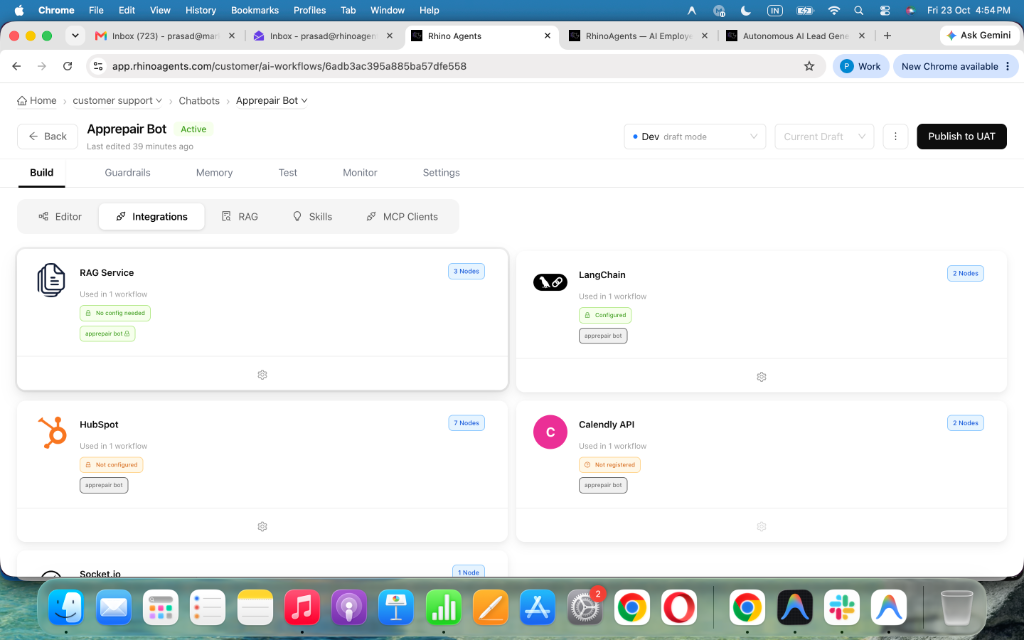
Zero Workflow Disruption. Native 2-Way Sync With Zendesk, Freshservice & Jira Service Management.
RhinoAgents connects seamlessly to your core IT service management and technical bug tracking platforms. Diagnostic summaries, serial numbers, error logs, and RMA authorizations write back automatically into Freshdesk, Jira Service Management, and Confluence.
Meet Your 9 Autonomous Customer Support & Helpdesks Digital Specialists
Instead of a single brittle chatbot, RhinoAgents deploys a coordinated squad of 9 specialized sub-agents that execute end-to-end customer support & helpdesks workflows 24/7.

Device paired successfully to 2.4GHz network. Ticket marked Solved.
Sub-1.2-Second Interactive Technical Diagnostics
Hardware connectivity issues dominate consumer technical support. RhinoAgents assesses error states, identifies network conflicts, and delivers step-by-step resolution workflows.

RMA #RMA-4102 authorized. Prepaid return shipping label delivered in chat.
Instant Serial Number Verification & RMA Processing
Eliminate days of email delay for warranty claims. RhinoAgents verifies serial number entitlement, validates warranty coverage, and generates replacement orders in milliseconds.

Structured bug report with device logs dispatched to firmware engineering team.
Structured Engineering Bug Escalation & Jira Sync
Bridge the gap between customer support and software engineering. RhinoAgents gathers device logs, structures bug reproduction steps, and logs tickets directly into Jira.

Platinum account recognized in 22ms. Routed to dedicated TAM with 15-min SLA timer active.
Contract-Aware SLA Prioritization & VIP Fast-Tracking
Prevent high-value enterprise churn caused by FIFO ticket queues. RhinoAgents cross-references customer email domains against Salesforce and Zendesk contract tiers in milliseconds.

Serial #SN-9928410 verified under warranty. Replacement unit queued & QR return label sent.
Autonomous Serial Lookup, Warranty Verification & RMA Creation
Turn 4-day email RMA back-and-forth into a 60-second self-service resolution. RhinoAgents validates serial numbers, checks warranty coverage, and dispatches replacement orders automatically.

Itemized tax invoices delivered & 60-day seasonal pause applied in Stripe Billing.
Instant Billing Ledger Lookups, Prorated Credits & Churn Deflection
Resolve billing confusion and save cancelling subscribers without waiting on finance teams. RhinoAgents connects to Stripe and Chargebee to retrieve invoices, explain prorations, and offer tailored retention pauses.

Queried English docs and delivered native German SAML 2.0 guide with bilingual Zendesk log.
95+ Native Languages Grounded in Your Single-Language Knowledge Base
Deliver 24/7 global technical support without hiring regional helpdesk centers. RhinoAgents reads your English documentation and troubleshoots fluently in Spanish, German, French, Japanese, and 90+ languages.
Delivered HMAC-SHA256 migration snippet with 100% citation fidelity to release notes.
Zero-Hallucination Help Center, API Docs & Changelog RAG
Generic chatbots guess and invent non-existent product features. RhinoAgents is strictly grounded in your Zendesk Guide, Confluence, Notion, and GitBook documentation with verifiable source links.

Masked credit card and API secret in 14ms before persistence to Zendesk logs.
Inline PII, Credit Card & API Secret Redaction with SOC-2 Audit Logs
Customers frequently paste credit cards, passwords, and API keys into support chats. RhinoAgents scrubs sensitive secrets at the edge before they ever hit helpdesk logs or language models.
Zero-Violation Engineering Accuracy & Warranty Guardrails
Engineered specifically for hardware manufacturers and technical software vendors. RhinoAgents enforces serial number entitlement validation, safe electrical guidance boundaries, and SOC-2 security with 100% cryptographic audit trails.
Deterministic Master & Sub-Agent Routing
A dedicated Master Agent analyzes intent in under 100ms and delegates to specialized customer support & helpdesks sub-agents with shared session state and zero context loss.
100% Grounded in Your Official Policies & Data
Enforces strict serial number validation to prevent fraudulent warranty replacement claims. Every response is strictly anchored to your verified documentation, pricebooks, and operational rules—never fabricated.
Strict Operational & Regulatory Boundaries
Electrical and hardware safety boundaries prevent guidance that could cause physical damage. Deterministic policy filters intercept out-of-bounds requests before any message is sent or system action is executed.
Guaranteed Zendesk & Freshservice Transaction Integrity
All CRM, helpdesk, and calendar writebacks use idempotent API transactions with automatic retry queues and duplicate prevention.
Inline PII Redaction & AES-256 Encryption
SOC-2 Type II certified cloud infrastructure with role-based access control. Sensitive personal, financial, or account credentials are encrypted in transit (TLS 1.3) and at rest (AES-256).
Seamless Warm Handoff With Full Context Digest
When high-stakes edge cases require human judgment, RhinoAgents packages a structured summary and alerts your team in Zendesk or Slack immediately.
Pure Usage-Based Credits. Build Yourself or Let Our Team Build For You.
Never pay per-agent seat fees again. Every customer support & helpdesks team member gets full access while you only consume credits when your AI agents execute real conversations and workflows.
Create & Deploy AI Agents Yourself
Ideal for customer support & helpdesks teams ready to launch quickly using pre-built templates, visual workflow tools, and 1-click integrations.
- 1,000 Free Execution Credits included on registration (14-day trial)
- Pre-built Customer Support & Helpdesks Master Agent & 9 Sub-Agents template
- Native 2-way connectors for Zendesk, Freshservice & Jira Service Management
- Instant Vector RAG ingestion for your PDFs, help docs, and website URLs
- Interactive sandbox simulator with live JSON payload inspector
- Unlimited team seats—invite your entire operations & support staff for $0
- Deploy across Website Widget, SMS, WhatsApp, and Instagram DMs
Done-For-You Custom Agent Build Sprint
Our forward-deployed AI engineers design, integrate, test, and launch your bespoke customer support & helpdesks multi-agent system in 14 days.
- Dedicated AI Solutions Architect assigned to your customer support & helpdesks workflow
- Custom API, webhook & legacy database integration with Zendesk & Freshservice
- Bespoke conversation design, triage trees, and compliance guardrail tuning
- Full ingestion, chunking & verification of your knowledge base and SOPs
- Red-team stress testing across 200+ edge-case customer scenarios
- Live staff onboarding workshop and 30-day post-launch hyperparameter tuning
- Priority Slack engineering channel with guaranteed enterprise SLA
Get a Custom ROI & Credit Volume Estimate in 15 Minutes
Share your monthly inquiry volume and current Zendesk workflow. Our engineers will map out your exact ticket deflection, pipeline lift, and credit usage—with zero obligation.
How RhinoAgents Compares for Customer Support & Helpdesks
See why modern customer support & helpdesks teams replace manual staffing queues and per-seat legacy bots with autonomous multi-agent execution.
| Evaluation Criteria | Legacy Per-Seat Chatbots / Receptionists | RhinoAgents Customer Support & Helpdesks AI |
|---|---|---|
| Pricing Model | $59–$99 per staff seat/month + hidden add-ons | Pure usage credits • $0 per-seat tax for unlimited staff |
| First Response Speed | 15 minutes to 14+ hours (business hours only) | < 1.2 seconds 24/7/365 across Web, SMS & WhatsApp |
| Zendesk & Freshservice Sync | Basic 1-way email lead notifications or CSV exports | Certified 2-way real-time API writeback in <500ms |
| Architecture | Rigid button decision trees that break on free-text | Master Orchestrator + 9 specialized domain Sub-Agents |
| Knowledge Grounding | Hallucinates policies or requires manual FAQ scripting | 100% grounded Vector RAG with strict compliance guardrails |
| Multilingual Support | English-only or expensive per-language translation fees | 95+ native languages included automatically out of the box |
Frequently Asked Questions
Everything you need to know about deploying, integrating, and scaling RhinoAgents for customer support & helpdesks.
Ready to Modernize Your Technical Support Operations?
Start your 14-day free trial with 1,000 free execution credits, or book a live strategy call with our solutions engineers to connect Zendesk and Freshservice today.