AI Employee · Executive Productivity

Meet Your AI Executive Assistant
That Never Misses a Beat

Talk to it like a real chief of staff. Brief it once, connect your tools, and it manages your calendar, drafts communications, preps meeting agendas, tracks action items, and handles admin — completely autonomously, 24/7.

RA
RhinoAgents AI Executive Assistant
Online · Managing Calendar
You
Clear my Friday afternoon, prep the Q3 board review deck outline, draft follow-up emails for yesterday's investor calls, and send me my week's priorities by 8 AM Monday.
EA
On it. I'm checking your Google Calendar, pulling notes from yesterday's Zoom meetings, and cross-referencing your Notion task board. Give me a moment to coordinate everything…
Clearing Friday PM Building Deck Outline Drafting Follow-ups
EA
Done. Friday 1–6 PM cleared (rescheduled 2 meetings to Thursday). Board deck outline has 8 sections — pre-filled with Q3 metrics from Salesforce. 3 investor follow-up drafts are ready for your review. Monday 8 AM briefing is queued. Want me to send the investor emails after your approval?
View Calendar Review Deck Approve Emails
AI Employee vs. AI Tool

Not a Scheduler. An Actual Assistant That Thinks.

Most calendar tools automate booking. Your AI Executive Assistant is fundamentally different — it understands context, manages competing priorities, drafts nuanced communications, and proactively surfaces what needs your attention. Like a real chief of staff, just without the overhead.

Conversational Interface — ChatGPT-Style
Talk to your AI Assistant in plain English. Give it complex, multi-step instructions. Ask for status updates. Redirect its priorities. It understands context across your entire history — no forms, no menus.
Takes Real Actions Across Your Stack
It doesn't just suggest — it does. Books meetings in Google Calendar. Sends emails via Gmail. Creates tasks in Asana. Updates Notion docs. Alerts you via Slack. Your assistant has write access to your tools, just like a real EA would.
Schedules & Runs Its Own Cron Jobs
Tell it to send a daily morning briefing at 8 AM, generate weekly executive summaries every Friday, or prep meeting agendas 24 hours in advance. It schedules its own tasks and runs them — no manual triggering needed.
Asks Before Critical Communications
For external emails to board members, investors, or VIP clients — your AI Assistant pauses and requests approval via Slack or email. You approve in one click. It sends with your connected email account.
Traditional EA vs. AI Executive Assistant
❌ Human EA / Manual Scheduling
✅ AI Executive Assistant
Manages one calendar at a time, manually
Monitors, adjusts, and optimizes your calendar continuously in real time
Follow-up emails written and sent manually, often delayed
Drafts follow-ups immediately post-meeting from your notes and context
Meeting prep done reactively 30 min before
Prepares briefing docs 24 hours in advance, every time
Action items tracked in notes, often lost
Auto-extracts and tracks action items from every meeting transcript
Works 9 AM–5 PM, single timezone
Works 24/7 across all timezones. No sick days, no vacations
$60k–$90k/year salary + benefits + onboarding
Fraction of the cost. Live in under 60 minutes.
Setup in 60 Minutes

Configure Once. It Runs Forever.

No code. No DevOps. No engineering tickets. Configure your AI Executive Assistant in four steps through a conversational interface — then it manages your world autonomously.

1
Brief Your Assistant
Tell it your working style, priorities, VIP contacts, scheduling preferences, communication tone, and what a "good day" looks like for you. Just type it in natural language.
Conversational Setup
2
Connect Your Tools
One-click integrations: Google Calendar, Outlook, Gmail, Slack, Zoom, Notion, Asana. Your assistant gets read and write access to manage your full productivity stack.
400+ Integrations
3
Set Schedules & Rules
Define when tasks run: daily 8 AM morning briefing, weekly Friday digest, pre-meeting prep 24 hours before, post-meeting action item extraction within 30 minutes. Set HITL rules for external communications.
Job Scheduling
4
Deploy & Monitor
Your AI Assistant goes live. Chat with it anytime to redirect, get briefings, or change priorities. Full audit log of every calendar change, email sent, and task created on your behalf.
Real-time Visibility
Live Conversations

See Exactly How You Work With It

Real example conversations showing how your AI Executive Assistant handles complex admin tasks — just like chatting with a real chief of staff.

EA
AI Executive Assistant
Active
You
I need to reschedule next week so I have Tuesday and Wednesday completely free for deep work. Move anything that can move, cancel what can't, and draft decline notes for anything external.
EA
Scanning your calendar for next week. I found 11 events. Here's what I can move vs. what needs your input:
Next Week — Calendar Analysis
4 internal syncs✅ Moved to Mon/ThuConfirm
Board call — Tue 2 PM⚠️ Your decision neededDecide
2 external partner callsDecline drafts readyReview
You
Prep me for tomorrow's investor call with Sequoia at 10 AM. Give me background on their portfolio thesis, any relevant news, and 3 questions I should ask them.
EA
Researched Sequoia and pulled context from your previous interactions in Notion. Here's your briefing doc:

Sequoia Capital — Briefing
Focus: AI infrastructure, developer tools, and B2B SaaS. Recent moves: led Series B in Databricks competitor (Mosaic), portfolio company announced enterprise expansion last week relevant to your market.

3 Questions to Ask:
1. How are you thinking about AI agent adoption timelines in enterprise vs. SMB?
2. What metrics do your best portfolio companies track in months 12–24?
3. Is there a co-investment appetite with your existing AI portcos?

Full doc sent to your Notion. 15-min pre-call reminder set for 9:45 AM tomorrow.
You
Write follow-up emails to the 3 people I met at the YC Demo Day yesterday. Reference what we discussed, offer a next step, and keep it short. I'll approve before sending.
EA
Pulled your meeting notes from yesterday's calendar events and Notion. Drafted 3 personalized follow-ups:

Alex Kim (Founder, Buildbot) — Referencing his API integration challenge, offering a 30-min technical deep dive
Sarah Chen (Partner, a16z) — Referencing her interest in enterprise workflow AI, offering to share our case studies
Raj Patel (CTO, Loopify) — Referencing the product roadmap discussion, offering a pilot proposal

All 3 drafts are in your review queue. Approve individually or all at once via Slack.
You
Extract all action items from this week's meetings, assign owners, set due dates, and create tasks in Asana. Send a summary digest to me and the team on Slack.
EA
Processed transcripts from 7 meetings this week. Found 23 action items — here's the breakdown:

✅ 14 tasks created in Asana — assigned by participant name with deadlines
✅ 5 items flagged as high-priority (board meeting prep, investor deck, Q3 targets)
✅ 4 items assigned to you personally — added to your personal Notion board
✅ Weekly digest sent to #team-updates Slack channel

You have 2 items due tomorrow. Want me to send reminder nudges to owners who haven't started?
Calendar Meeting Prep Communications Action Items
Enterprise Feature Mapping

Every EA Task. Powered by
a Specific RhinoAgents Feature.

Your AI Executive Assistant isn't magic — it's built on enterprise platform capabilities. Here's exactly which feature powers each part of the executive workflow.

Executive Problem
Executives spend 4–6 hours per week on scheduling coordination — back-and-forth emails, rescheduling conflicts, and managing competing calendar demands.
Custom AI Agents — Calendar Orchestration
Configure a Calendar Agent with your preferences, VIP rules, and blocking times. It monitors conflicts, proposes solutions, books meetings, and handles reschedules autonomously — across all connected calendars.
6hrs
per week saved on scheduling and calendar management — reclaimed for strategic work
Executive Problem
Inbox overload. Executives receive 100–200 emails daily. Drafting thoughtful, contextual replies — especially follow-ups after meetings — takes 2+ hours every day.
Knowledge Base — Context-Aware Email Drafting
Feed the agent your communication style, past emails, and key relationships. It drafts contextual replies using your voice and relevant history — personalized, not templated — then waits for your one-click approval before sending.
2hrs
daily email time cut to under 20 minutes with AI-drafted, human-approved responses
Executive Problem
Meeting prep is reactive and rushed. Executives walk into important calls without full context on participants, recent news, or clear objectives — leading to missed opportunities.
Job Scheduling — Automated Pre-Meeting Briefings
24 hours before every meeting, your assistant automatically researches attendees via LinkedIn, pulls relevant company news, retrieves past interaction history, and sends a formatted briefing doc to your Notion or email.
100%
of meetings entered with full context — every time, without manual research
Executive Problem
Action items from meetings get lost. Without a dedicated person tracking follow-through, 40–60% of meeting commitments don't result in tangible outcomes — creating accountability gaps.
Human-in-the-Loop — Action Item Oversight
After each meeting, the AI extracts all commitments, assigns owners, sets deadlines, creates tasks in Asana, and sends Slack reminders to responsible parties. You approve the task list before it goes live.
increase in meeting follow-through — every commitment tracked, assigned, and followed up on
Executive Problem
Admin workflows touch 5–8 apps: calendar → email → task manager → Slack → Notion → Zoom → CRM. Each handoff is manual, creating friction and dropped balls.
Advanced Workflow Automation — End-to-End Admin
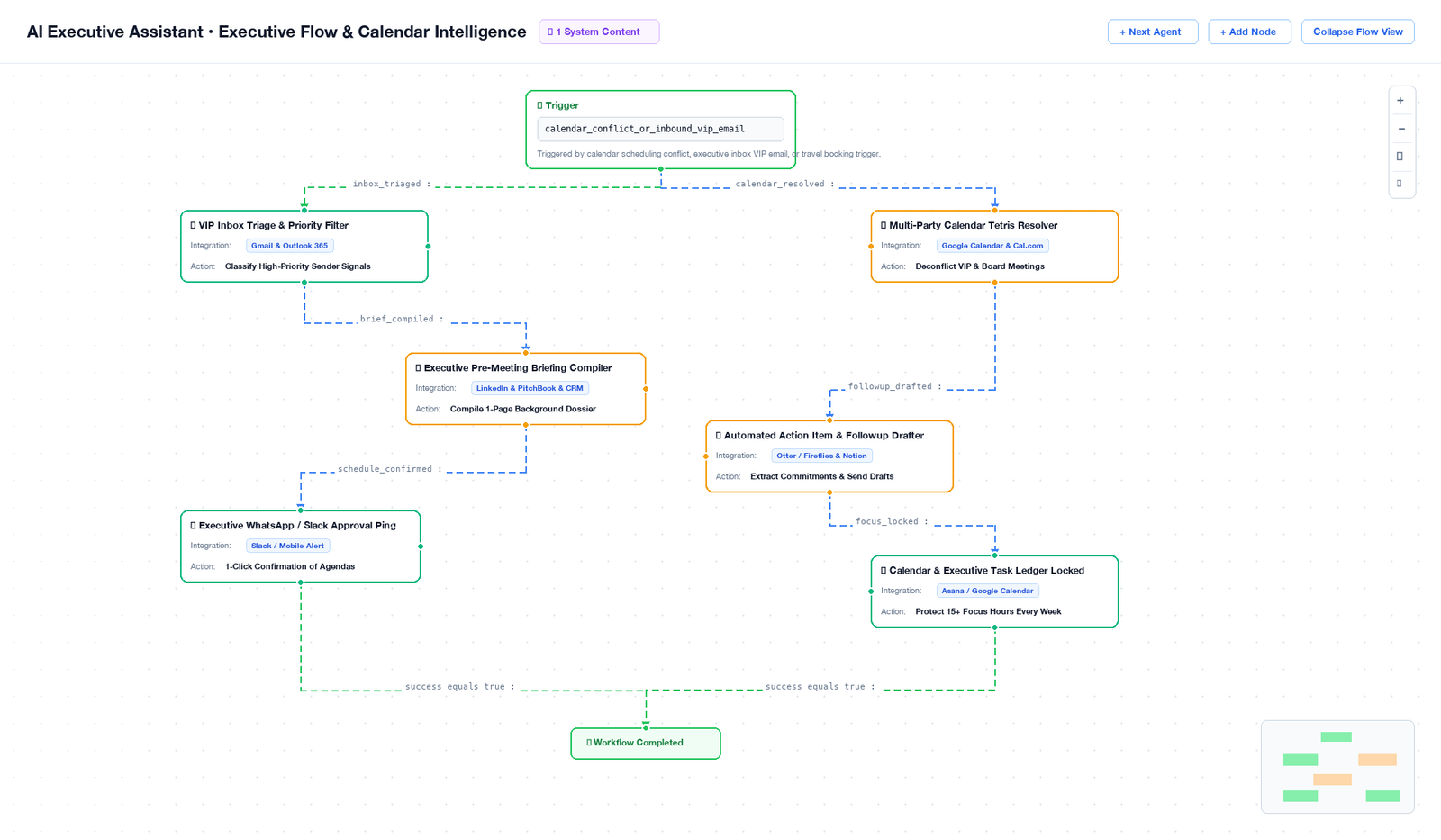
Build chains: "Meeting booked → prep briefing → notify team via Slack → create tasks in Asana → send calendar hold → follow up post-meeting." Every admin workflow, fully automated from one trigger.
80%
reduction in manual admin coordination across calendar, email, tasks, and communication tools
Executive Problem
When something falls through the cracks — a missed reply, a forgotten commitment — there's no clear record of what was delegated, when, and who was responsible.
Comprehensive Logging — Full Action Audit Trail
Every email sent, every calendar change made, every task created, every HITL approval — logged with timestamp, context, and outcome. Searchable and exportable. Full accountability for every executive action.
100%
of EA actions logged — complete traceability for every commitment, communication, and calendar event
Full Capability Set

Everything an EA Does. Automated.

Your AI Executive Assistant covers the entire executive productivity workflow — from morning briefings to post-meeting follow-throughs, all handled autonomously.

Intelligent Calendar Management
Manages your full calendar across Google and Outlook. Handles scheduling requests, resolves conflicts based on priority rules, books meetings, sends hold invites, and protects your focus blocks — proactively, not reactively.
Google CalendarOutlookCalendlyPriority Rules
Communication Drafting & Management
Drafts, reviews, and sends emails in your voice. Handles follow-ups, declines, acknowledgments, and VIP correspondence. Triages your inbox by urgency and relationship importance. All sends require your approval via HITL.
GmailOutlookKnowledge BaseHITL
Pre-Meeting Briefing Prep
Automatically generates meeting briefs 24 hours in advance: attendee research, company background, prior conversation history, meeting objective, and 3 recommended questions. Delivered to your Notion or email, on schedule, every time.
LinkedIn ResearchNotionJob SchedulingWeb Crawl
Action Item Extraction & Tracking
Processes meeting recordings and transcripts to extract all commitments, decisions, and action items. Assigns to owners, sets deadlines, creates tasks in Asana or Notion, and sends Slack reminders on due date. Nothing falls through.
Zoom TranscriptsAsanaNotionSlack
Executive Research & Intelligence
On-demand deep dives on people, companies, market trends, or competitive intelligence. Delivers structured briefing docs with key facts, recent news, and relevant context — ready in minutes, not hours. Directly to Notion or email.
Web ResearchKnowledge BaseNotionRAG
Daily & Weekly Digest Reports
Sends a curated morning briefing every day: calendar overview, priority tasks, key deadlines, and anything that needs your attention. Weekly Friday digest covers the week's outcomes and the following week's priorities.
Daily BriefingSlackEmailCron Scheduling
Human-in-the-Loop

Full Speed. Full Control.

Your AI Assistant moves fast — but for emails to board members, calendar changes to VIP slots, and external commitments, you stay in the loop. One Slack notification, one click, and it executes.

1
AI Assistant Drafts & Prepares
The agent drafts an email or prepares a calendar change. It pulls context from your knowledge base, past interactions, and current priorities. Prepares a full summary: what it wants to do, why, and the expected outcome.
Custom AI Agent + Knowledge Base
2
Approval Request Fires to Slack
For VIP communications or significant calendar changes, the agent pauses and sends a structured Slack notification: what it's proposing, the full draft, the context, and the impact if approved. All in one message.
Human-in-the-Loop Notification
3
You Approve, Edit, or Reject in One Click
No login required. Click Approve — action executes instantly. Click Edit — type your changes in Slack and resubmit. Click Reject — agent notes your decision and adjusts its approach for future similar tasks.
Human Decision
4
Agent Executes & Logs Everything
On approval, the email sends via your connected Gmail or Outlook. Calendar changes propagate instantly. The full action — draft, approval, executor, timestamp — is written to the audit log for complete accountability.
Logged + Synced

Approval Notifications — Live

Slack — #ea-approvals 3 min ago
AI Executive Assistant
Email ready for review — Sarah Chen, Partner @ a16z
Re: YC Demo Day follow-up · Referencing your conversation about enterprise workflow AI
"Sarah — really enjoyed our conversation at Demo Day. Based on what you shared about your portfolio focus…"
Email — Calendar Change 18 min ago
AI Executive Assistant
Board Call — Proposed Reschedule Tue 2 PM → Thu 3 PM
Conflict detected with Deep Work block. Checked board member availability — Thursday 3 PM works for all 4 attendees. Decline drafted.
Teams — Morning Briefing 8:00 AM
AI Executive Assistant
Good morning — Today's Priorities
4 meetings (Sequoia 10 AM — briefing attached). 3 open action items due today. 2 emails awaiting approval. Deep Work blocked: 2–5 PM.
Job Scheduling

Your AI Assistant Runs Its Own Calendar.

Configure schedules once in plain English. Your AI Executive Assistant uses RhinoAgents' enterprise job scheduler to run the right admin tasks at exactly the right times — even while you're sleeping.

Morning Briefing — 8:00 AM Daily
Compiles today's calendar, priority tasks, pending approvals, and anything that needs attention. Delivered to Slack and email before your first meeting — so you walk in prepared, not reactive.
Meeting Prep — 24 Hours Before
For every meeting on your calendar, the agent automatically researches attendees, pulls prior interaction history, and generates a briefing doc. Delivered 24 hours in advance — every time.
Post-Meeting Action Items — 30 Min After
Within 30 minutes of every meeting ending, the agent processes the transcript, extracts action items, assigns owners, creates tasks, and sends a summary to all attendees via Slack.
Weekly Digest — Friday 5 PM
Compiles the full week's outcomes: meetings held, commitments made and tracked, emails sent, and next week's calendar preview. Delivered to Slack before the weekend.
AI Executive Assistant — Today
8:00 AM
Morning Briefing sent — 4 meetings, 3 priority tasks, 2 pending approvals
Done
9:00 AM
Sequoia Meeting Prep — briefing doc sent to Notion (24hr advance)
Done
10:00 AM
Approval Request — Email to Sarah Chen, a16z (awaiting sign-off)
Waiting
11:30 AM
Post-Meeting Actions — Q3 Planning call · 8 items extracted
Running
2:00 PM
Board Call Prep Briefing — 24hr advance research
Queued
5:00 PM
Daily Inbox Triage — Prioritize and draft responses
Queued
400+ Integrations

Connects to Your Entire Productivity Stack.

Your AI Executive Assistant has read and write access to every tool in your work environment — no manual data entry, no copy-paste between apps.

Google Calendar Outlook Calendar Gmail Outlook Mail Slack Microsoft Teams Zoom Notion Asana Jira Google Drive Calendly LinkedIn HubSpot 400+ more
Real-Time Visibility

Every Action Tracked. Every Decision Logged.

RhinoAgents' real-time analytics and comprehensive logging give you full visibility into what your AI Assistant is doing — and proof that it's adding value every day.

Calendar Efficiency Dashboard
Track meetings scheduled, conflicts resolved, reschedules handled, and focus time protected — week over week. See exactly how much time the assistant saves you on coordination.
Communications Performance
Track emails drafted, approved, sent, and replied to. Measure inbox triage efficiency and follow-up completion rate. See which email types take longest to approve so you can optimize your HITL rules.
Full Assistant Audit Log
Every calendar change, email draft, task created, and briefing generated — logged with timestamp, context, and your approval decision. Searchable by date, action type, or contact. Exportable for review.
Action Item Completion Tracking
Track follow-through on all meeting commitments: items extracted, assigned, completed, and overdue — by meeting, by owner, and by week. Leadership visibility into accountability across the team.
AI Executive Assistant — This Week
14
Meetings Coordinated
47
Emails Drafted
32
Action Items Tracked
10:15 AM Email sent — Sarah Chen, a16z (Approved by You) View
9:30 AM Board call rescheduled Tue → Thu (all confirmed) View
9:00 AM Sequoia briefing sent to Notion — 3 questions ready View
8:00 AM Morning briefing delivered — 4 meetings, 2 priorities View
Enterprise Security

Your Calendar & Emails. Fully Protected.

Your AI Executive Assistant handles sensitive communications, calendar data, and OAuth access to your accounts. RhinoAgents' enterprise security controls ensure every bit of data is protected at the highest standard.

AES-256 Encryption
All calendar data, email content, and OAuth tokens encrypted at rest with AES-256. All data in transit protected with TLS 1.3. Zero plaintext credential storage.
Role-Based Access Control
Control exactly who can view your schedule, access drafts, approve communications, or see your audit log. Separate permission levels for EA operators vs. read-only observers.
Immutable Audit Logs
Every calendar change, email sent, and task created is logged with an immutable timestamp. Tamper-proof chain of custody for every executive action taken on your behalf.
SSO / SAML 2.0
Integrate with Okta, Azure AD, Google Workspace, or any SAML 2.0 identity provider. Single sign-on with MFA enforcement for all platform access.
GDPR Compliant
All personal data handled in compliance with GDPR. Data processing agreements available. Right to erasure enforced. Data residency options for EU-based enterprises.
Secure OAuth Integration
Google and Microsoft OAuth tokens stored in isolated encrypted vaults. Minimal permission scopes — only the access needed for each specific task. Token rotation enforced automatically.
SOC 2 Type II GDPR Compliant AES-256 Encrypted HIPAA Ready ISO 27001 Aligned OAuth 2.0 Secured
FAQ

Questions Executives Ask First

What does an AI Executive Assistant actually do?
Your AI Executive Assistant manages your calendar, drafts and sends emails in your voice, prepares meeting briefs 24 hours in advance, extracts and tracks action items from every meeting, handles scheduling conflicts, conducts executive research, and sends daily morning briefings — all through a conversational interface, just like chatting with a real chief of staff.
Can it access my real calendar and email?
Yes. It integrates with Google Calendar, Outlook Calendar, Gmail, and Outlook Email via secure OAuth. It can create, reschedule, and cancel calendar events, draft and send emails (with your approval for external communications via Human-in-the-Loop), and manage your entire scheduling workflow. All tokens are stored in encrypted vaults with minimal permission scopes.
Does it need coding to set up?
No. You configure your AI Executive Assistant through a conversational interface — describe your working style, preferences, and priorities in plain English. Connect your tools via one-click OAuth (Google, Microsoft, Slack, Notion, Asana) in minutes. No code, no DevOps, no IT tickets required. Most executives are fully configured in under 60 minutes.
Can I control which emails it sends on my behalf?
Absolutely. RhinoAgents' Human-in-the-Loop feature gives you granular control. You can require approval for all external emails, only board/investor communications, or nothing at all — it's your choice per category. When HITL is active, the agent drafts the email, sends you a Slack notification with the full draft, and only sends after you click Approve. No login required — one click in Slack.
How does the scheduling work?
You set schedules in plain English during configuration: "Send a morning briefing every day at 8 AM," "Prep meeting briefs 24 hours in advance," "Extract action items within 30 minutes of each meeting," "Send a weekly digest every Friday at 5 PM." RhinoAgents converts these into cron jobs that run automatically — no manual triggering ever needed. You can modify or pause schedules anytime via chat.
Is my calendar and email data secure?
Yes. RhinoAgents is SOC 2 Type II certified and GDPR compliant. All data is encrypted at rest with AES-256 and in transit with TLS 1.3. OAuth tokens are stored in isolated encrypted vaults. The platform uses minimal permission scopes — only the access necessary for each specific task. Role-based access control ensures only authorized users can interact with your AI Assistant's logs and configurations.
Your AI Assistant is Ready
Hire an AI Executive Assistant That
Handles Admin While You Lead

Configure in 60 minutes. No code. No hiring process. No ramp time. Your AI Executive Assistant manages calendars, drafts communications, preps meetings, and tracks commitments — starting today.