Official Customer Onboarding

Deploy Your Autonomous AI Workforce in 6 Simple Steps

Takes under 2 minutes from registration to live production. Basic details, company & goal, select AI employees, connect your tools, select your plan, and onboard them into production.

100 Free Credits Included No Credit Card Required Safe Human Oversight Mode SOC 2 Type II Encrypted
Register for Free (100 Credits) Preview Onboarding Steps ↓ Book Guided Kickoff
Live Onboarding Wizard

Customer Registration & Deployment Portal

Live at: app.rhinoagents.com/customer/register

Click any step below to preview its interface and learn what is configured:

1

1. Basic Details & SSO

~30 sec

Enter name, work email, phone, role, password, or use 1-click Google / GitHub corporate SSO.

2

2. Company & Business Goal Details

~45 sec

Provide company URL, department, and state your target outcomes in plain English.

3

3. Select AI Employees

~30 sec

Select from our catalog of pre-trained AI employees across Sales, Support, Operations, Finance & IT.

4

4. Select Tools

~45 sec

Connect your essential SaaS tools (Slack, Gmail, HubSpot, Salesforce, Zendesk, Stripe) in 1 click.

5

5. Select Plan

~15 sec

Your account is credited with 100 free autonomous execution credits. Zero credit card required.

6

6. Onboard Them

Live 24/7

Set safety guardrails and activate your AI workforce live into production 24/7.
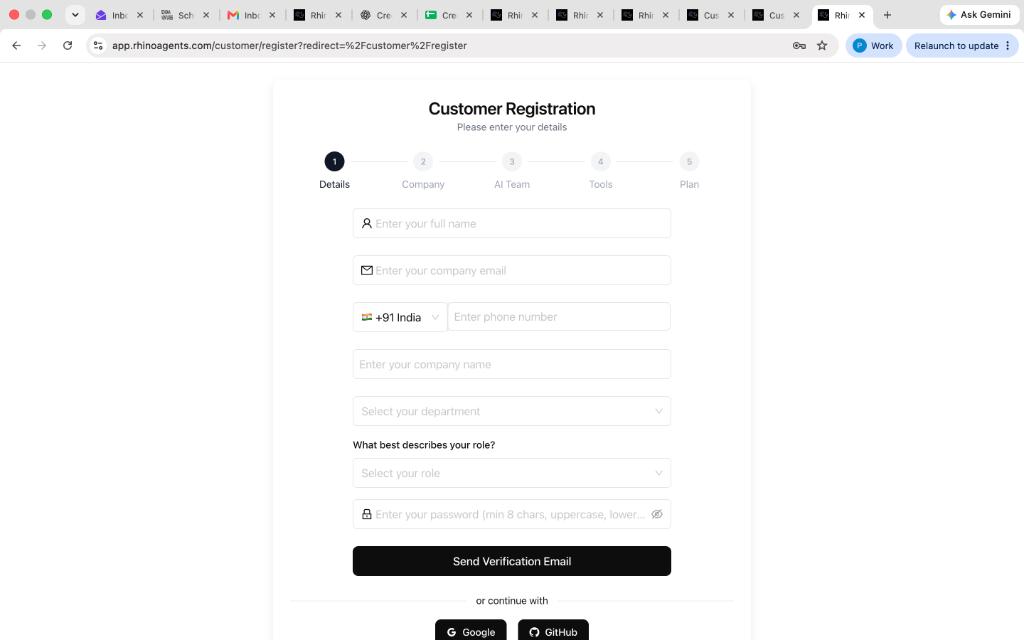
https://app.rhinoagents.com/customer/register
Step 1: Details
RhinoAgents Live Customer Registration Wizard

Step 1: Basic Details & Corporate SSO

Name, work email, phone, role, password, or Google/GitHub login to claim 100 free credits.

Register →

Click any step on the left to preview its screen, or register live at app.rhinoagents.com/customer/register

Zero Prompt Scripting

Simply specify your business targets in plain English. RhinoAgents autonomously compiles your objectives into deterministic execution rules.

100% Human Oversight

Run in Supervised Mode with 1-click Slack and Email approvals before any high-stakes external communication or database modification.

400+ SaaS Connectors

1-Click OAuth 2.0 authorization for Google Workspace, Slack, HubSpot, Salesforce, Stripe, Zendesk, and QuickBooks in seconds.

100 Free Run Credits

Every new organization gets 100 free autonomous execution credits. Verify response quality and ROI before any billing commitment.

Onboarding & Getting Started FAQ

Frequently Asked Questions

Everything you need to know about getting your team set up and deploying autonomous AI employees.

How long does the customer onboarding process take?
Completing the 6-step customer registration wizard takes less than 2 minutes. You simply provide your basic details (or use Google/GitHub SSO), enter your company website and target goals, choose your pre-trained AI specialist, connect your tools via 1-click OAuth, claim your 100 free credits, and activate. Your digital employee is ready to begin work immediately.
Do I need to enter a credit card to register and test?
No. Zero credit card or upfront billing information is required. Every new organization receives 100 free autonomous execution credits upon email verification so you can explore capabilities, test integrations, and verify accuracy before making any financial commitment.
What are the 100 free autonomous execution credits?
Credits represent units of autonomous work completed by your AI employees—such as researching and qualifying an inbound lead, drafting and sending a personalized email, resolving a customer support ticket, or reconciling an invoice. Your 100 free credits allow you to run real workflow executions end-to-end.
What is the difference between Supervised Mode and Autonomous Mode?
In Supervised Mode, your AI employee performs all the research, data lookup, and draft synthesis, but pauses before executing external actions (e.g. sending an email, approving a refund, updating a CRM stage). It sends a 1-click approval card to Slack or Email requiring human sign-off. In Autonomous Mode, the AI executes actions automatically whenever its internal confidence score exceeds 95%, only escalating borderline cases to human teammates.
Which applications and CRMs can I connect during onboarding?
RhinoAgents supports over 400+ business applications with native 1-click OAuth 2.0 connectors. Popular integrations include Google Workspace (Gmail, Calendar, Docs, Sheets), Microsoft 365, Slack, Microsoft Teams, HubSpot, Salesforce, Zendesk, Freshdesk, Stripe, Jira, GitHub, Apollo, Intercom, and QuickBooks.
How does RhinoAgents protect our company data and credentials?
RhinoAgents is built for enterprise security. All tokens and credentials are encrypted using AES-256 and stored in hardware security modules (HSM) with least-privilege permission scopes. We never sell or share customer data, and your proprietary data is strictly isolated within your private tenant and never used to train public foundation models. We comply with SOC 2 Type II and GDPR standards.
Can I invite my teammates and coworkers to my workspace?
Yes. You can invite unlimited team members, managers, and administrators to your workspace. Team members can collaborate with AI employees, review approval queues in Slack or web dashboard, inspect audit logs, and monitor performance analytics together.
What happens if an AI employee encounters an unfamiliar customer question?
RhinoAgents incorporates deterministic confidence scoring. If a customer request falls outside established knowledge bases or below confidence thresholds, the AI employee automatically pauses, flags the ticket, and routes it to the designated human team member with a pre-drafted summary of the inquiry and suggested next steps.
Can I customize the name, role charter, and tone of my AI employee?
Yes, fully. While all 50+ AI employees come with pre-packaged role charters and industry benchmarks, you can customize your digital employee's name, avatar, job title, department, operating guidelines, communication tone (formal, friendly, technical), and specific boundary constraints at any time in workspace settings.
How does pricing work once our 100 free credits are used?
After exhausting your 100 free credits, you can seamlessly select a plan tier that matches your monthly execution volume (Starter, Professional, or Enterprise). RhinoAgents bills based on autonomous execution units rather than costly per-seat human license taxes, allowing your organization to scale cost-effectively.
Does RhinoAgents offer custom implementation or white-glove onboarding?
Yes. In addition to self-serve onboarding, our solutions engineering team provides white-glove implementation services for organizations with proprietary systems:
  • Small Implementation ($1,000 – $2,500): Core integrations and single employee configuration.
  • Advanced Workflow Implementation ($5,000 – $10,000): Multi-step logic, custom database connectors, and approval trees.
  • Enterprise AI Workforce ($10,000 – $25,000+): Full departmental rollout, dedicated solutions architect, custom fine-tuning, and bespoke SLAs.
What support is available if my team needs help during onboarding?
Every client has access to our 24/7 technical documentation, interactive sandbox, and email support. You can also book a 1-on-1 guided kickoff call directly with our solutions engineering team via our calendar booking link to walk through your exact tools and use cases together.
Get Started in Under 2 Minutes

Ready to Deploy Your Autonomous AI Workforce?

Join forward-thinking companies automating sales outreach, customer support, and financial operations with RhinoAgents. Start with 100 free autonomous execution credits today.

Register for Free (100 Credits) Book Guided Demo
No Credit Card Required Instant Setup 100 Free Run Credits