
Every business owner knows the feeling. Leads arrive after hours and go cold. A customer repeats their story to a third person in a week. The CRM is three days out of date because nobody had time to update it. You bought software to fix all of this, and now you have more tabs, more logins and more tools to babysit.
The last decade of business software promised leverage and delivered overhead. First came rules-based automation, which saved clicks but never understood anything. Then came chatbots, which could talk but forgot you the moment the window closed. Then came generic AI copilots, which are clever but belong to whoever happens to open them, with no job, no target and no accountability.
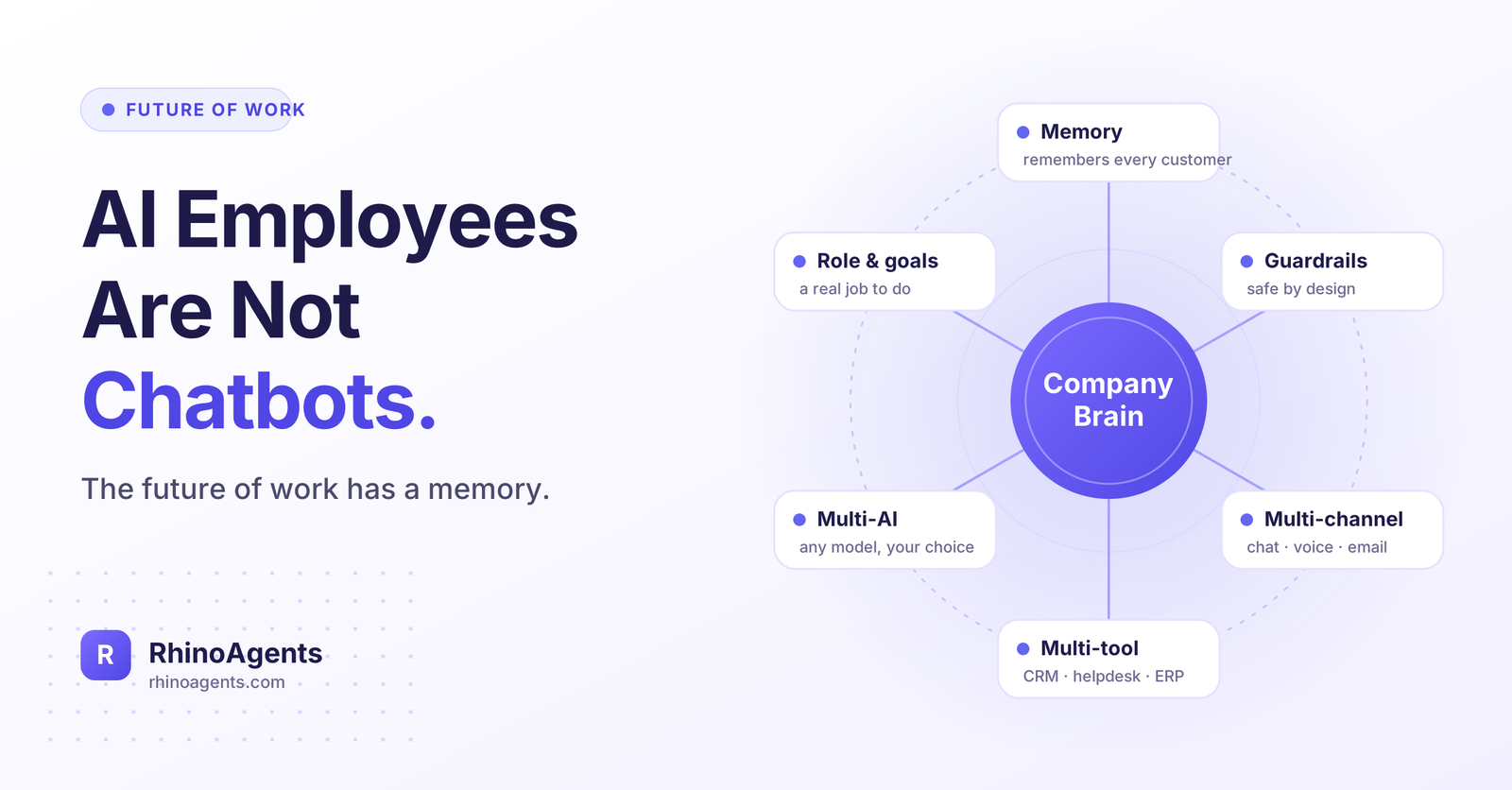
A different model is emerging: the AI employee. Not a widget and not a prompt box, but a defined digital worker with a role, a KPI, shared company knowledge, memory, access to your tools and clear limits on what it may do. This article explains what that shift means for the future of work, and the six building blocks that separate a real AI employee from a demo: CompanyBrain, memory, guardrails, multi-channel reach, multi-tool execution and multi-AI flexibility.
The Problem: More Software, Same Workload
Most businesses don’t struggle to imagine AI use cases. They struggle to turn those ideas into something reliable enough to trust with real customers and real data. Three traps show up again and again.
The channel trap. You buy a voicebot or a website chat widget hoping to cut labor costs. It can’t follow up on WhatsApp, it can’t update your CRM, and your team still spends hours copying notes and chasing leads. The bot talks, but the work still lands on a human.
The copilot trap. You pay monthly licenses for a general-purpose AI assistant. A few enthusiasts use it; most people forget it exists. There is no job role, no service-level target and no clear KPI, so nobody can say what it is worth.
The automation trap. You stitch together webhooks and zaps. They work until an API changes its schema, and then they fail silently. Nobody owns them, and nobody knows they’re broken until a customer complains.
The common thread is that all three are tools, and tools need a person to operate them. What most businesses actually want is the opposite: work taken off their plate, zero missed leads and measurable savings.
Before and after: a missed lead
Before. A prospect fills in a form at 9:40 p.m. The message sits until morning. A salesperson reads it at 10:15 a.m., writes an email, and realizes the prospect already booked a demo with a competitor who replied in minutes. Nothing was logged in the CRM, so nobody even knows the lead was lost.
After. An AI SDR replies within seconds, asks two qualifying questions, checks the calendar, books the meeting, sends a confirmation on WhatsApp, and logs the whole exchange in HubSpot. The salesperson starts the day with a booked call and a summary instead of an unread inbox.
The difference isn’t better wording. It’s that the second system has a job, context and the ability to act.
What Is an AI Employee, Really?
An AI employee is a digital worker defined by three things: a role, a KPI and a set of channels and tools to do the job.
- A role. It isn’t “an AI that can answer questions.” It is an SDR, a customer support executive, an accounts payable specialist, a recruiter, a receptionist or an operations manager. It knows what “done” looks like and what falls outside its remit.
- A KPI. A support employee might be measured on resolution rate and response time. An SDR might be measured on meetings booked and speed to first reply. If you can’t measure it, you can’t manage it, and you can’t justify it.
- Channels and tools. It talks to customers on the phone, WhatsApp, chat and email, and it works inside the same systems your team already uses.
This is why the comparison with a chatbot misses the point. A chatbot is a feature. An AI employee is a position on your team: it can be hired, onboarded, measured, reviewed and improved. For many roles it can replace or augment the cost of a full-time headcount, and it works around the clock without handoffs getting lost.
You can see this in practice by browsing the ready-to-use AI employee templates for sales, support, finance, HR and operations, such as the AI SDR, the AI Customer Support Executive or the AI Accounts Payable Specialist.
But a role and a KPI are only the beginning. Whether an AI employee is trustworthy depends on what sits underneath it. Six foundations matter most.
Foundation 1: CompanyBrain, the Knowledge Every New Hire Wishes They Had
Ask any new employee what slows them down in the first month. It’s almost never skill. It’s context: how we price, what we promised this customer, which policy applies, why we stopped doing that last year.
An AI employee without company knowledge has the same problem, except that it fills the gaps with confident guesses. That is where hallucinations come from. The fix is CompanyBrain: a centralized knowledge base that indexes your SOPs, manuals, product specifications, pricing tiers, internal wikis and brand guidelines, so every answer is grounded in verified company information rather than a model’s general knowledge.
The most important word is shared. When the AI employee answering the phone, the one replying on WhatsApp and the one running a back-office workflow all draw from the same source of truth, you update a price or a policy once and every employee is current immediately. No more “the chatbot says one thing and sales says another.”
A good CompanyBrain also changes how you think about documentation. Instead of PDFs that nobody reads, your processes become living inputs that do real work every day. Teams often discover gaps in their own SOPs the first time an AI employee asks a question the documents can’t answer, which is a feature, not a flaw.
You can learn more about how CompanyBrain works, and how reusable skills such as document parsing, translation, objection handling and pricing calculation sit on top of it.
Foundation 2: Memory, the End of “Can You Repeat That?”
Customers hate repeating themselves. Employees hate re-explaining the same thing. Memory is what turns a series of isolated interactions into a relationship.
It helps to think of memory in three layers:
- Short-term memory keeps the thread of the current conversation, so the employee never asks for something you just said.
- Long-term memory remembers the customer, their history, their preferences and what was agreed last week or last quarter.
- Shared memory lets one AI employee hand off to another, or to a human, without losing context.
The real test is memory that works across channels. A customer who emails on Monday, calls on Wednesday and messages on WhatsApp on Friday should feel they are dealing with one company, not three disconnected systems. Open tasks matter as much as past conversations: if an employee promised a callback or a quote, that commitment has to survive the end of the session.
Memory also raises the bar for governance. What an AI employee remembers, how long it keeps it and who can see it are business decisions, not technical afterthoughts. That is why memory belongs alongside permissions and policy, not in a separate silo. You can read how cross-session, cross-channel memory works in RhinoAgents.
Foundation 3: Guardrails, Autonomy You Can Actually Trust
The first question every serious buyer asks is not “How smart is it?” It is “What happens when it’s wrong?”
You wouldn’t give a new hire unlimited authority on day one. They start with defined responsibilities, clear limits and a manager who checks their work. AI employees deserve the same discipline, and the businesses that adopt them successfully tend to treat governance as the product, not an add-on.
A strong guardrail layer typically includes:
- Scope and policy limits. Business rules, tool boundaries and deterministic policy checks on every action, so the employee can only do what its role allows. See how guardrails enforce these rules, including PII redaction.
- Human-in-the-loop approvals. Read-only tasks can run autonomously, while sensitive actions such as outbound emails, financial approvals and ERP updates pause for one-click sign-off in Slack, Teams or email. Learn more about human-in-the-loop approvals.
- Role-based access control. Scoped credentials and permissions so each AI employee can read and write only what it needs. Details are on the enterprise security and RBAC page.
- Audit trails. Tamper-evident records of who changed a workflow, which tools ran and what decision was made, available through audit logs.
- Pre-production evaluations. Test accuracy, edge cases and regressions before an employee goes live, using evaluations and testing.
- Safe deployment. Dry runs in a sandbox, versioned releases and instant rollback, so a change never disrupts the employee that is currently live. See sandbox and zero-downtime deployment.
There is also the compliance picture. For regulated industries, standards such as ISO 27001, SOC 2, HIPAA, GDPR and DPDP are not optional extras; they decide whether a pilot can ever become production. Guardrails and audit logs are what make those conversations possible.
The principle is simple: trust is earned, measured and widened over time. Start with narrow authority and human approval on anything consequential. As the numbers prove the employee out, relax the gates that no longer need to be there.
Foundation 4: Multi-Channel, Working Where Customers Already Are
Your customers don’t think in channels. They call, message on WhatsApp, send emails and use web chat, sometimes in the same week and sometimes in the same hour. Most companies handle this with a separate tool for each channel, which means every channel becomes a silo and nobody sees the whole customer.
A real AI employee shows up on all of them and carries the context between them. Consider what one employee should be able to do in a single customer journey:
- Answer the phone call. Pick up instantly, around the clock, with natural conversational voice, identify the need and qualify the opportunity.
- Continue on WhatsApp. Send the brochure, the pricing sheet or the booking link while interest is hot, without asking the same questions again.
- Send the follow-up email. Deliver the recap, the quote or the calendar invite without anyone on your team lifting a finger.
- Update the CRM. Log the summary, the qualification result and the deal stage automatically.
- Report on itself. Show response speed, conversion and exceptions so owners can see what happened.
The problem was never “we need a chatbot on our website.” It was that every touchpoint starts from zero. You can explore the channels behind this, from voice AI and web chat to WhatsApp, and see how an AI Receptionist handles the front desk.
Foundation 5: Multi-Tool, Because Talking Is the Easy Part
An employee who can’t touch your systems isn’t an employee. Conversation is the visible part of the job; the real work happens inside the CRM, the helpdesk, the calendar, the inbox and the ERP.
That means AI employees need controlled access to the same tools your people use. Look up an order in the ERP. Update a deal in HubSpot or Salesforce. Create a ticket. Match an invoice to a purchase order and a goods receipt, then route exceptions for approval in Slack. This is where insight turns into action, and it is where most AI pilots stall, because integration is genuinely hard.
Three things matter when evaluating this layer:
- Breadth. Pre-built, bidirectional connectors across CRMs, ERPs, databases, email, messaging and payment systems, plus open standards such as MCP and custom REST APIs for internal software. RhinoAgents offers 400+ integrations.
- Resilience. Traditional automations break when an API schema changes. Managed connectors that are maintained for you are far less fragile than a pile of webhooks.
- Permissions. Every connection should be scoped, with approval gates on sensitive actions, so tool access never becomes a security hole.
The point of workflows is that multi-step logic stays predictable. The AI handles the judgment and the conversation; deterministic steps handle the parts that must never improvise, such as financial approvals.
Foundation 6: Multi-AI, Don’t Marry One Model
The model that is best at reasoning isn’t always the best for voice, and it isn’t always the cheapest option for high-volume, low-stakes tasks. The leaderboard also changes every few months. Betting your operations on a single model is a business risk, however good that model is today.
The smarter approach is model flexibility. Use a stronger model for complex reasoning, a faster and cheaper one for routine steps, and a different one for voice. Switch when something better arrives, upgrade or downgrade per step, and keep your CompanyBrain, memory, guardrails and workflows exactly as they are. In this setup the model becomes an interchangeable part. Your business knowledge and your processes stay yours.
This also helps with cost and latency. Right-sizing models per task, caching prompts and watching response times in real time can reduce spend without sacrificing quality where it matters. You can read about multi-model switching across providers such as OpenAI, Claude and Gemini, or private endpoints, and about real-time analytics for tracking latency, resolution rates and cost per task.
A Day in the Life: Before and After
Let’s put the six foundations together in a realistic scenario. The details below are illustrative, but the pattern is common.
Before: a mid-sized online retailer with a small support team.
- Customers ask “Where is my order?” by phone, WhatsApp, email and chat. Each channel has its own queue.
- Agents look up orders in the ERP by hand, then paste updates into the helpdesk.
- A customer who emailed yesterday calls today and starts over.
- Refunds wait for a manager who is in meetings, so customers chase.
- Reporting is a spreadsheet someone updates on Fridays.
After: an AI Customer Support Executive on the team.
- The employee answers across all four channels from one CompanyBrain, so a policy change is reflected everywhere at once.
- It looks up live order status in the ERP and replies in seconds, in the customer’s channel of choice.
- Memory means yesterday’s email is already known when the customer calls today.
- A refund above a set threshold pauses for one-click approval in Slack; smaller ones follow policy automatically.
- Every action is logged, and a daily report lands in the manager’s inbox covering resolution rate, response time and exceptions.
Notice what changed for the humans. They are no longer the routing layer between systems. They handle the genuinely difficult cases, approve the consequential actions and improve the policies. That is the future of work in miniature.
What This Means for the Future of Work
The fear that AI simply replaces people misses how work actually changes. Roles don’t disappear; the mix of tasks inside them shifts.
- The SDR stops copying leads between tabs and spends the day in real conversations with qualified buyers.
- The support lead stops answering the same ten questions and starts fixing the root causes behind them.
- The finance team stops keying invoices and starts investigating the discrepancies an AI employee flags.
- The founder stops being the bottleneck for every follow-up and every decision.
Small and mid-sized businesses stand to gain the most. For the first time, a team of ten can operate with the coverage, speed and consistency that used to require a much larger organization. Always-on response, consistent follow-up and clean data stop being things only large companies can afford.
A few shifts are worth planning for:
- Managers become employers of digital staff. They set goals, review KPIs and decide where authority should widen. Management skills matter more, not less.
- Documentation becomes infrastructure. Companies with clear SOPs and clean knowledge will deploy faster and get better results.
- Governance becomes a competitive advantage. Buyers and customers will prefer companies that can show audit trails and approval controls.
- Switching costs move. If your knowledge, memory and workflows are portable across models, you aren’t locked into any one vendor’s roadmap.
The companies that win won’t be the ones with the most AI tools. They will be the ones whose AI employees share context, follow the rules and work across every channel and system.
How to Start: One Role, One KPI
You don’t need to automate everything at once. The most reliable path is narrow and measurable.
- Pick one role with a clear job. Lead qualification, customer support, invoice processing and candidate screening are all good first candidates because outcomes are easy to count.
- Define the KPI. Meetings booked, resolution rate, response time or touchless invoice rate. Pick one number that matters.
- Load the knowledge. Give the employee your SOPs, pricing rules and policies through CompanyBrain.
- Connect the essentials. Start with email, calendar and your CRM or helpdesk, then add more tools as you go.
- Set the guardrails. Keep approvals on anything consequential, test with evaluations, and review the audit trail.
- Measure, then expand. When the numbers hold, widen authority or add the next employee.
If you would rather not do the engineering yourself, RhinoAgents works with teams in two ways: guiding your team as they manage AI employees on the platform, or building and managing them end to end, including integrations, deployment and ongoing maintenance. Either way, your people bring the process knowledge and approval rules.
Frequently Asked Questions
What is an AI employee, and how is it different from a chatbot?
A chatbot is usually limited to one channel, forgets context when a session ends and can’t do back-office work. An AI employee has a defined role and KPI, works across voice, WhatsApp, chat and email, remembers past interactions, uses your business tools and reports on its own performance.
What is CompanyBrain?
CompanyBrain is a shared knowledge base built from your SOPs, manuals, pricing, product specifications and policies. Every AI employee answers from it, which keeps responses consistent and grounded in verified company information instead of guesswork.
How do guardrails keep an AI employee safe?
Guardrails limit what an AI employee can say and do through policy checks, tool boundaries, PII redaction and role-based access. Sensitive actions can pause for human approval, and audit logs record what happened. Pre-production evaluations help catch problems before anything goes live.
Do we need an AI engineering team?
No. RhinoAgents can handle development, integrations, deployment and maintenance, or guide your own team if you prefer to manage employees yourself. You contribute process context, permissions and approval rules.
Can AI employees work with the tools we already use?
Yes. Common connections include Salesforce, HubSpot, Zoho CRM, SAP, Microsoft Dynamics, Microsoft 365, Google Workspace, Slack, Teams, WhatsApp and standard databases, with custom API and webhook integrations for internal software. You can browse the full integrations library.
Why does multi-model support matter?
Different tasks suit different models, and the best option changes over time. Model flexibility lets you pick the right model for each step, control cost and latency, and avoid dependence on a single provider, while your knowledge and workflows stay intact.
Will AI employees replace my team?
The more common outcome is augmentation. AI employees take on repetitive, high-volume work and extend coverage to nights and weekends, while people focus on judgment, relationships and the exceptions that need a human decision.
Conclusion: The Next Hire Has a Memory
The future of work isn’t a smarter chat window. It’s a workforce in which digital employees hold real roles, share the knowledge of the company, remember the people they serve, respect clear limits, meet customers wherever they are, act inside the systems that run the business and run on the best model for each job.
That combination, CompanyBrain plus memory plus guardrails across every channel, tool and model, is what separates AI that impresses in a demo from AI that earns its place on the team.
Ready to see what that looks like for your business? Explore the AI employee templates or the full set of platform features at rhinoagents.com, or contact the team to scope your first AI employee.
