
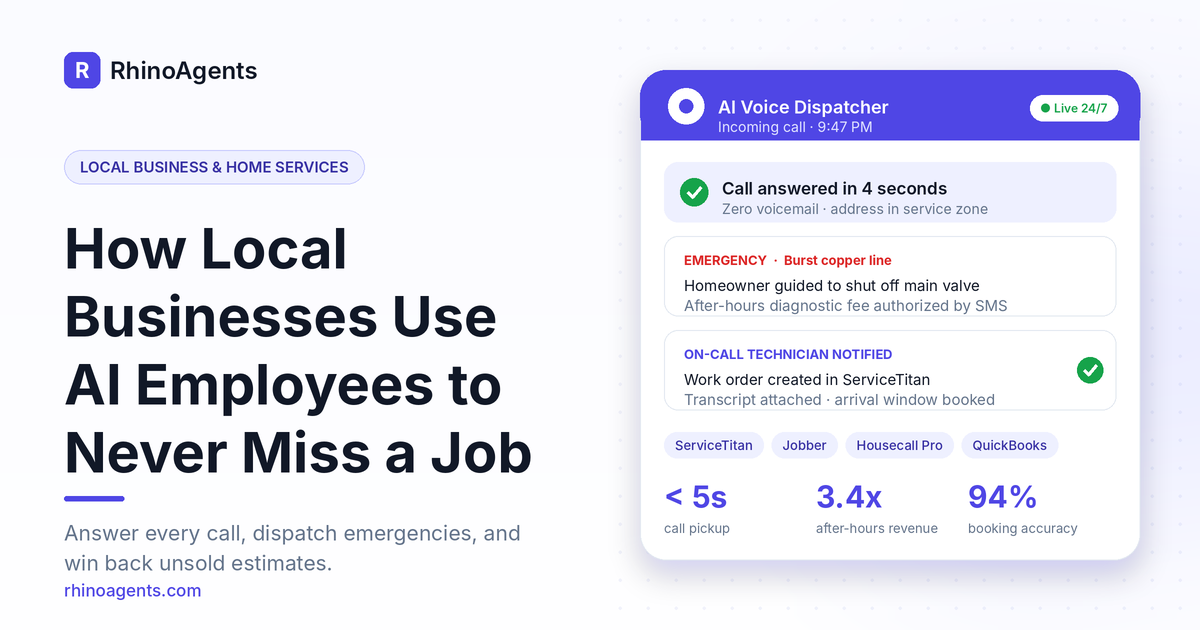
It is 9:47 PM in late January. A homeowner in Plano notices water running down the wall of her hallway. A copper line in the crawlspace has burst. She grabs her phone, searches for a local plumber, and calls the first number she sees. It rings four times and goes to voicemail. She hangs up, taps the next result, and that plumber answers. The job, easily worth a four-figure emergency repair plus whatever follow-on work the water damage uncovers, just went to a competitor. The first plumber will not even know it happened until the morning, if at all.
This scene plays out thousands of times a day across the home services industry. Local businesses, from solo electricians with two trucks to HVAC contractors running a 40-technician fleet, live and die by the phone. Yet the people who answer that phone are the same people who are under a sink, up on a roof, or driving between jobs. The result is a structural problem: the work that creates revenue is the same work that prevents you from capturing more of it.
This guide explains how local businesses are solving that problem with AI employees: specialized, ready-to-use digital team members that answer calls, triage emergencies, book jobs, chase unsold estimates, collect payments, and ask for reviews. We will walk through the real costs of missed calls, what each role actually does, how guardrails keep pricing and dispatch under your control, and what the numbers can look like for a typical six-truck contractor. If you want the short version of the offering first, you can see the full Autonomous AI Workforce for Local Businesses & Home Services page.
The Problem: Home Service Revenue Leaks Out Through the Phone
Most contractors know they lose some calls. Few have added up how much. When you look at where revenue slips away in a typical home services company, the leaks cluster in four places.
1. Calls that go to voicemail
Homeowners with an urgent problem do not leave voicemails. They call the next company. A no-heat call at midnight, a flooded basement on a Sunday, an AC failure on the hottest afternoon of the year: these are the highest-margin jobs in the trades, and they are also the ones most likely to arrive when nobody can pick up. Every unanswered ring is a customer handed to a rival.
2. Estimates that go cold
A replacement estimate for an HVAC system, an electrical re-wire, or a new roof often runs between $5,000 and $25,000. Homeowners rarely say yes on the spot. They compare quotes, talk to a spouse, and look at financing. Then life gets in the way. Without systematic follow-up, a large share of these estimates quietly die, not because the customer chose someone else, but because nobody stayed in touch.
3. Seasonal demand spikes and valleys
A heat wave or a cold snap floods the office with calls the team cannot absorb. Weeks later, the shoulder seasons leave technicians with gaps in the schedule and no one reaching out to the customer base to book maintenance. Both extremes cost money: one through missed demand, the other through idle capacity.
4. Slow cash collection
A job can be finished on Tuesday and paid for weeks later, simply because sending the invoice and chasing the balance falls to whoever has a spare minute. For small and mid-size contractors, that delay is a direct hit to cash flow.
Underneath all four leaks is the same cause: the business depends on a small number of busy humans to do repetitive, time-critical communication work around the clock. The traditional fixes each have drawbacks. Hiring more office staff is expensive and still leaves nights and weekends uncovered. Third-party answering services pick up the phone, but they read generic scripts, bungle customer details, and know nothing about your service area, your pricing, or your technicians’ availability.
The Solution: A Configurable AI Workforce Built for the Trades
The alternative is to add AI employees to your team: digital workers that each own a specific job, follow your rules, and plug directly into the software you already run your business on. This is the approach behind the RhinoAgents local business and home services workforce, which is designed around the operational reality of field service trades rather than around generic call-center scripts.
The difference from an answering service is fundamental. A generic service reads a script and takes a message. An AI employee configured for your company knows which zip codes you serve, what your diagnostic trip fee is, what your after-hours surcharge is, which equipment brands you are authorized to work on, and who is on call tonight. It can then act on that knowledge: book the appointment, create the work order, text the confirmation, and escalate to a human when the situation requires one.
There are two important points about how this works in practice.
It is ready to use, not a project. You are not assembling software from scratch. You start from a pre-configured role, connect your tools, load your company details, and deploy. The aim is days, not months.
It scales to your size. A solo owner-operator and a 50-truck fleet have very different needs, so the workforce is shaped around two models, covered next.
Two Business Models, Two Ways to Use AI Employees
Model A: The owner-operator (1 to 3 trucks)
If you are a solo tradesperson or run a very small crew, you are probably also your own dispatcher, receptionist, estimator, and bookkeeper. The phone rings while you are in the middle of a job, and you simply cannot answer it with your hands inside a water heater.
For this operator, the AI workforce acts as a dedicated 24/7 office dispatcher. Every incoming call is answered within two rings. The AI pre-screens the scope of the job, discloses your standard diagnostic trip fee, checks your calendar, and books a confirmed arrival window, then sends an SMS confirmation to the homeowner and a summary to you. It works with the channels solo trades rely on, including calls generated from Google Local Services Ads and yard signs, and it syncs with Jobber, Housecall Pro, and Google Calendar.
The practical outcome: one person operating with the equivalent of a full-time office dispatcher, without the payroll. A solo operator can connect the AI directly to a business phone number and Google Calendar without complicated software. When you are driving or under a crawlspace, calls get answered, details get captured, appointments land on your calendar, and the summary arrives by text.
Model B: The fleet contractor (5 to 50+ trucks)
A growing HVAC, plumbing, electrical, or roofing company has a different challenge. It has office staff, but they are stretched thin by seasonal call spikes, and the best use of their time is high-margin commercial bids and equipment logistics, not answering the same questions repeatedly.
For fleets, AI employees absorb high-volume work: triaging midnight no-heat calls, routing jobs by zone to cut windshield drive time and fuel waste, following up on open estimates through multiple touches, and collecting overdue balances. They read and write live data in systems like ServiceTitan, FieldEdge, and QuickBooks, so the office sees everything in the tools it already uses.
The headline capability for this model is capacity. With routine communication handled by AI, a single office CSR can dispatch roughly three times more service calls, and technicians spend more of their day on billable work.
Meet the AI Employees: Six Roles Every Contractor Can Deploy
The local business workforce is organized around roles, each one a job description a contractor will instantly recognize. You can start from a template and customize skills, workflows, tools, and booking rules.
1. AI Voice Dispatcher and Phone Receptionist
This is the front door of the business. It answers incoming calls with natural voice inflection, pre-screens the caller’s service issue, verifies the service address against your approved zip codes, discloses your standard trip fee, and books the job directly into your dispatch schedule. Pickup is under five seconds, so no call is sent to voicemail day or night.
It connects with ServiceTitan, Housecall Pro, Jobber, and Twilio voice. When a call ends, it can create or match a customer profile by phone number, generate a work order, attach the call transcript, and place the arrival window in your live schedule. That means no re-keying, no sticky notes, and no lost details.
2. AI Emergency Repair Triage Specialist
Emergencies do not respect business hours, and they require judgment, not just scheduling. This employee evaluates urgent after-hours situations such as burst water lines, gas leaks, and furnace failures in freezing weather. It walks callers through safety steps, such as locating the main shutoff valve, and then automatically dials your on-call technician.
It follows your customized triage decision tree. For a suspected gas leak, the instruction is to evacuate and call 911 or the local gas utility. For an active flood, it guides the homeowner to the main shutoff, opens an emergency ticket, and rings the technician on duty. It integrates with PagerDuty, ServiceTitan, SMS dispatch, and Slack.
3. AI Estimate and Replacement Quote Closer
This role targets the money sitting in unsold estimates. It follows up systematically on open replacement quotes in the $5,000 to $25,000 range for HVAC systems, electrical re-wiring, and roofing. It answers the questions that stall decisions, such as financing options, SEER2 ratings, and warranty terms, and keeps the conversation moving over SMS and other channels. It works alongside ServiceTitan, Jobber, GoodLeap financing, and Twilio SMS.
The value here is persistence. A human estimator with a full schedule may follow up once. An AI employee can run a patient, multi-touch follow-up ladder on every open quote, every time.
4. AI Seasonal Maintenance and Tune-Up SDR
Shoulder seasons are when schedules go quiet. This employee contacts your historical customer database ahead of seasonal surges, whether that means spring AC check-ups or fall furnace inspections, books maintenance appointments to fill gaps, and renews annual service club memberships. It connects with Housecall Pro, Mailchimp, Twilio SMS, and QuickBooks.
If your team already thinks in terms of outbound sales roles, this is the home services version of an AI SDR: a tireless outbound worker, pointed at your existing customer list instead of cold prospects.
5. AI Accounts Receivable and Payment Specialist
Getting paid quickly is as important as winning the job. As soon as a technician marks a work order complete, this employee sends a polite SMS payment link. It answers billing questions, structures compliant payment options, and reconciles paid invoices with QuickBooks Online. It works with Stripe invoicing, ServiceTitan, and Square. The result is same-day payment for many jobs and far less time spent chasing balances.
6. AI Google Review and Local SEO Sentinel
For local businesses, reviews are marketing. This employee sends personalized post-service review requests by SMS when the homeowner’s satisfaction is at its peak, and it collects 5-star Google Business Profile reviews that mention the specific service performed. Over time, a steady stream of fresh, trade-specific reviews helps you climb the Google map pack, which is where most local service searches are won. It connects with Google Business, NiceJob, Podium, and Twilio SMS.
How the Workforce Is Structured: Four Composable Layers
What separates a useful AI employee from an awkward script reader is how it is constructed. The local business workforce is built from four layers, so each employee reflects your company’s actual rules.
Layer 1: Employee role. This defines responsibilities and tone. Examples include the AI Voice Call Dispatcher, the AI Emergency Repair Specialist, the AI Estimate Follow-up SDR, and the AI Accounts Receivable Collector. Think of it as a tailored job description.
Layer 2: Field service skills. These are the modular actions an employee can take: booking a job in ServiceTitan, scheduling in Housecall Pro, handling voice telephony through Twilio, checking addresses with Google Maps geofencing, and sending Stripe SMS invoices. There are more than 400 field trade connectors available.
Layer 3: Workflow engine. Workflows are visual, multi-step processes with deterministic logic. Examples include a midnight water leak triage flow, an unsold HVAC estimate follow-up ladder, seasonal tune-up campaigns, and overdue payment dunning. Because the logic is deterministic, the employee does the same right thing every time rather than improvising.
Layer 4: Company context. This is a searchable company knowledge base grounded in your service area zip codes, hourly labor rates, after-hours surcharges, warranty policies, and authorized OEM brands. It keeps the AI’s answers tied to your actual policies rather than to guesses.
Because the layers are separate, you can change one without breaking the others. Updating your trip fee means editing company context. Adding a new campaign means adding a workflow. Hiring a new type of employee means defining a new role on top of skills you already have.
Guardrails: Autonomy Without Rogue Pricing or Midnight Wake-Up Calls
The most common concern from contractors is control. “I do not want an AI quoting a $9,000 repair it has never seen, or waking up my technician at 2 AM for a non-emergency.” That is exactly what guardrails are for. The local business workforce ships with deterministic safeguards designed for the trades.
Geofenced service area boundaries
The AI checks each caller’s address against your approved zip code list. Out-of-area requests are politely declined or routed for special mileage authorization, so your trucks do not end up driving an hour for a job that does not make economic sense.
Strict trip fee disclosures
Before confirming an appointment, the AI discloses your exact diagnostic fee, for example a standard fee during business hours and a higher fee after hours. It never invents repair estimates without a technician’s diagnosis. For standard flat-rate services such as an AC tune-up or a water heater flush, you can configure fixed prices in the knowledge base.
On-call technician escalation gate
Non-urgent calls are scheduled for the next business morning. Only verified critical emergencies ring the on-call technician’s cell phone after hours, so your team gets sleep unless it truly matters.
Human approval where it counts
For high-stakes moments, the workflow can pause for human confirmation. Picture an emergency dispatch: a homeowner reports a burst copper line in a crawlspace. The AI verifies she is inside your service zone, guides her to shut off the street meter valve, gets her authorization of the after-hours diagnostic fee by SMS, and then pauses with a clear summary. The dispatcher can approve sending the on-call truck immediately or schedule the first call of the next morning. Nothing is dispatched or priced without your rules being satisfied.
Before and After: What Changes in a Real Week
Concrete scenarios show the difference better than feature lists.
Scenario 1: The after-hours emergency
Before: At 10:30 PM, a no-heat call comes in during a cold snap. The office is closed and the owner’s phone is on silent. The call goes to voicemail. The family calls a competitor and books within minutes. The contractor learns about the lost job when listening to messages at 7 AM.
After: The AI Voice Dispatcher answers in under five seconds. It confirms the address is in the service area, discloses the after-hours diagnostic fee, and confirms the situation is a genuine emergency. The triage specialist gives safety guidance, and the on-call technician receives a call and a text with the full job details. The customer profile and work order are already in ServiceTitan by the time the technician is in the truck.
Scenario 2: The estimate that stalls
Before: An estimator quotes a $12,000 HVAC replacement on a Tuesday. The homeowner says they will think about it. The estimator is booked solid for two weeks and never follows up. The homeowner signs with a company that checked in twice.
After: The Estimate and Replacement Quote Closer starts a follow-up sequence the same day. It answers questions about SEER2 ratings and warranty terms, shares financing options, and keeps the conversation going over SMS. When the customer is ready, the booking is created in the schedule and the estimator is notified.
Scenario 3: The slow season
Before: It is early spring, and half of the technicians have light schedules. The office is too busy with day-to-day tasks to call past customers about tune-ups.
After: The Seasonal Maintenance SDR reaches out to the customer database before demand picks up, books maintenance visits to fill the gaps, and renews service club memberships. Technicians stay busy, and recurring revenue grows.
Scenario 4: The unpaid invoice
Before: A water heater replacement is finished on Friday. The invoice goes out the following week and payment arrives weeks after that, after several reminders from a busy office manager.
After: The moment the technician closes the work order, the customer receives an SMS payment link. Many jobs are paid the same day, and the payment is reconciled in QuickBooks automatically.
The Financial Case: What a Six-Truck Contractor Can Expect
The local business page models the economics for a six-truck home services contractor with $1.8 million in annual revenue. Such a business can lose a very large sum each year to unanswered calls during lunch and after hours, unaccepted replacement quotes that slip through the cracks, and the cost of third-party answering services. The projection breaks the opportunity into five components:
- After-hours emergency calls captured: about $145,000 per year, from picking up high-margin furnace breakdowns and water leaks when competitors go to voicemail.
- Reclaimed unsold replacement estimates: about $120,000 per year, from systematic multi-channel follow-up on $8,000 to $15,000 HVAC and roof estimates.
- Replaced answering service fees: about $38,000 per year, from eliminating third-party services.
- Same-day invoice payments via SMS links: about $22,000 per year.
- Office hours saved: about 4,800 hours of CSR and dispatch time, freed for higher-value work.
Taken together, the page estimates an annual bottom-line value of roughly $325,000 for this example contractor. These are modeled projections for a specific business profile, not guarantees, and your results will depend on call volume, average ticket size, close rates, and how thoroughly you configure your employees. A useful exercise is to plug your own numbers into the ROI calculator on the local business AI workforce page and see where your own leaks are largest.
Here are some headline operating metrics the page cites for the workforce:
- Call pickup in under 5 seconds, with no calls sent to voicemail
- 94 percent intake booking accuracy on address, issue scope, and equipment model
- 3.4x growth in after-hours revenue from capturing emergency leaks and furnace failures
- 3x more service calls dispatched per office CSR
How It Connects to the Tools You Already Use
A workforce is only as good as the systems it can read from and write to. The local business employees connect to the software contractors already rely on, including ServiceTitan, Housecall Pro, Jobber, FieldEdge, QuickBooks, Stripe, Square, Google Calendar, Google Business Profile, Twilio, Slack, and PagerDuty. Connections run through official developer APIs and Model Context Protocol data bridges.
In practice, this means a completed call can automatically do five things:
- Create a new customer profile, or match an existing record by phone number.
- Generate a work order ticket.
- Attach the call transcript to the record.
- Book the arrival window in your live schedule.
- Notify the right person by SMS, Slack, or phone.
For teams that handle large volumes of inbound questions beyond voice, such as chat on your website or texts after a service visit, the same company knowledge base can power an AI customer support executive and a sales AI chatbot, so customers get consistent answers across every channel.
A Practical Rollout Plan for Your Business
You do not need to transform the whole company at once. Most contractors get the best results by deploying in stages.
Week 1: Answer every call. Start with the AI Voice Dispatcher. Connect your business phone number and calendar or field service software, load your service area, trip fees, and hours, and run it alongside your current process. Review the transcripts and bookings daily so you can refine instructions.
Week 2: Add emergency triage. Configure your emergency decision tree, on-call schedule, and escalation rules. Test with sample scenarios such as a burst pipe or a no-heat call before going live after hours.
Weeks 3 and 4: Turn on follow-up. Bring in the Estimate and Replacement Quote Closer and set up your follow-up ladder. This is often where the largest recovered revenue appears, because the open estimates already exist in your system.
Month 2 and beyond: Expand the team. Add the AR Specialist, the Seasonal Maintenance SDR, and the Review Sentinel. Each one builds on the company context and integrations you have already set up, so adding them is faster than the first deployment.
On pricing structure, the page notes that you can start with a self-serve trial that includes 100 free credits, which gives you room to test real calls and workflows before committing further.
What Makes a Good AI Employee Deployment
A few principles separate deployments that thrive from those that disappoint:
- Be specific about your rules. The more precisely you document service areas, fees, hours, brands, and escalation paths, the better the AI performs. Vague instructions create vague results.
- Keep humans in the loop for high-stakes decisions. Use approval gates for dispatching, unusual pricing, and anything involving safety.
- Review early, then trust. Read transcripts for the first couple of weeks, fix gaps in the knowledge base, and then let the workflow run.
- Measure what matters. Track answered-call rate, booking rate, estimate close rate, days-to-payment, and review volume before and after.
- Treat it like a hire. Give each AI employee a clear role, clear boundaries, and regular feedback, just as you would a new office team member.
Local Business FAQ
How does the AI sound to callers? Will homeowners get frustrated?
The voice uses modern conversational models with low latency and natural tone. It listens without interrupting while a caller describes the problem and responds with polite, empathetic professionalism. For most homeowners, an immediate and helpful answer beats a voicemail greeting or a distant call center.
How does it integrate with ServiceTitan, Housecall Pro, and Jobber?
Through official developer APIs and Model Context Protocol data bridges. After a call, the system can create a customer profile, match existing records by phone number, generate a work order, attach the transcript, and book the arrival window in your schedule.
What happens when a caller has a true emergency, like a gas leak or an active flood?
The AI follows your customized emergency triage decision tree. For a gas leak, it instructs the homeowner to evacuate and call 911 or the gas utility. For an active flood, it guides the caller to the main water shutoff, opens an emergency ticket, and rings your on-call technician directly.
Can the AI quote complex repair prices over the phone?
No. By default, it is instructed never to estimate complex repair costs without a technician’s diagnosis. It discloses your standard diagnostic trip fee and sends a technician to diagnose in person. For fixed-price services like tune-ups or water heater flushes, you can configure flat prices.
Can a solo tradesperson with one or two trucks use this without complicated software?
Yes. Solo operators connect the AI to their business phone number and Google Calendar. When you are driving or working, the AI answers calls, captures customer details, schedules appointments, and texts you the summary.
Will it replace my office staff?
The goal is to take repetitive, time-sensitive communication off your team’s plate so they can focus on higher-value work like commercial bids, equipment logistics, and customer relationships. For fleets, the headline benefit is capacity: one CSR can dispatch about three times more calls.
Is this only for HVAC and plumbing?
The local business workforce is designed for HVAC, plumbing, electrical, roofing, and other home service contractors, and the same role-based structure adapts to many field trades. If your business sits closer to project-based work, you may also want to look at the construction industry page. If you manage dispatch-heavy operations with fleets and routing at larger scale, the logistics and supply chain page covers that side.
Explore Other Industries
Local businesses are one of many verticals where AI employees are changing how teams work. If you operate in an adjacent field, these pages may be relevant:
- Real Estate and Multifamily for property managers and agents dealing with maintenance requests and leads
- Retail and E-Commerce for product and order support
- Financial Services for regulated customer communication
- Healthcare and Life Sciences for appointment-heavy practices
You can browse the complete list on the RhinoAgents industries hub.
Conclusion: Stop Handing Your Best Jobs to the Next Result
In home services, speed wins. The company that answers first, shows up when it says it will, follows up on the quote, and makes paying easy is the company that grows. For years, that level of responsiveness required a large office team and round-the-clock coverage that only bigger contractors could afford.
AI employees change that equation. A solo owner-operator can now have an always-on dispatcher. A growing fleet can absorb seasonal spikes without panic hiring. Every open estimate can get the patient follow-up it deserves, every completed job can trigger a payment link, and every happy customer can be invited to leave a review, all while your people stay focused on the work only they can do.
If you are ready to see what that looks like for your trade, explore the local business and home services AI workforce, then deploy your first local business AI employee with the self-serve trial and 100 free credits. If you would rather talk through your call volume and dispatch setup first, you can book an operations briefing with the team.
