
Many Shopify stores reach the same point. Support starts in a shared Gmail inbox, works fine for a few months, then collapses under its own weight. So the team moves to Zendesk. Tickets get numbers, agents get queues, managers get reports. It is a real improvement, and for a while it feels like the problem is solved.
Then order volume doubles. The queue fills with the same questions, “where is my order,” “can I return this,” “can you change my address,” and every one of them still needs a person to open Shopify, find the order, copy the details into Zendesk and type a reply. Zendesk organizes the work. It doesn’t do the work.
This guide shows how to automate Shopify customer support with Zendesk so that routine requests are resolved automatically, tickets arrive pre-structured when a human is needed, and refunds stay under your control. It also shows how an AI employee like Liam from RhinoAgents can sit on top of your Zendesk setup and handle the repetitive load across website chat, WhatsApp, email, voice and SMS.
What Zendesk does well, and where the gap is
Zendesk is a helpdesk. It is very good at the things a helpdesk should be good at:
- Giving every conversation a ticket with an owner, status and history
- Routing work to the right team or queue
- Tracking response and resolution times against targets
- Reporting on volume, backlog and satisfaction
What a helpdesk doesn’t do on its own is understand a customer’s question, look up the order in Shopify, decide what the policy says and write a correct reply. That work still falls on your team. The gap between “a ticket exists” and “the customer has an answer” is where most of your support cost lives.
Automation closes that gap in two ways. It resolves the simple requests before a human ever sees them, and it prepares the complicated ones so that the human starts with everything they need.
Where Shopify and Zendesk fit together
It helps to be clear about what each system owns.
Shopify holds the facts: orders, items, fulfillment status, shipping addresses, customer records and refund history.
Zendesk holds the conversation: who asked what, when, who replied, what’s still open and how long it has taken.
For support to work well, these two need to talk. Agents should see order context beside the ticket without switching tabs. And whenever something happens in the conversation, such as a refund approved or an address updated, the result should be reflected in both places.
An automation layer is the missing third piece. It reads the customer’s message, pulls the facts from Shopify, applies your rules, takes the action and writes the outcome back to Zendesk.
The requests worth automating first
Start with the categories that are high in volume and low in risk. For most Shopify stores they look like this:
Order status and tracking. Usually the largest category by far. The answer sits in Shopify and the carrier’s tracking page. No judgment required.
Returns and exchanges. The policy is documented. The system can explain eligibility, collect the reason and open the request.
Cancellations and address changes. Time-sensitive, and clear-cut when the rules are written down: if the order hasn’t shipped, proceed; if it has, explain the options.
Product, sizing and shipping questions. Answerable from your product pages, size guides and policies.
Damage and missing-item reports. These need a human in the end, but automation can collect photos, order numbers and the customer’s preferred fix, so the ticket arrives complete.
Look at your last 60 days in Zendesk and sort tickets by tag or subject. The top three categories will probably account for more than half of your volume.
Step-by-step: automating Shopify support with Zendesk
Step 1: Clean up your Zendesk structure first
Automation works best on top of a tidy helpdesk. Before you add anything, review:
- Ticket types and tags. Create consistent categories such as order status, return, refund, cancellation, product question and damaged item.
- Custom fields. Add fields for order number, order value and request type so automated tickets can be filled in the same way every time.
- Queues and assignment. Decide which team receives which type of escalation.
- Priority and SLA rules. Define what makes a ticket urgent, such as a delivery date this week or a high-value order.
This step takes a few hours and pays off on every ticket afterward.
Step 2: Write your policies down
Return windows, refund conditions, exchange rules, delivery times and escalation triggers all need to be explicit. If they live only in your team’s heads, the automation can’t follow them. Many stores find that this documentation alone reduces inconsistent answers.
Step 3: Set your money rules
Decide the refund amount above which a human must approve, and which cancellations can be handled automatically. A simple example: refunds under a small amount proceed when the order is within the return window, anything above goes to a manager. This one decision determines how safe the whole system is.
Step 4: Prepare your knowledge base
Collect help center articles, product pages, size guides, shipping and returns policies and your FAQ. These become the source of truth for answers. Keep them current. The RhinoAgents Knowledge Base ingests documents, help centers and URLs and syncs updates so answers change when your policies do.
Step 5: Connect Shopify, Zendesk and your payment tool
The automation layer needs three connections. Shopify, so it can verify customers and look up orders. Zendesk, so conversations become well-formed tickets. And your payment tool, so approved refunds can execute without anyone retyping amounts. See the Shopify integration and Stripe integration for what’s supported.
Step 6: Add one-click approvals in Slack or Teams
When a request needs a human decision, don’t make the approver open Zendesk, then Shopify, then your payment tool. Send them a single card with the customer, order, amount and policy check, and let them approve or reject in one click. Approval time drops from hours to minutes. See the Slack integration.
Step 7: Launch on two channels
Start with website chat and WhatsApp. Together they usually cover the bulk of routine volume. Add email, voice and SMS after the first channels are stable.
Step 8: Review the first two weeks closely
Read real conversations. You’ll find gaps in your knowledge base, phrases customers use that you hadn’t anticipated and edge cases that should become rules. After that, rely on weekly summaries.
How Liam works with Zendesk
All of the steps above can be done piece by piece with separate tools. The alternative is to deploy one ready-to-use AI employee that already does the work. Liam, the RhinoAgents AI Customer Support Employee, is designed to run on top of the helpdesk you already have.
Here’s what that looks like with Zendesk.
Tickets created automatically, with context. When a conversation needs a human, Liam creates the ticket in Zendesk and attaches the full transcript. If the customer began on the website and continued on WhatsApp, both conversations are included, so your agent sees one story, not two fragments.
Categorization and field updates. Liam categorizes issues and updates custom fields, so the ticket lands in the right queue already labeled.
Two-way sync. Liam creates, updates and closes tickets. When a ticket is resolved, the customer is told, and when something changes on the Zendesk side, Liam can respond accordingly.
Resolution, not just logging. For routine requests, Liam resolves the conversation itself: it looks up the order in Shopify, answers from your approved knowledge base and closes the loop. The page lists a 78% autonomous resolution rate, under 30 seconds to first response and 94%+ CSAT as headline benchmarks. Results will vary with your catalog and ticket mix.
Human approval for refunds. Liam checks your policy, creates the ticket, and sends your support lead an interactive Slack or Teams card. Only after approval does it process the refund and notify the customer.
Works with other helpdesks too. Liam syncs with Zendesk, Freshdesk and Intercom, so a future switch doesn’t mean starting over.
Prefer to start narrower? RhinoAgents also offers a dedicated AI Zendesk Assistant for helpdesk-focused work.
A worked example: one refund from message to resolution
Here is how a Shopify refund moves through a connected setup.
10:00 a.m., website chat. A customer asks where order #12345 is. Liam matches the email to the Shopify order, checks tracking and replies that it will arrive today.
11:30 a.m., WhatsApp. The customer writes: “Can I cancel item two and get a refund?” Liam recognizes the phone number, recalls the morning chat and sees that item two shipped separately.
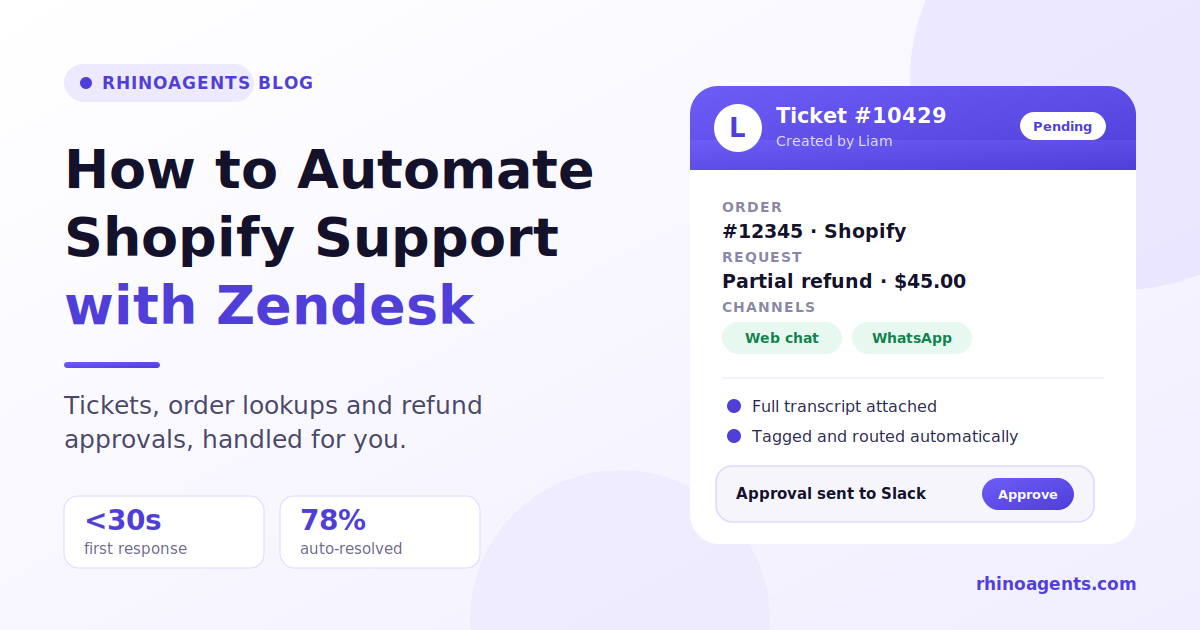
11:32 a.m., ticket opened in Zendesk. The customer confirms they want a partial refund of $45. Liam creates a Zendesk ticket with both transcripts and the order details attached, tagged and categorized.
11:33 a.m., approval requested. The policy says refunds over $25 need approval. Liam posts a card to your approvals channel in Slack with the amount, order and policy check.
12:00 p.m., resolved. The support lead clicks Approve. Liam issues the refund, confirms it to the customer on WhatsApp with a receipt, marks the Zendesk ticket solved and asks for a rating.
The human spent one click. The customer never repeated a detail. The ticket is complete and auditable. Without automation, the same case would involve two inboxes, several copy-and-paste lookups, a manager chasing context and a next-day reply.
Setting up Zendesk for clean automation
A few practical choices make a big difference.
Use consistent tags for automated tickets. Mark tickets created by automation so you can report on them separately. You’ll want to compare resolution time and satisfaction for automated versus human-handled tickets.
Keep escalation paths short. Every escalation should have one clear destination: a named queue or person. Ambiguity creates delays.
Route by urgency, not just topic. A delivery question with a deadline this week deserves a different priority than a general inquiry.
Attach the full conversation. The single biggest frustration for support agents is a ticket with no context. Make full transcripts part of every escalation.
Close the loop with the customer. When a ticket is solved, the customer should hear it in the channel they used, not only by email.
Metrics to track once it’s live
Zendesk’s reporting makes this easier. Track these:
- First response time. Should fall to seconds on every channel, including nights and weekends.
- Autonomous resolution rate. The share of conversations closed without a human. Break it down by request type.
- Tickets per order. If this falls while order volume rises, automation is absorbing the repetitive load.
- CSAT. If satisfaction drops while handled volume rises, the system is deflecting, not resolving.
- Escalation quality. When a human takes over, do they have everything? Count how often agents have to ask the customer to repeat something. The target is zero.
- Approval turnaround. How long refund approvals wait.
- Reopen rate. High reopen rates point to answers that don’t land.
Liam also sends a daily briefing to Slack or email covering volume, resolution rate, CSAT, SLA risks and trending issues, and it provides a single dashboard with channel breakdowns. See Real-Time Analytics for more.
Common mistakes to avoid
Automating a messy helpdesk. If your tags and queues are inconsistent, automation will inherit the mess. Clean up first.
Skipping the refund rules. Without clear thresholds, you’ll either block everything or approve too freely. Decide in advance.
Treating every channel as a separate project. Separate tools mean separate histories. Prefer one employee across channels with shared memory.
Hiding the human option. Customers should be able to reach a person easily. It increases trust in the automated parts.
Launching everywhere at once. Start with the top request types and two channels, then expand.
Not reading the conversations. The first two weeks are the best source of improvements you’ll ever get.
For more on controls around sensitive data and actions, see Guardrails.
What it costs
On the Liam page, the Starter plan is $20 per month and covers website chat, knowledge base ingestion and Zendesk and Freshdesk sync. The Pro Omnichannel plan at $49 per month adds WhatsApp, Slack refund approvals and the unified dashboard. The Business plan at $99 per month covers all five channels, including voice. A 14-day free trial is available. Check the current pricing page before deciding, as plans can change.
Your Zendesk subscription stays as it is. The automation sits on top and reduces how many tickets your human agents have to work.
Related reading and next steps
- Looking for a broader overview? Read our guide on how to automate customer support for Shopify stores.
- Explore the E-commerce Order Support template for a ready-made order support flow.
- Handle store-specific actions with the AI Shopify Assistant.
- Browse the Retail & E-Commerce industry page.
Frequently asked questions
Do I need to replace Zendesk to automate Shopify support? No. Zendesk remains your system of record. Automation sits on top, resolves routine requests and creates properly structured tickets for everything else.
Can automation create and close Zendesk tickets by itself? Yes. Liam creates, categorizes, updates and closes tickets in Zendesk, with the conversation transcript and relevant details attached.
How does the system know which Shopify order a customer means? It links customers using verified identifiers such as email, phone number or order number, then looks up the matching order before sharing details.
Is it safe to automate refunds? It is when approvals are built in. Liam checks policy and, for amounts above your threshold, requests one-click approval from your manager in Slack or Teams before executing the refund. Every action is logged.
What if a customer starts on my website and continues on WhatsApp? The conversation continues with full context, and both transcripts are attached to the Zendesk ticket if a human needs to step in.
Can I use Freshdesk or Intercom instead of Zendesk? Yes. Liam syncs with Zendesk, Freshdesk and Intercom.
How long does setup take? The Liam page states you can hire Liam and be ready in under 24 hours, with channel configuration taking minutes. Your timeline mostly depends on how ready your policies and documents are.
Is customer data kept private? The page lists SOC 2 Type II certification, automatic PII redaction and no training of public models on customer data. See Enterprise Security.
The bottom line
Zendesk gives your Shopify support structure. Automation gives it capacity. Together they let you handle more orders without a matching rise in headcount: routine requests resolved in seconds, complex ones handed to your team with full context, and every refund approved by a person before money moves.
If you’d like to see it working, meet Liam, your AI Customer Support Employee, start the 14-day free trial or book a strategy demo from the page. Connect Shopify and Zendesk, set your refund rules, launch on website chat and WhatsApp, and let your team focus on the conversations that need them.
