
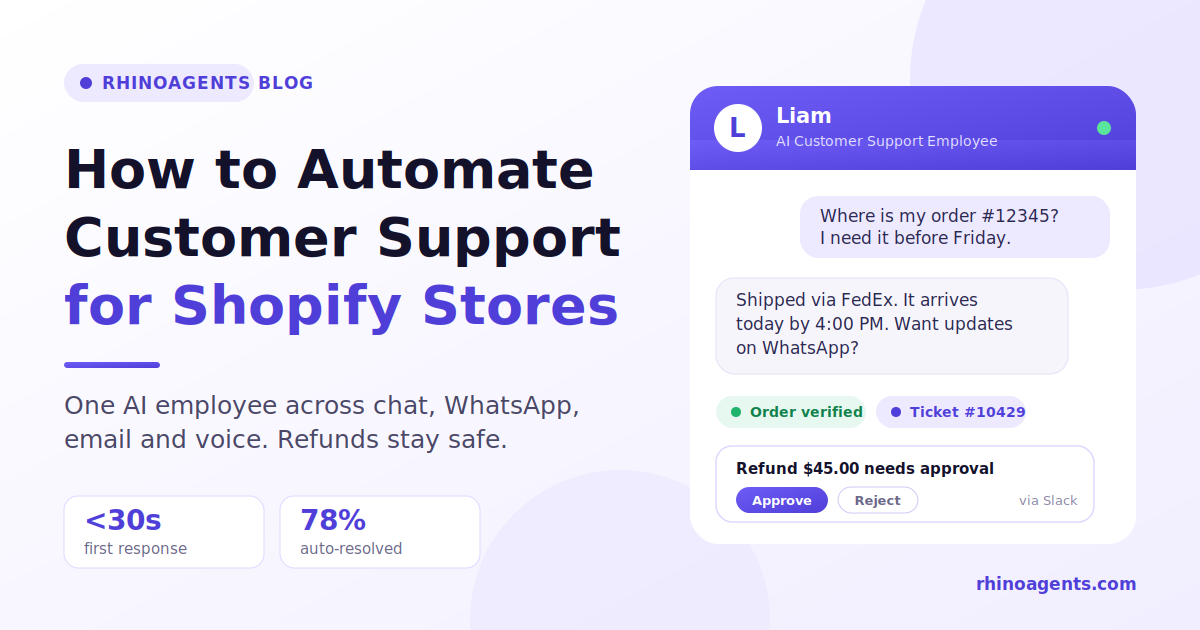
If you run a Shopify store, you already know the pattern. Orders grow, and the inbox grows faster. Every new sale brings a small tail of questions: where is my package, can I change my address, how do I return this, does this come in a different size. None of them is hard. All of them are urgent to the person asking. And together they quietly eat the hours your team should spend on the things only humans can do.
The good news is that most Shopify support is repetitive by nature, which makes it one of the best candidates for automation. The challenge is doing it without turning your support into a wall of canned replies, or worse, an automated system that hands out refunds it shouldn’t.
This guide walks through how to automate customer support for a Shopify store the right way: what to automate first, what to keep human, how to set up guardrails around money, and how a single AI employee like Liam, the RhinoAgents AI Customer Support Employee, can handle the load across website chat, WhatsApp, email, voice and SMS without ever asking a customer to repeat themselves.
Why Shopify support breaks at scale
Shopify makes it easy to launch a store and relatively easy to grow one. What it doesn’t do is answer your customers. As volume rises, three things tend to happen at once.
Response times stretch. A question that arrives at 11 p.m. waits until morning. A question that arrives during a flash sale waits behind two hundred others. Customers who wanted a quick answer start opening duplicate tickets, which makes the queue even longer.
Your team becomes a lookup service. Most tickets don’t need judgment. They need someone to open the Shopify admin, find the order, check the tracking number and type it back. It is skilled people doing copy-and-paste work.
Channels fragment. A customer asks on your website, follows up on WhatsApp, then emails because nobody replied fast enough. Each channel has its own inbox, its own history and its own agent who has no idea what happened elsewhere. The customer ends up explaining the same problem three times, and that frustration, more than the original issue, is what drives bad reviews.
Hiring more people solves the first problem for a while. It does nothing for the third, and it makes the economics worse every time order volume spikes around holidays or promotions.
What “automating support” really means today
When most store owners hear “support automation,” they picture the chat widget that offers three buttons and a link to an FAQ page. That is automation in the loosest sense. It deflects, it doesn’t resolve.
Modern support automation is different in three ways.
It understands open-ended questions. Customers don’t phrase things the way your decision tree expects. “My order hasn’t come and I’m leaving Friday” is a delivery question, an urgency signal and a possible expedite request in one sentence. A good system reads it that way.
It connects to live data. The difference between a helpful answer and a useless one is whether the system can see the actual order. Connected to your Shopify store, it can check order status, fulfillment, items and tracking before it replies, rather than pasting a generic shipping policy.
It takes action, within limits. Creating a ticket, updating a record, initiating a return or requesting a refund approval are all actions. The question is never whether automation can act, but which actions it may take alone and which need a human sign-off.
That is the idea behind an AI employee rather than a chatbot: a role with responsibilities, access to your tools and clear rules about what it can and can’t do.
The six request types to automate first
Before you touch any software, look at your last 30 days of tickets and sort them. For most Shopify stores, the bulk falls into six buckets. Start here, because these deliver the biggest time savings with the lowest risk.
1. Order status and tracking (“Where is my order?”)
This is usually the single largest category, often a third or more of all contacts. The answer lives in Shopify and the carrier’s tracking page. An automated system can verify the customer by email, phone number or order number, look up the order and respond with status, carrier and expected delivery, in seconds, at any hour.
2. Returns and exchanges
Customers want to know the window, the conditions and the steps. The policy is written down, which makes it ideal for automation. The system explains eligibility, collects the reason, and moves the request forward, flagging anything outside policy for a human.
3. Cancellations and address changes
These are time-sensitive. If the order hasn’t shipped, a fast answer saves you a return or a lost parcel. If it has, the customer deserves a clear explanation immediately rather than a reply next morning.
4. Product, sizing and stock questions
“Does this run small?” “Is this safe for sensitive skin?” “Will it ship to Canada?” These are pre-sale questions, which means every slow answer is a potential lost sale. When the system is trained on your product pages, size guides and FAQs, it answers like your best salesperson, at 2 a.m.
5. Shipping, duties and policy questions
Delivery times by region, payment methods, warranty terms, discount rules. Answers that exist in your policies but that customers never find.
6. Post-purchase issues that need triage
Damaged items, missing items, wrong sizes. These need a human eventually, but automation can do the first 80 percent: collect photos, order details and the customer’s preferred resolution, then create a clean ticket so your team starts with the full picture instead of a blank page.
What should stay with humans
Automation works best when you’re deliberate about its edges. Keep people in the loop for:
- Refunds and credits above a threshold you choose. Money should move only with approval.
- Angry, distressed or high-value customers. Tone matters. The system should recognize frustration and route the conversation to a person with the full history attached.
- Legal, fraud and chargeback situations.
- Genuine exceptions. The loyal customer whose parcel was lost twice deserves a human decision.
The goal isn’t to remove your team from support. It is to make sure they only see conversations where their judgment adds value.
How to automate Shopify customer support: step by step
Here is a practical sequence you can follow whether you’re a two-person brand or a growing retailer.
Step 1: Audit your tickets
Export 30 to 90 days of conversations. Tag each by type and note how long it took to resolve. You’re looking for high-volume, low-complexity categories. The top three usually account for more than half of your volume.
Step 2: Write down your rules
Automation is only as consistent as the policies behind it. Before you go live, document your return window, refund conditions, shipping times, exchange rules and escalation triggers. Most stores discover their policies live in the heads of two or three team members. Getting them on paper is half the project.
Step 3: Decide your money rules
Pick the refund amount above which a human must approve. Decide which cancellations are automatic (not yet fulfilled) and which need review. This is the single most important safety decision you’ll make, and it takes ten minutes.
Step 4: Prepare your knowledge base
Gather your help center articles, product pages, size guides, shipping policy and FAQ. The system searches these to answer. Keep them current, because a system that is fast and wrong is worse than one that is slow. Tools like the RhinoAgents Knowledge Base keep documents synced so answers update when your policies do.
Step 5: Connect your store and helpdesk
The system needs to see orders to be useful. Connect Shopify so it can verify and look up orders, and connect your helpdesk (Zendesk, Freshdesk or Intercom) so every conversation that needs a human lands as a properly formed ticket. If you process refunds through Stripe, connect that too, so approved refunds can execute without anyone retyping amounts. See the Shopify integration and Stripe integration for what’s supported.
Step 6: Launch on the channels that matter most
Don’t try to switch everything on at once. Start with website chat and WhatsApp, where most customers already are. Add email, voice and SMS later.
Step 7: Set up human approvals and escalation
Route refund approvals to Slack or Microsoft Teams so a manager can approve with one click. Define who receives escalations and what context they get with them.
Step 8: Measure, review and tune
For the first two weeks, read the conversations. You’ll find gaps in the knowledge base, phrasing you hadn’t anticipated and edge cases to turn into rules. After that, review weekly summaries rather than individual chats.
Meet Liam: one AI employee for every channel
The steps above are straightforward on paper. The effort is in stitching together a chat tool, a WhatsApp tool, an email tool, a helpdesk and a refund process, then keeping them in sync. This is where Liam, the AI Customer Support Employee from RhinoAgents, comes in.
Liam is a ready-to-use AI employee, not a collection of disconnected bots. You deploy one role, and that one role works across website chat, WhatsApp, support email, inbound voice and SMS. Behind all of them sits a single company brain: your approved documents, policies and FAQs, plus one shared customer history.
In practice, that means:
- Live order lookups. Liam checks Shopify for order data and carrier tracking before replying, so customers get real answers rather than generic ones.
- Cross-channel memory. Liam matches customers using verified details such as email, phone number or order number. If someone chats on your website in the morning and messages on WhatsApp at lunchtime, the conversation continues where it left off.
- Ticketing that writes itself. Liam creates and updates tickets in Zendesk, Freshdesk and Intercom, with the transcript and key details already attached.
- Human approval for money. Refunds above your threshold go to your support lead as an interactive Slack or Teams card. Approve, and Liam completes the refund and tells the customer.
- Tone awareness. Liam monitors frustration in real time, adapts its replies and escalates at-risk customers to a person with context.
- A daily briefing. Every morning Liam posts a summary of volume, resolution rate, CSAT and pending approvals to Slack or email.
The page lists headline benchmarks of under 30 seconds to first response, 94%+ CSAT and 78% of tickets resolved autonomously. Your numbers will depend on your catalog, policies and ticket mix, but those are the right metrics to hold any system to.
A real scenario: one customer, two channels, zero repetition
Here is how a typical Shopify conversation unfolds when everything is connected.
10:00 a.m., website chat. A customer asks where order #12345 is. Liam matches the email to the Shopify order, checks the carrier and replies that the parcel is out for delivery today by 4 p.m.
11:30 a.m., WhatsApp. The same customer writes: “I asked on your site earlier. Can I cancel item two and get a refund?” Liam recognizes the phone number, recalls the morning’s conversation and notes that item two shipped separately.
11:32 a.m., ticket created. The customer confirms they want a partial refund of $45. Liam creates a Zendesk ticket with both conversations attached.
11:33 a.m., approval requested. Company policy says refunds over $25 need sign-off. Liam posts an approval card to the support channel in Slack with the customer, order, amount and policy check.
12:00 p.m., resolved. The support lead clicks Approve. Liam issues the refund through Stripe, sends the customer a receipt on WhatsApp, closes the ticket and asks for a rating.
Start to finish: about half an hour, one human click, no repeated questions, and a complete audit trail.
Now compare that with the manual version. The customer waits for an email reply, forgets which address they used, contacts you on WhatsApp, speaks to someone who has no record of the first conversation, gets asked for the order number again, waits for a manager, and finally hears back the next day. Same outcome, but a very different experience and several times the labor.
Keeping refunds safe with human-in-the-loop controls
The objection we hear most from store owners is, “I don’t want an AI giving away money.” It’s the right instinct, and it’s why guardrails aren’t an add-on but the core of the design.
A sound refund workflow has four parts:
- A policy check. Is the order within the return window? Is the item eligible? Is the amount within the automatic limit?
- A threshold. Below your limit, simple cases can proceed. Above it, a human must approve.
- A one-click approval. The approver sees everything they need in Slack or Teams, with no need to open another system, so approvals take seconds rather than hours.
- An audit log. Every decision is recorded, so you can see what was approved, by whom and when.
With Liam, refunds and cancellations follow exactly this pattern. Liam never issues unauthorized credits. It verifies policy, opens the ticket, requests approval and only then executes. You can read more about how governance controls work in Guardrails.
Which channels to start with
It’s tempting to launch everywhere on day one. Resist it. For most Shopify stores, website chat plus WhatsApp covers the large majority of routine volume, and the RhinoAgents team recommends exactly this pairing for a first launch.
- Website chat catches shoppers while they’re browsing: sizing, shipping and stock questions, plus post-purchase order lookups from the order confirmation page.
- WhatsApp is where many customers prefer to follow up, especially for delivery updates, returns and proactive notifications. See the WhatsApp integration for setup details.
- Email is worth adding once chat is stable, because a shared inbox holds long, multi-turn threads that benefit from drafted replies.
- Voice suits stores with older customers or high-ticket items, where people still pick up the phone. For order-related calls, take a look at the Ecommerce Order Tracking voice use case.
- SMS works best for dispatch confirmations and short status updates.
Because a single employee powers every channel, turning on a new one later doesn’t mean retraining or re-uploading documents. The knowledge and customer history are already there.
Serving customers in several regions? Multi-language support lets the same employee reply in the customer’s language.
The metrics that tell you it’s working
Don’t judge automation by how many chats it handled. Judge it by outcomes.
- First response time. Should drop to seconds on every channel, including nights and weekends.
- Autonomous resolution rate. The share of conversations fully resolved without a human. Track it by request type, not just overall.
- CSAT. Ask after every resolved conversation. If satisfaction drops while volume handled rises, the system is deflecting instead of resolving.
- Escalation quality. When a human steps in, do they have the full context? Count how often agents ask the customer to repeat something. The target is zero.
- Approval turnaround. How long do refund requests wait for sign-off?
- Cost per resolution. Total support cost divided by resolved conversations, tracked over time.
- Repeat contacts. If customers keep coming back about the same order, something in the answer isn’t landing.
A unified dashboard helps here. With separate tools per channel you end up stitching spreadsheets together; with one employee across all channels, you get channel breakdowns and daily reports in one place. See Real-Time Analytics and Job Scheduling for how reports and recurring tasks work.
Common mistakes to avoid
Launching without clean policies. If your return policy contradicts itself across three pages, the automation will too. Fix the source first.
Automating everything at once. Begin with the top three request types. Expand as confidence grows.
Hiding the human option. Customers should always be able to reach a person. A visible, easy handoff increases trust in the automated part.
Using separate tools per channel. Five disconnected bots means five histories and five sets of rules. Customers feel the seams.
Ignoring the post-launch review. The first weeks are where you learn the most. Read real conversations and update your knowledge base accordingly.
Forgetting that speed alone isn’t the goal. A fast wrong answer is worse than a slow right one. Accuracy comes from good source material and clear rules.
Thinking about cost
Support costs rise with order volume unless something changes the equation. Every ticket your team handles manually costs time at a skilled hourly rate. Automating the repetitive 70 to 80 percent changes the shape of that curve: volume can double without doubling headcount.
On pricing, the Liam page shows a Starter plan at $20 per month for website chat and knowledge base ingestion, a Pro Omnichannel plan at $49 per month that adds WhatsApp, Slack refund approvals and the unified dashboard, and a Business plan at $99 per month with all five channels. There’s also a 14-day free trial. Check the current pricing page before you decide, since plans and inclusions can change.
Compare that with the cost of an additional support hire, and the question stops being whether to automate and becomes how soon.
Related ways to extend your support automation
Once routine support is covered, the same approach applies to adjacent jobs:
- Keep stock answers accurate with an AI Inventory Coordinator.
- Reduce churn and drive repeat purchases with an AI Head of Customer Success.
- Handle store-specific actions through the AI Shopify Assistant.
- Explore the E-commerce Order Support template for a ready-made order support flow, or browse the Retail & E-Commerce industry page for more ideas.
Frequently asked questions
Can I automate Shopify customer support without losing the human touch? Yes. The aim is to automate routine requests and route anything sensitive, emotional or unusual to a person, with the full conversation attached. Customers usually notice the speed more than the automation.
Will an AI employee be able to see my Shopify orders? Once connected, it can look up order and shipping details to answer questions like “where is my order?” It verifies the customer using details such as email, phone number or order number before sharing anything.
Is it safe to let automation handle refunds? It is when refunds are governed by clear rules. Liam checks policy first, requests one-click approval from your manager in Slack or Teams for amounts above your threshold, and only then executes the refund. Every step is logged.
What if a customer starts on my website and continues on WhatsApp? Liam links customer profiles using verified identifiers, so the conversation continues with full context. The customer doesn’t have to start over.
Do I need to launch on every channel at once? No. Website chat and WhatsApp are the recommended starting pair. Email, voice and SMS can be added later with no retraining.
How long does setup take? The Liam page states that you can hire Liam and have your channels ready in under 24 hours, with channel configuration taking minutes through secure OAuth connections. Your timeline will mostly depend on how ready your policies and documents are.
Can it work with the helpdesk I already use? Liam syncs with Zendesk, Freshdesk and Intercom, so tickets are created and updated where your team already works.
Does it keep my customer data private? The page lists SOC 2 Type II certification, automatic PII redaction and a commitment that customer data is never used to train public models. See Enterprise Security for details.
The bottom line
Shopify support doesn’t need to scale linearly with your order count. Most of what customers ask is predictable, rule-based and answerable from data you already have. The stores that handle growth best are the ones that automate the routine, put guardrails around money, and keep their people free for the conversations that need them.
If you’d like to see how that looks in practice, meet Liam, your AI Customer Support Employee, start a 14-day free trial, or book a strategy demo directly from the page. Launch with website chat and WhatsApp, connect Shopify and your helpdesk, set your refund rules, and let your support team get back to the work that only they can do.
