


Ask any sales leader what stalls their pipeline and the answer is rarely a lack of ambition. It is capacity. Good outbound means researching the right accounts, writing something a busy VP will actually read, following up on day 3, day 7 and day 14, handling the replies, booking the meeting and logging all of it in the CRM. Every step is simple. Doing all of them, for hundreds of prospects, every single day, is where teams run out of hours.
That is the gap an AI BDR employee fills. It is not a template tool and it is not a chatbot that drafts emails when you ask. It is a ready-to-use AI employee that takes a goal, breaks it into tasks, works across your real tools, and reports back, the way a good business development representative would.
In this guide we walk through what an AI BDR is, why outbound breaks without one, how the RhinoAgents AI BDR works day to day, what it costs, and how to deploy one in roughly an hour.
Why outbound keeps breaking
Most outbound programs do not fail because the strategy is wrong. They fail in the gaps between steps. If you have run a BDR team, these will sound familiar.
Research is the bottleneck. A human BDR can realistically research and enrich 10 to 20 leads a day. Anything beyond that means shallow research, and shallow research means generic emails.
Personalization collapses at volume. The first ten emails of the week are thoughtful. By Thursday afternoon it is copy, paste, swap the first name.
Follow-ups slip. The sequence says day 3, day 7, day 14. Then a busy week hits, a hot deal needs attention, and half the follow-ups never go out. Most replies arrive after the second or third touch, so this is where pipeline quietly disappears.
The inbox becomes a second job. Interested, not now, wrong person, out of office, objection. Someone has to read, sort and answer each one, ideally within minutes.
The CRM is always behind. Manual logging is the first thing to go when reps are busy, so reporting is incomplete and nobody trusts the data.
Hiring is slow and expensive. A BDR typically costs $80,000 to $120,000 a year once salary, benefits and ramp time are counted. And ramp time is real: months before a new hire is productive.
None of these are people problems. They are capacity and consistency problems, which is exactly what software that works around the clock is good at.
What an AI BDR employee actually is
The easiest way to understand an AI BDR is to see how you work with it. You talk to it in plain English, like a colleague. Here is a real example of the kind of exchange the AI BDR page shows with Zoe, the AI Business Development Representative:
You: Find 20 VP of Sales prospects at Series B SaaS companies in the US with headcount between 50 and 200. They should have posted on LinkedIn in the last 30 days.
Zoe: On it. Pulling from Apollo and LinkedIn Sales Navigator with your filters, then enriching and scoring each lead.
A moment later, the report comes back: 23 qualified leads, 3 removed for no recent activity, and the top five flagged with buying signals, including two who posted about scaling their sales team that week. Zoe offers to draft personalized cold emails for all 23 and queue them for Monday at 9 AM, and says it will pause for your approval before anything is sent.
A few things are worth noticing in that exchange.
- It takes goals, not just commands. You described an outcome. It decided how to get there.
- It acts, it does not only suggest. Your AI BDR has write access to your tools. It adds leads to Salesforce, sends email through Gmail, updates sequences in Outreach and books meetings in Calendly.
- It asks before critical actions. Sending a campaign, submitting a proposal or changing a deal stage can pause for one-click approval in Slack, email or Teams.
- It keeps its own schedule. Tell it to check replies every morning at 7 AM or run a weekly enrichment job, and it sets up and runs those jobs itself.
That combination is what separates an AI employee from a sales automation tool. A sequencer runs the steps you pre-built. An AI BDR works toward an objective and adapts as prospects respond.
Traditional BDR vs. AI BDR employee
Here is how the two compare on the points that decide whether outbound scales, using the figures listed on the product page.
| Traditional BDR | AI BDR employee | |
|---|---|---|
| Research volume | 10 to 20 leads per day | 500+ leads per day, fully enriched |
| Availability | 9 to 5, five days a week | 24/7/365, no sick days or holidays |
| Personalization | Templates with light edits | One personalized email per prospect using LinkedIn, news and company data |
| Follow-ups | Missed when the pipeline gets busy | Cron-run at exact scheduled times |
| CRM updates | Manual and often incomplete | Every action synced to Salesforce or HubSpot |
| Cost | $80k to $120k per year plus benefits and ramp | A fraction of the cost, live in under 60 minutes |
The goal is not to remove your human team. It is to take the repeatable 80 percent, the research, first drafts, follow-ups and logging, off their plate so they spend time on conversations that need a person.
How an AI BDR works, step by step
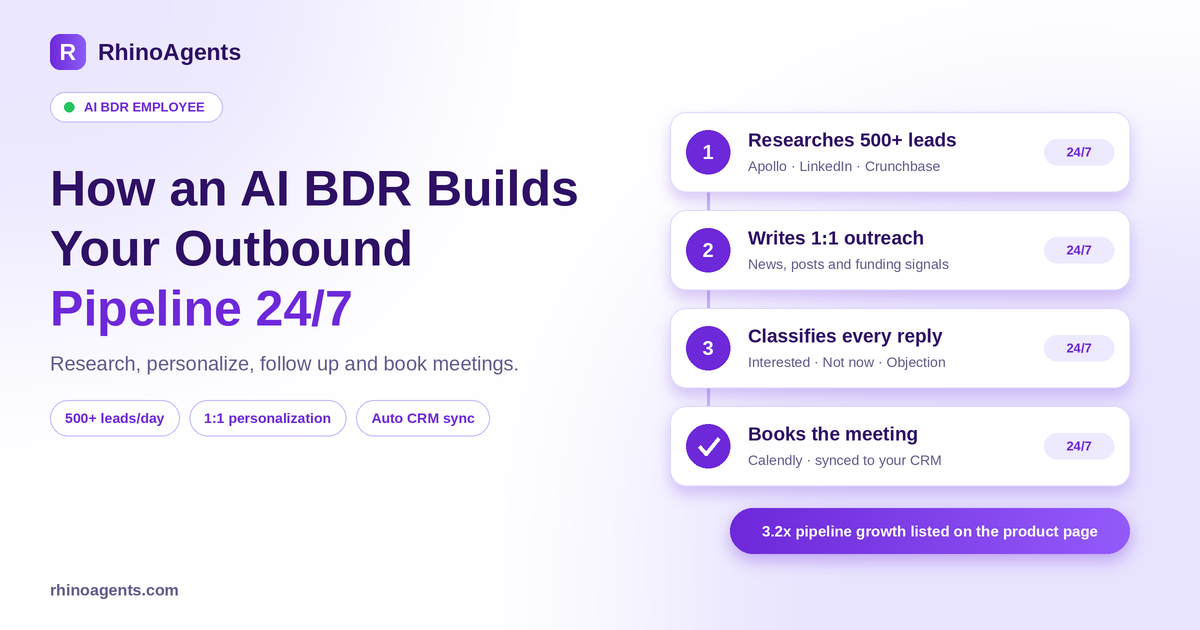
Under the hood, your AI BDR covers the full outbound loop. Here is each stage and what it does.
1. Prospect research and scoring
You define your ideal customer profile once: industry, company stage, headcount, titles, geography, signals that matter. Each morning the AI BDR searches sources such as Apollo, LinkedIn and Crunchbase, enriches every record, and scores it against your criteria. Leads with no recent activity are filtered out before anyone wastes a touch on them.
If you want to see the building blocks, RhinoAgents also publishes a Prospect Research template and a Funding and Signals template that show how this research is structured.
2. Personalization that is real, not merge fields
Personalization comes from two places. The first is live research: the prospect’s recent LinkedIn posts, company news, job postings and funding announcements. The second is your own knowledge base: product positioning, customer stories and ICP pain points, indexed so the right context is retrieved for each prospect. Combined, the email references something specific and current about the person, not a swapped company name.
The more good material you give it, the better it writes. Upload your five best-performing cold emails and it learns the tone, structure and personalization patterns that already work in your market. See how this works in the Knowledge Base feature.
3. Sequences and follow-ups that never slip
Follow-ups on day 3, day 7 and day 14 are scheduled, not remembered. Sends are timed to the prospect’s timezone. You can set schedules in plain English, such as every morning at 7 AM or every two hours, and the platform converts them into recurring jobs. More on this in Job Scheduling.
4. Reply handling and intent classification
Every reply is read and classified: interested, not now, wrong person, out of office, or objection. Interested replies are fast-tracked. Not-now replies go into a nurture sequence automatically. Objections get a contextual answer in your approved messaging, and anything strategic is routed to a human with context ready. The page lists 97 percent accuracy for intent classification in its sample test results.
If you want to look closer at how replies are drafted, there is an Email Reply template you can explore.
5. Meeting booking
When a prospect says yes, the AI BDR proposes times, books the meeting through Calendly or your calendar, and notifies the account executive in Slack with the full prospect history. No back-and-forth, and no lead going cold while someone finds a slot.
6. CRM sync and handoff
Every action syncs to Salesforce or HubSpot: contacts, sequence logs, classified replies, meeting notes. Your account executives open the record and see exactly what happened before they pick up the phone. Handing the warm lead to a closer is smooth because the AI BDR already did the paperwork. If you also want an AI employee focused on pipeline hygiene, take a look at the AI CRM Assistant and the AI Account Executive.
A Monday, before and after
Numbers on a page only go so far. Here is a more concrete picture of the same Monday morning in two versions of the same sales team.
Before. Maya, a BDR, opens her laptop at 9. She has 14 replies from the weekend sitting in the inbox, two of them marked interested and one buried in a thread from Friday. She spends the first two hours sorting replies and updating the CRM. By 11 she starts researching the day’s list, manages around 15 accounts by lunch, and writes six decent emails before a team meeting takes the afternoon. The day 7 follow-ups for last week’s sequence do not go out. Two warm replies get answers the next morning.
After. The AI BDR ran its research job at 7 AM and has a scored list waiting. Its sample dashboard shows what a productive day looks like: 48 leads enriched, 23 personalized emails ready, 4 replies classified, 1 hot lead flagged, 2 meetings booked that week, and 142 actions logged with a full audit trail. Maya starts her day reading the summary in Slack, approves the first-touch emails to enterprise accounts with one click each, and spends her morning on the two live conversations that matter. The follow-ups went out on schedule. Nothing sat unanswered.
The human work did not disappear. It moved up the value chain.
You stay in control
The fear with any autonomous system is that it will send something you would never have approved. The AI BDR is designed around the opposite principle: full speed where it is safe, full control where it is critical.
You set approval rules once. A typical configuration looks like this:
- First-touch emails to C-suite titles: pause and request approval in Slack.
- Enterprise accounts above 500 employees: require manager review before the sequence is sent.
- New campaign launches: review the copy and targeting for the first batch.
- Follow-ups on day 3, 7 and 14: run automatically once the sequence is approved.
- Meeting confirmations and reminders: run automatically.
Approvals arrive as simple Slack, email or Teams requests with one-click approve, edit or reject. Every action is written to an immutable audit trail, so you can review exactly what the AI employee did and why. For more on that, see Audit Logs and the Data Classification and PII Guardrails feature.
On security, RhinoAgents lists SOC 2 Type II certification, GDPR and CAN-SPAM compliance, AES-256 encryption at rest, TLS 1.3 in transit, isolated vaults for credentials, and built-in opt-out tracking and suppression lists. Details are on the Enterprise Security page.
Deploy your AI BDR in 10 steps
Most teams are running a first campaign within about 60 minutes. The setup follows ten steps, and you can skim through the early ones quickly.
- Name and identity. Give it a clear name such as AI BDR North America so your team knows what it does when they see it in Slack.
- Roles and responsibilities. Start with two or three: prospect researcher, outreach specialist, reply handler, meeting booker.
- Skills. Turn on email writing, lead research, CRM management, data enrichment, calendar management and intent classification.
- Tasks. For example, research 50 ICP-matching leads daily, write personalized emails, classify replies, send follow-ups, book meetings, and post a weekly report.
- Schedules. Plain-English schedules such as research at 7 AM, inbox checks every two hours, sends at 9 AM in the prospect’s timezone, and a Friday pipeline report.
- Workflows. Connect the steps: new lead, research, enrich, draft, approval check, send, wait for reply, classify, book meeting.
- Memory. Upload positioning, ICP definitions, top-performing emails and case studies.
- Human-in-the-loop. Decide which actions need sign-off.
- Testing. Run a research test, an email-writing test and a reply-handling test before going live. The sample results on the page show 94 percent email quality, 91 percent research accuracy and 97 percent intent classification.
- Deploy. Go live and watch the dashboard.
If you want to design something unique, such as a multilingual outbound motion, account-based plays for a specific vertical, or proprietary integrations, the same ten steps let you tailor a custom AI BDR.
Who an AI BDR is built for
There are three typical profiles.
Early-stage startups and boutiques (1 to 10 staff). You need an outbound engine but cannot justify BDR headcount yet. The AI BDR researches target accounts and sends personalized outreach every day, which the page puts at 500+ personalized touches per week.
Scaling B2B teams (10 to 50 reps). Your account executives need a steady stream of qualified conversations. The AI BDR tracks intent signals and automates objection triage so AEs spend their time on real meetings. Typical fits include Series A to C tech companies, IT managed services, logistics providers and commercial insurance.
Enterprise outbound organizations (50+ SDRs). You orchestrate territory-based account plans, intent data triggers from tools such as 6sense and Demandbase, and multi-touch cadences. The AI BDR adds consistent CRM sync and deliverability discipline across the whole motion.
Industries listed on the page include B2B SaaS, management consulting, digital agencies, IT managed services, freight and logistics, executive recruiting, commercial real estate, and financial and tax services.
What results to expect
RhinoAgents lists 3.2x pipeline growth, a 40 percent plus reply rate and about 20 hours saved per rep each week for its AI BDR. Treat those as directional marketing figures rather than a guarantee. Real results depend on your ICP, the quality of your offer, list quality and how much good context you feed the knowledge base.
Track the metrics that tell you whether the system is working:
- Reply rate and positive reply rate by segment and message angle.
- Meetings booked per week and the meeting-to-opportunity rate.
- Time from reply to booked meeting.
- Hours saved per rep on research, logging and inbox triage.
- Deliverability signals, such as bounces and spam complaints.
Review them after the first week, then tighten the ICP and the messaging. The AI BDR improves fastest when you tell it what worked.
What it costs
Pricing is transparent and has no per-seat fees, so your whole team can collaborate with the AI employee without extra user charges. Current plans on the product page:
- Free trial: $0 for 14 days, with 1,000 free credits and no credit card.
- Starter: $20 per month, up to 3 AI employee roles and 10,000 monthly credits.
- Pro: $49 per month, up to 5 roles and 50,000 credits, with persistent memory and Slack or Teams approvals.
- Business: $99 per month, 10+ roles, 150,000 or more credits and 400+ connectors.
- Custom enterprise: from $1,000 per month, with dedicated VPC or on-premise options.
Two honest notes. First, third-party tools such as Apollo, Salesforce, HubSpot or LinkedIn Sales Navigator are not included, so you connect your own accounts and the vendors bill you directly with no mark-up from RhinoAgents. Second, unused monthly credits do not roll over, though you can buy extra credit packs any time. Full details are on the pricing page.
Compared with a $80,000 to $120,000 BDR hire, the difference is significant, but the right framing is capacity. Many teams use the AI BDR to take on the repetitive volume work and keep their human BDRs on higher-touch accounts.
Common mistakes to avoid
- A fuzzy ICP. If you cannot describe your ideal buyer in a sentence, the AI cannot either. Start narrow and widen later.
- Skipping the knowledge base. Without positioning and examples, outreach will be competent but generic.
- Removing approvals too early. Keep approvals on first-touch emails for a week or two, then relax them where the quality holds.
- Ignoring deliverability. Use secondary domains, sensible daily limits and a proper warm-up. Volume without reputation backfires.
- Not telling it what worked. Feed back winning replies and meetings so the next batch is better.
AI BDR or AI SDR?
The terms overlap, so a quick rule of thumb: a BDR is outbound-first and creates pipeline from cold prospects, while an SDR is often inbound-first and qualifies the people who already raised their hands. The AI SDR employee is built for sub-minute inbound response, scoring and booking, with nurture sequences for leads that are not ready. Many teams run both: the BDR fills the top of the funnel, the SDR keeps every inbound lead warm. You can browse the full lineup in the AI Employees directory or the AI Head of Sales for a leadership-level view.
Frequently asked questions
How is an AI BDR different from a sales automation tool? A sales automation tool runs a pre-built sequence. An AI BDR takes a goal such as finding 30 VP Sales prospects who raised a Series B this quarter, breaks it into tasks, researches, writes, manages replies, schedules follow-ups and reports back. You can redirect it mid-flight just by chatting with it.
Does it actually send emails, or only draft them? Both, and you choose. Standard sequences can send automatically through your connected Gmail or Outlook account. For strategic accounts, it drafts the email, pauses, and sends only after you approve in Slack or Teams.
How does it personalize emails at scale? It combines live research on each prospect, such as LinkedIn posts, news, job postings and funding, with your own knowledge base of positioning, customer stories and ICP pain points.
How do schedules work? You describe them in plain English, for example research every morning at 7 AM, inbox checks every two hours, follow-ups on days 3, 7 and 14 at 9 AM in the prospect’s timezone. The scheduler turns them into recurring jobs, and you can change them anytime by chatting with the AI BDR.
How fast can we go live? Most teams run a first campaign within about 60 minutes: brief it on your ICP, connect your tools, set schedules and approvals, review the first drafts, and deploy. Onboarding help is available for your first session.
Is prospect data secure and compliant? RhinoAgents lists SOC 2 Type II certification, GDPR and CAN-SPAM compliance, encryption at rest and in transit, and built-in opt-out and suppression management.
Which tools does it connect to? Apollo, LinkedIn Sales Navigator, Salesforce, HubSpot, Gmail, Outlook, Slack, Calendly, Outreach and Mailshake are among the tools listed, and there are 400+ connectors in total. See the integrations directory.
Put an AI BDR to work
If your outbound is limited by hours in the day rather than ideas, an AI BDR is the fastest way to add capacity. Start with the 14-day free trial, define your ICP, connect your CRM and email, keep approvals on for the first batch, and watch what the first week produces.
Hire your AI BDR and have it researching prospects, writing outreach and booking meetings before the end of the day.

