


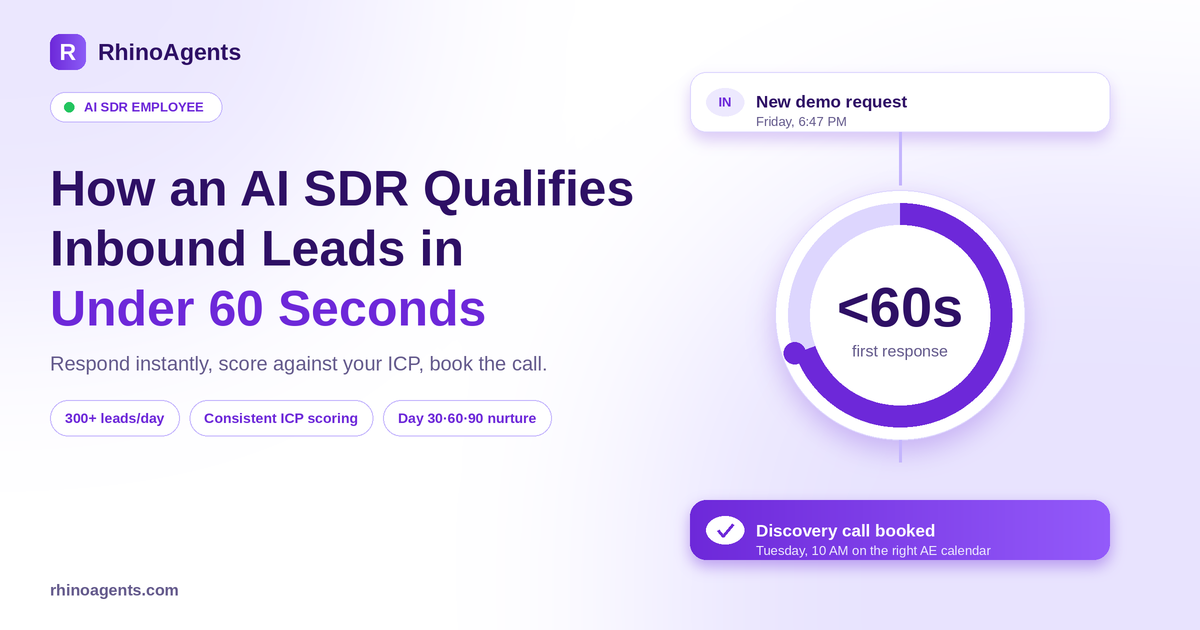
It is 6:47 on a Friday evening. A VP of Operations at a company that fits your ideal customer profile perfectly fills in your demo request form. She is interested right now, with the problem fresh in her mind and a few tabs of competitors open.
Your team is offline. The lead sits in a queue until Monday morning, where it is one of 40 other requests. By the time a rep replies, she has booked a call with someone else.
This is the most common and most expensive leak in B2B pipeline, and it has nothing to do with marketing or product. It is response time. An AI SDR employee is built to close that gap: it responds to every inbound lead within seconds, qualifies it against your criteria, books the call, and keeps the not-ready leads warm until they are.
In this guide we look at why inbound pipeline leaks, what the RhinoAgents AI SDR actually does, how qualification works, and how to deploy one in about an hour.
Why inbound leads go cold
Inbound leads are the most valuable leads you have. Someone chose to contact you. And yet most teams handle them with a process that guarantees some will be lost.
Slow responses. The typical first response to an inbound lead takes anywhere from 4 to 24 hours. Interest peaks in the first minutes. Every hour after that, the odds of a real conversation drop.
Limited capacity. A human SDR can manually qualify roughly 20 to 40 leads per day. When campaigns, launches or webinars spike volume, the queue grows faster than the team can work it.
Inconsistent qualification. One rep asks about budget first. Another focuses on timeline. A third skips the tech stack question entirely. The result is a pipeline where lead quality depends on who happened to pick it up.
CRM data that cannot be trusted. Updates are done by hand and often skipped when the day gets busy. Next quarter, nobody can say which leads were worked and why.
Follow-ups that fall through. Leads that are not ready today are often forgotten completely. The prospect who said “check back in Q3” gets no follow-up in Q3.
High cost to fix with people. An SDR typically runs $50,000 to $80,000 per year in salary, plus ramp time and benefits. That is hard to justify for every incremental batch of leads.
An AI SDR targets each of these directly: instant response, high capacity, consistent criteria, automatic CRM updates and reliable nurture.
What an AI SDR employee actually is
Most lead tools score a lead and stop. A number appears in a field and a human still has to do the work. The AI SDR is different because it acts like a sales rep. It takes your qualification criteria, evaluates every inbound lead, reaches out conversationally, handles objections and books discovery calls on your reps’ calendars.
Here is how the exchange looks on the AI SDR product page, with Ava, the AI SDR:
You: Qualify all inbound leads from last week, score them by ICP fit, reach out to qualified ones with a personalized first touch, and book discovery calls for the top 10 who respond.
Ava: On it. Pulling last week’s inbound from HubSpot, cross-checking against your ICP criteria and enriching each lead with LinkedIn and company data.
The result: 47 inbound leads reviewed, 19 qualified against the ICP, personalized first touches drafted for all 19 and scheduled for Tuesday at 9 AM, leads staged in HubSpot. Ava will monitor replies and book calls as soon as someone responds positively, and asks whether you want to approve before anything is sent.
Four capabilities define how this works in practice.
- Conversational interface. Give goals in plain English, ask for pipeline updates, or change focus to a new ICP segment mid-campaign. It keeps context across the whole conversation.
- Real actions across your stack. It sends first-touch emails through Gmail, updates lead stages in HubSpot, books calls in Calendly and logs everything to Salesforce.
- Its own schedule. Check for new inbound leads every hour, run enrichment at 7 AM, send follow-ups on day 3, 7 and 14. It schedules and runs those tasks automatically.
- Human approval for high-stakes leads. For enterprise or strategic prospects, it pauses and sends the lead profile and proposed outreach to your team in Slack for one-click approval.
Manual SDR process vs. AI SDR employee
Here is the comparison, using the figures on the product page.
| Manual SDR process | AI SDR employee | |
|---|---|---|
| Response to inbound leads | 4 to 24 hours | Under 60 seconds, 24/7 |
| Leads qualified per day | 20 to 40, done manually | 300+, fully enriched and scored |
| Qualification criteria | Varies by rep | Consistent against your exact ICP, every lead |
| CRM updates | Manual, often skipped | Automatic after every interaction |
| Follow-ups | Missed when the pipeline gets busy | Fire on the exact scheduled day |
| Cost | $50k to $80k per year plus ramp and benefits | A fraction of the cost, live in under 60 minutes |
The point is not to replace the human conversation that closes a deal. It is to make sure every lead gets a fast, consistent first conversation, and that your reps spend their time on the leads most likely to buy.
How qualification works
Qualification is where an AI SDR earns its keep, so it is worth looking at the sequence in detail.
Step 1: Capture and enrich
The moment a lead submits a form, sends an email or triggers a qualifying event, the AI SDR picks it up. It enriches the record with company and contact data, such as role, company size, tech stack and funding, so it is not qualifying from a bare email address.
Step 2: Score against your ICP
You define what a good lead looks like: industry, size, role, geography, budget range, buying timeline. The AI SDR scores every lead against those criteria the same way every time. If your team uses frameworks like BANT or MEDDPICC, those criteria can be built into the scoring and the questions it asks. For a closer look at the underlying logic, see the Lead Qualification template and the overview pages on lead qualification and lead scoring.
Step 3: Engage conversationally
Qualified leads get a personalized response, not an auto-reply. The AI SDR answers product questions, asks the qualifying questions you care about, and handles common objections using your approved messaging. If a conversation becomes complex or strategic, it routes to a human rep with the context already prepared.
Step 4: Book the call
When a lead is ready, the AI SDR offers times and books the discovery call directly on the right rep’s calendar. For teams that route by geography, company revenue or tier, it can work with calendar and routing tools such as Calendly and Chili Piper. You can see how the booking step is structured in the Meeting Booking template.
Step 5: Hand off and log
Every interaction is logged to HubSpot or Salesforce. A deal opportunity is created when a call is booked, and meeting notes sync automatically. See the CRM and Sales Handoff template for the pattern. The rep opens the record and sees the whole story before picking up the phone.
What happens to leads who are not ready
This is the part most teams underestimate. Most inbound leads are not ready to buy on day one. A process that only works the “hot” leads leaves a large share of future pipeline on the table.
The AI SDR automatically enrolls not-ready leads into a time-boxed nurture sequence, with follow-ups at day 30, 60 and 90 using different messaging angles tied to their stated timeline or objection. If a lead re-engages, it is escalated back into active qualification automatically. Nothing falls out of the pipeline just because a rep got busy.
On top of that, standard follow-up touches on day 3, 7 and 14 run on schedule. For a detailed view of how this recurring work is managed, see Job Scheduling.
Friday, 6:47 PM: before and after
Let us go back to that VP of Operations and run the scenario twice.
Before. The form submission lands in a shared inbox. Nobody sees it until Monday at 9:15. A rep spends the first hour clearing 40 requests, researches this one for ten minutes, and sends a generic reply at 11:30. The prospect, who booked a competitor’s demo over the weekend, replies two days later saying they have gone another direction. The CRM shows “Attempted contact,” with no notes.
After. At 6:47 PM the AI SDR picks up the submission, enriches the lead, and scores it as a strong ICP match. Within a minute she receives a personalized reply that references what she asked about, with two questions about timeline and team size. She answers in a few minutes. The AI SDR confirms the fit, offers three times next week and books Tuesday at 10 AM on the right account executive’s calendar. The AE gets a Slack summary with the full conversation. The CRM already shows the deal, the notes and the source.
The prospect never experienced a gap, and the rep started the week with a qualified, warm discovery call on the calendar. That is what speed-to-lead looks like in practice.
You stay in control
Autonomy is only useful if you trust it. The AI SDR is built so you decide where it moves on its own and where a person signs off.
- First-touch emails to C-suite titles such as CEO, CRO or CTO: pause and ask for one-click approval in Slack.
- Enterprise accounts above 500 employees: require manager review before a sequence is sent.
- Follow-up touches on day 3, 7 and 14: run automatically once the sequence is approved.
- Meeting bookings and calendar holds: sync instantly without delay.
Approvals arrive as interactive Slack or Teams cards that show the context and proposed action, so you can approve or reject from your phone in a second. Every action is recorded in an audit log. Learn more about Audit Logs and Enterprise Security.
Test it before it touches a real lead
Before granting production access, you run your AI SDR through realistic scenarios: messy data, edge cases, tricky objections. The sample results on the product page give a sense of what to measure:
- Email personalization: 96 percent, covering context depth, tone accuracy and a non-templated feel.
- ICP match calibration: 94 percent, covering title filtering, tech stack verification and revenue band.
- Reply intent classification: 97 percent, separating interested, not now and referral.
- Workflow logic and approval gates: every trigger, action, decision and output branch validated.
- Multi-channel delivery: Slack, Teams, email and webhook dispatch under 1.5 seconds.
Treat those as the shape of a good test plan, not as promises. Run your own prompts with your own data, and only turn on write access to your CRM once you are happy with the results.
Deploy your AI SDR in 10 steps
Most teams go live in about 60 minutes. The process follows ten steps.
- Name and identity. Give it a recognizable name such as Ava so people can mention it in Slack like any colleague.
- Roles and responsibilities. Define what it owns: researching decision-makers, writing personalized outreach, monitoring inbound mailboxes, booking meetings into AE calendars.
- Skills. Choose lead research and ICP scoring, personalized outreach, two-way CRM sync, reply intent classification, calendar booking and Slack approvals.
- Tasks. Set priorities, for example classify replies within five minutes as critical, and everything else high or medium.
- Schedules. Plain-English schedules for morning research, inbox scans every 15 minutes, queued sends at 9 AM, follow-ups on day 3, 7 and 14, and a Friday pipeline digest in Slack.
- Workflows. Connect the flow: new lead, research and enrich, draft email, approval check, send, wait for reply, classify intent, book the call.
- Memory. Upload product positioning, ICP definitions and buyer personas, winning email templates and customer case studies. Learn more about the Knowledge Base.
- Human-in-the-loop. Decide which actions need sign-off.
- Testing. Validate quality, calibration and approval flows.
- Deploy. Go live and monitor results in a dashboard with a full audit log.
The SDR page frames the outcome as 18 to 24 meetings booked per month, with 35 hours per week reclaimed and about $70,800 per year saved. Treat these as the product’s illustrative targets and compare them against your own baseline.
Which teams benefit most
The AI SDR is designed for three profiles of inbound volume.
Lean teams with 20 to 100 inbound leads per month. Never let a demo request go cold. Engaging high-intent prospects within 60 seconds of form submission, while interest is highest, is the main win. Typical fits: B2B startups, digital agencies, boutique consultancies and professional practices.
High-growth teams with 200 to 2,000 inbound leads per month. Triage self-serve signups, product-qualified leads and enterprise demo requests with smart routing to the right account executive. Typical fits: product-led SaaS, fast-growing e-commerce tech and EdTech platforms.
Enterprise demand engines with 5,000+ inbound leads per month. Route leads by geography, company revenue and tier with real-time Salesforce, HubSpot and Chili Piper sync. The goal is zero lost high-value leads and consistent routing logic at scale.
Industries listed include cloud software and SaaS, online education and bootcamps, developer tools and API platforms, AdTech and MarTech, digital health, fintech and payments, customer support software, and cybersecurity and compliance tech. For a broader view see the Technology and SaaS industry page.
AI SDR or AI BDR?
The two roles overlap, and many companies need both. A simple way to think about it: an SDR typically qualifies the people who raised their hand, while a BDR goes out and starts conversations with people who did not. The AI BDR employee is built for outbound: research, personalized cold outreach, sequences and meeting booking. The AI SDR is built around speed-to-lead and qualification of inbound demand, with nurture for everything that is not ready yet. Run them together and your top and middle of funnel are both covered around the clock. Browse the full lineup in the AI Employees directory.
What it costs
Pricing is transparent and has no per-seat fees, so every teammate can work with the AI employee at no extra charge. Plans on the product page:
- Free trial: $0 for 14 days, 1,000 free action credits, no credit card required.
- Starter: $20 per month, up to 3 AI employee roles and 10,000 monthly credits.
- Pro: $49 per month, up to 5 roles and 50,000 credits, with persistent memory and Slack or Teams human-in-the-loop.
- Business: $99 per month, 10+ roles, 150,000+ credits and 400+ connectors.
- Custom enterprise: from $1,000 per month, with dedicated VPC or on-premise deployment.
Two things to know. Third-party tools such as HubSpot, Salesforce, Apollo or ZoomInfo are not included, so you connect your own accounts and pay those vendors directly. And monthly credits reset each billing cycle rather than rolling over, with on-demand packs available if you need more volume. Full details are on the pricing page.
Mistakes to avoid
- Vague qualification criteria. Write down what makes a lead qualified, including the knockout rules, before you deploy. The AI can only be as consistent as the definition you give it.
- No knowledge base. Product answers and objection handling are only as good as the material it can draw on.
- Auto-sending to strategic accounts. Keep approvals on for C-suite and enterprise first touches.
- Ignoring the nurture track. A fast reply helps the hot leads. The day 30, 60 and 90 sequence is where the rest of the pipeline comes from.
- Not reviewing the early output. Spend ten minutes on day one reading the first batch of drafts and the lead scores. Small corrections early compound quickly.
Frequently asked questions
How is an AI SDR different from a lead scoring tool? A lead scoring tool assigns a number and stops. The AI SDR acts on it: it qualifies leads against your ICP by email or chat, writes personalized first-touch outreach, handles objections and books discovery calls on your reps’ calendars.
Can it really handle replies and objections? Yes. It monitors inbound responses, classifies intent and replies to qualified leads, answering common questions and addressing objections with your approved messaging. Complex or strategic accounts are routed to a human via Slack with the context prepared.
Does it integrate with our CRM? Yes. It has read and write access to HubSpot and Salesforce. It creates contacts, updates lead status, logs every interaction, creates deal opportunities when a call is booked and syncs meeting notes. See the integrations directory for the full list.
How quickly does it respond to new leads? The moment a lead submits a form, sends an email or triggers a qualifying event, it qualifies, enriches and responds, reducing first response time from hours to under 60 seconds, including nights, weekends and holidays.
What happens to leads that are not ready to buy? They enter a nurture sequence with follow-ups at day 30, 60 and 90 using messaging tied to their timeline or objection. If they re-engage, they return to active qualification.
How quickly can we go live? Most teams go live in about 60 minutes: brief it on your ICP, connect your CRM and email, set approval rules and schedules, review the first drafts, and deploy. The onboarding team can guide your first session.
How much does it cost? Plans start with a 14-day free trial and a $20 per month Starter plan, with no per-seat fees. Third-party tool subscriptions are billed separately by those vendors.
Stop letting good leads go cold
Every inbound lead is a signal that someone already wants what you sell. The only question is how fast and how well you respond. An AI SDR gives every lead a fast, consistent first conversation and a path to a booked call or a patient nurture track, without adding headcount or ramp time.
Start with the 14-day free trial, define your qualification criteria, connect your CRM and email, and keep approvals on for the first batch. Hire your AI SDR and let it take the next inbound lead the moment it arrives.

