


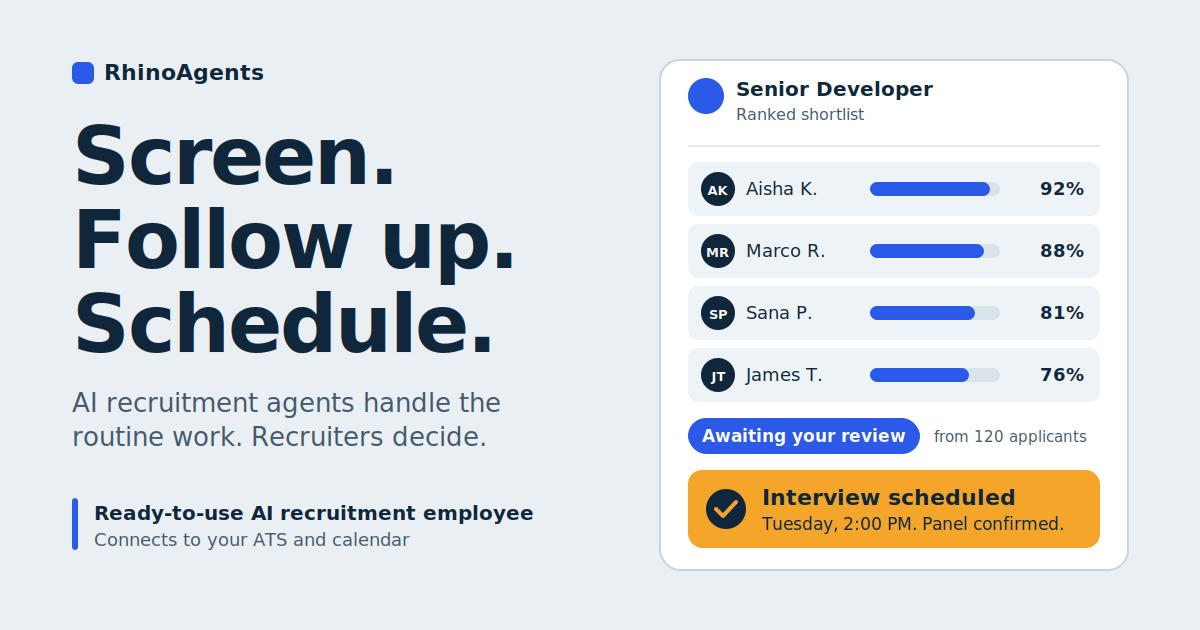
A recruiter posts a role on Monday. By Wednesday there are 200 applications. Each one is a PDF in a different format, with a different way of describing similar experience. Meanwhile, candidates who applied on day one are wondering whether anyone has seen their resume, the hiring manager is asking for a shortlist, and three panelists are trying to find a shared hour next week. The recruiter, who wanted to spend the week talking to people, spends it reading, sorting, emailing, and copying notes into the applicant tracking system (ATS).
None of this is the part of recruiting that requires a recruiter. Parsing resumes against a job description, asking the same intake questions, answering the same benefits question for the fortieth time, and coordinating calendars are all repetitive, rule-driven tasks. They are also the tasks that cause the most delay, and delay is what makes good candidates accept other offers.
AI recruitment agents take over that repetitive layer. They match resumes to job requirements, run initial screening conversations, answer candidate questions, schedule interviews, keep the ATS current, and report on the pipeline every day. The important design principle is the last part of that sentence: recruiters stay in charge. The agents prepare, organize, and coordinate. People review the shortlists and make the hiring decisions.
This guide walks through each stage, using the RhinoAgents AI recruitment employee as the working example.
The Quick Answer: What Are AI Recruitment Agents?
An AI recruitment agent is software that carries out defined steps of the hiring workflow on its own, using your job criteria, your calendars, and your systems. Instead of a single chatbot, you can think of it as a ready-to-use AI employee on your recruiting team, with a specific job: screening, scheduling, candidate communication, or record-keeping.
RhinoAgents offers eight ready-made recruitment templates covering the funnel from sourcing to offboarding, and you can also describe a custom workflow in plain language. Either way, the agent connects to your ATS and calendar and starts handling the routine work.
The Problem: Where Hiring Time Goes
Most recruiting delays come from a handful of bottlenecks.
Resume screening takes hours. Reading every application carefully is impractical at volume, and skimming is inconsistent. Qualified candidates get missed, and different reviewers apply different standards.
Candidates hear nothing. Silence is one of the biggest causes of drop-off. An applicant who gets no update for a week assumes the answer is no and moves on.
Questions repeat endlessly. Salary range, remote policy, benefits, interview process, and start dates come up in almost every conversation, and each answer takes a recruiter’s time.
Scheduling is a puzzle. Coordinating a candidate with three interviewers across different time zones can take a dozen emails, and any reschedule restarts the process.
The ATS falls behind. Stages, notes, and scorecards are updated late or not at all. Calendars, spreadsheets, and the ATS drift out of sync, so nobody has a reliable picture of the pipeline.
Recruiters lack visibility. Without current data, it is hard to see which requisitions are stalled, where candidates drop off, or how long hiring is really taking.
Each of these is a coordination problem, and coordination is exactly what agents are good at.
Who Does What: AI Prepares, Recruiters Decide
Before going through the steps, it helps to be explicit about the division of labor. Hiring decisions affect people’s livelihoods, and they should stay with people.
| Stage | What the AI agent does | What the recruiter does |
|---|---|---|
| Screening | Parses resumes, scores them against your criteria, builds a ranked shortlist with reasons | Reviews the shortlist, checks edge cases, decides who moves forward |
| Pre-screening | Collects salary expectations, notice period, location, and availability | Reads the summaries, holds the conversations that matter |
| Candidate questions | Answers routine questions, sends updates | Handles sensitive or unusual questions, builds the relationship |
| Scheduling | Finds overlapping slots, books, reschedules, sends reminders | Decides who interviews and with whom |
| ATS | Logs stages, notes, and scorecards | Reviews records and adds judgment |
| Reporting | Compiles daily and weekly pipeline reports | Acts on what the numbers show |
| Decisions | Nothing | Makes every hiring decision, including offers and rejections |
Keep that last row in mind throughout. The agent produces better-organized information, faster. The decision remains human.
Step 1: Matching Resumes to Job Requirements
The first and most time-consuming task is turning a pile of applications into a ranked shortlist. The Resume Screener template parses every incoming resume, cover letter, and application-form answer as soon as it arrives, then scores it against the criteria you have defined for the role. RhinoAgents reports saving around 90 percent of resume screening time, though your own results will depend on volume and how clearly your criteria are defined.
There are three things worth noticing about how this works.
One rubric for everyone. The same criteria apply to every applicant. Two candidates with equivalent experience receive equivalent scores, regardless of when they applied or how they phrased their resume. That consistency is difficult to achieve when several people are reading under time pressure.
Ranked and explainable. The output is not just a score. Recruiters get a ranked shortlist they can inspect, so they can see why a candidate was placed where they were and challenge it if something looks off.
Edge cases go to people. The agent flags unusual profiles for human review rather than guessing. A career changer, an unconventional background, or an incomplete application is exactly the kind of case a recruiter should look at.
An example of the kind of brief that sets this up, adapted from the product page: monitor applications for a senior developer role in your ATS, parse each resume, score it against the job description, shortlist the top matches, and send scheduling links to anyone above a threshold you choose. You can then adjust the criteria and logic in a visual workspace.
A few practical tips for better matching:
- Separate must-haves from nice-to-haves. Mark which skills or qualifications are essential and which are a bonus, so the score reflects that.
- Describe skills, not proxies. Criteria based on actual skills and experience are fairer and more accurate than proxies such as a particular school or a specific employer.
- Review the first batch. Compare the agent’s ranking with what a recruiter would have chosen, and adjust the rubric until they line up.
Step 2: Conducting Initial Screening
Once you have a shortlist, the next question is whether the basics line up. Does the candidate’s salary expectation fit the band? Can they start within your timeline? Are they in the right location or able to work where you need them?
The Pre-screening Intake template handles this through a short, structured conversation over email or WhatsApp. It confirms details such as salary expectations, notice period, work authorization, and location fit, and it logs every answer directly to the candidate’s ATS record. By the time a recruiter picks up the phone, they already know whether the fundamentals match.
This changes how recruiters spend their time. Instead of opening every call with the same ten questions, they can use it for what a person does best: understanding motivation, probing experience, and assessing fit.
One important note: the agent can route clear mismatches out of the funnel, such as a candidate whose notice period is far beyond the role’s needs or whose location cannot work. Decide in advance how you want those cases handled. Many teams prefer that a recruiter reviews a summary of declined candidates, especially early on, before any rejection becomes final.
Step 3: Answering Candidate Questions
Candidates have questions at every stage, and they do not wait for office hours. What does the role pay? Is it remote? What are the benefits? What happens after the first interview? When a candidate cannot get an answer, they assume the process is disorganized, and disorganized processes lose candidates.
The Candidate Experience and FAQ template answers applicant questions about the role, compensation bands, remote policy, and benefits at any hour, in the candidate’s own words, over email and WhatsApp. It also pushes proactive status updates as candidates move through stages, which addresses candidate ghosting at the source: people stop disappearing when they know where they stand.
Just as important is what it does not try to answer. Anything outside its scope, such as a sensitive personal circumstance or a negotiation point, is escalated to a recruiter with the full conversation attached, so the candidate does not have to repeat themselves.
Before going live, you can preview the conversation to check tone and logic. The Chatbot Preview feature lets you test how a candidate FAQ or pre-screening conversation reads before it reaches an applicant.
Some tips for the candidate-facing side:
- Give the agent real answers. Provide accurate salary bands, policies, and process descriptions, or it cannot answer well.
- Be transparent. Make clear to candidates that they are chatting with an assistant and how to reach a person.
- Keep the tone human. Match your employer brand, whether that is formal or friendly.
Step 4: Scheduling Interviews
Scheduling is the clearest example of a task that is trivial for software and painful for people. The Interview Coordinator template checks panel interviewers’ calendars in real time, proposes slots where everyone actually overlaps, confirms the booking when the candidate chooses, and manages rescheduling.
If a panelist’s calendar changes, or the candidate needs a different time, the agent re-runs the same check and re-books automatically, with no email thread. It also sends reminders to reduce interview no-shows. It works with Google Calendar and Calendly, among other tools.
A custom brief from the product page illustrates the idea: once a candidate is marked “Schedule Tech Loop” in your ATS, coordinate the three-person panel’s availability, send a booking link, and log the confirmed slot back to the ATS. The recruiter decides who is interviewed and by whom. The agent handles the logistics.
The benefit is speed. A candidate who can book an interview within hours, rather than days, stays engaged, and your best candidates are usually also the ones with competing offers.
Step 5: Updating the ATS Automatically
An ATS is only as useful as its data, and manual updates are the first thing to slip when a recruiter is busy. The ATS and Database Sync template keeps candidate stages, interview notes, and scorecards synchronized across your ATS, calendar, and internal trackers in real time.
RhinoAgents lists integrations with Greenhouse, Lever, Workday, Zoho Recruit, and BambooHR, plus Slack, Microsoft Teams, WhatsApp, and more through its integrations library. In practice, that means:
- Candidate stages move as events happen, rather than in a weekly clean-up
- Pre-screening answers appear on the candidate record
- Confirmed interview slots are logged back to the system
- Scorecards and notes stay attached to the right person
Every screening decision, message, and booking is also recorded in searchable logs. That serves two purposes. It gives you an audit trail for compliance reviews, and it makes it easy to answer a simple question later: why did this candidate move forward, or not? The Comprehensive Logging feature is the backbone of that trail.
Step 6: Delivering Daily Recruitment Reports
Recruiting leaders need to know where each requisition stands, and reporting is usually compiled by hand, if at all. Because the agents already record every action, they have the data for a regular summary.
RhinoAgents includes real-time analytics covering time-to-hire, funnel conversion by stage, and screening throughput, and a job scheduling feature that can run recurring tasks such as weekly pipeline digests on a schedule you set. A daily recruitment report is a matter of choosing that cadence and the content.
A useful daily report might cover:
- New applications received per role
- Shortlist status, including how many candidates are awaiting recruiter review
- Pre-screening results, including completed, pending, and non-responsive candidates
- Interviews scheduled for the coming days and any that need rescheduling
- Stalled candidates or requisitions that have not moved in several days
- Open candidate questions that were escalated to a recruiter
Delivered to your inbox or a Slack channel each morning, that report becomes the recruiter’s starting point for the day. Real-time analytics can surface a stalled requisition before it costs you a candidate.
Where Recruiters Stay in Control
It is worth stating plainly, because it matters for both quality and trust: AI recruitment agents support the recruiter and do not replace the recruiter’s judgment. In a well-run setup:
- Recruiters review every shortlist before candidates are contacted for interviews
- Recruiters decide who advances, who is declined, and who receives an offer
- Recruiters own the criteria. The agent applies the rubric you set, and you revise it as roles change
- Edge cases go to people, including unusual profiles, sensitive conversations, and anything the agent is unsure about
- Recruiters handle the human moments: the interview, the persuasion, the negotiation, the rejection call that deserves a real voice
A good test is to ask, for each task, whether a mistake would be costly or hard to reverse. If so, a person should make the call. Scheduling a panel is low risk, so it can be fully automated. Deciding that a candidate is not a fit is higher risk, so it should pass through a recruiter.
Fairness, Compliance, and the Audit Trail
Hiring is a regulated activity, and automation raises fair questions. A few points are worth understanding.
Consistency is a benefit, but not a guarantee. The screening agent evaluates every applicant against the same defined criteria, which reduces the variation that comes from different people reading under different conditions. But an agent can only be as fair as its criteria. If a rubric contains biased proxies, it will apply them consistently. Review your criteria for skills-based language and test results across candidate groups.
Compliance tracking helps. The Compliance and EEOC Tracker template flags screening decisions that fall outside your defined evaluation criteria and logs a consistent audit trail for each hiring stage, with checks designed for regulated industries and enterprise hiring teams. That helps you catch drift before it becomes a pattern.
Rules vary by location. Some jurisdictions have specific requirements around automated tools used in employment decisions, including notices, audits, and rights to human review. Check the rules that apply to you, and involve your legal or compliance team before deploying screening automation.
Protect candidate data. Candidate PII, compensation data, and interview notes are sensitive. RhinoAgents describes AES-256 encryption, role-based access control, and detailed audit logs, and you can read more under Enterprise Security. Review these against your own requirements.
Before and After: One Role, One Week
Consider a hypothetical mid-sized company hiring a senior developer, with 120 applicants in the first week. The scenario is illustrative, meant to show the shape of the change rather than promise specific results.
Before:
- A recruiter spends most of two days reading resumes and building a spreadsheet
- Candidates who applied early hear nothing for a week
- Salary expectations surface in the first call, and some do not match
- A three-person panel takes a dozen emails to schedule
- Notes are entered into the ATS in a batch on Friday
- The hiring manager asks for an update and gets an estimate
After:
- Every application is parsed and scored on arrival, and the recruiter opens a ranked, explainable shortlist
- Candidates receive acknowledgments and status updates
- Pre-screening answers are on each record before the first call
- Shortlisted candidates pick a time from slots where all interviewers are free
- The ATS stays current without manual entry
- A daily report shows applications, shortlist status, and interviews scheduled
The recruiter’s week now goes to reviewing the shortlist, talking to candidates, and advising the hiring manager. The work that remains is the work that required a recruiter in the first place.
Three Ways to Get Started
RhinoAgents supports different starting points depending on how your team likes to work.
- Describe it. Write the workflow in plain language, for example screening applicants against your criteria, ranking them, and sending scheduling links to the top matches. RhinoAgents generates a working agent from that brief, and you refine the screening logic, messaging, and connected systems.
- Start from a template. Eight templates cover screening, scheduling, sourcing, intake, ATS sync, candidate FAQs, compliance tracking, and offboarding. Each comes with sensible defaults, you connect your systems, and you can be live in under an hour. You can combine several templates into one hiring workflow.
- Let the team set it up. If you lack the time to configure it yourself, you can walk the RhinoAgents team through your hiring workflow and have them scope, set up, and connect the agent for you. Contact the team for details.
Whichever you choose, the setup follows four steps: pick a starting point, refine the criteria and messaging in the visual workspace, connect your ATS, calendar, and messaging channels with one-click connectors, and deploy. New versions deploy without disrupting the version currently live, and you can roll back if something needs adjusting. You can also benchmark a new screening rubric against the current one before pushing it live, and use workflow automation to chain screening, scheduling, and engagement into one flow, with different paths for senior roles and high-volume roles.
What It Costs
RhinoAgents prices recruitment agents on a usage basis at $0.01 per execution, with implementation scoped to your hiring volume and system complexity. There is no per-seat licensing. For specifics, see the pricing page.
When evaluating cost, think about the whole process: recruiter hours spent on screening and scheduling, the cost of a role staying open longer, and the cost of losing a strong candidate to a faster competitor. Those are usually larger than the software line item.
What AI Recruitment Agents Will Not Do
A fair assessment includes the limits.
- They will not make hiring decisions. That belongs to your recruiters and hiring managers.
- They cannot assess everything a person can. Motivation, potential, team fit, and the subtle signals of an interview need human judgment.
- They depend on your criteria. Vague or biased job requirements produce vague or biased shortlists.
- They need monitoring. Review early results, compare rankings with recruiter judgment, and adjust.
- They do not remove legal responsibility. You remain accountable for fair, compliant hiring practices.
Who Benefits Most?
AI recruitment agents are a particularly good fit when volume or speed puts pressure on your team:
- In-house talent teams handling many applicants per role
- Staffing and recruitment firms juggling several clients and requisitions
- Companies with multi-person interview loops that are hard to schedule
- Growing businesses with small HR teams that cannot add headcount for every hiring push
- Employers hiring at volume in retail, hospitality, or other hourly work, where candidate questions are frequent
If you hire only a few people a year and already respond to every candidate personally within a day, the gains will be smaller. If you want to look at related workflows, see the RhinoAgents HR agents and the employee onboarding agent, which pick up after the offer is accepted.
Frequently Asked Questions
What does an AI recruitment agent actually do?
It screens incoming applications against your job criteria, ranks candidates, runs pre-screening conversations, answers routine candidate questions, coordinates interview panel availability, and keeps your ATS records current. Recruiters review the output and make the hiring decisions.
Does it make hiring decisions?
No. It prepares ranked, explainable shortlists and handles logistics. Recruiters review shortlists and decide who advances, who is declined, and who receives an offer.
Which ATS and calendar tools does it work with?
RhinoAgents lists integrations with Greenhouse, Lever, Workday, Zoho Recruit, and BambooHR, plus Google Calendar, Calendly, Slack, Microsoft Teams, and WhatsApp, among others.
Can it answer candidate questions?
Yes. The Candidate Experience and FAQ template answers questions about the role, compensation bands, remote policy, and benefits around the clock, and escalates anything outside its scope to a recruiter with full context.
Can it reduce bias in screening?
It applies the same defined criteria to every applicant, which improves consistency. It cannot remove bias that is built into your criteria, so review your rubric, monitor outcomes, and keep a human in the decision.
Can I change a template after I start?
Yes. Every template opens in the same visual workspace as a custom agent, so you can adjust criteria, messaging, and connected systems at any time. New versions deploy without disrupting the live one.
How quickly can I be live?
RhinoAgents says you can connect your systems and go live with a template in under an hour, then tune the details as you learn what your team needs.
What does it cost?
Usage-based pricing at $0.01 per execution, with implementation scoped to your hiring volume and system complexity.
The Bottom Line
Good recruiting is a human craft: understanding what a role really needs, persuading a candidate, reading a room, making a judgment under uncertainty. The tasks that surround that craft, such as reading every resume, asking the same intake questions, answering the same FAQs, juggling calendars, and updating the ATS, are mostly coordination. They are important, but they do not need a recruiter’s attention.
AI recruitment agents take on that coordination. Candidates get faster answers and fewer silences. Interviews get scheduled in hours rather than days. The ATS stays accurate. Leaders get a daily view of the pipeline. And recruiters get time back for the conversations and decisions that only they can make.
To see how it could work on your own hiring process, explore the RhinoAgents AI recruitment employee or book a demo and walk through your first role.

